認証情報を入力した後、NetWroker Web UI(NWUI)がログイン認証情報でスタックする
Summary: 認証情報を入力した後、NetWroker Web UI(NWUI)がログイン認証情報でスタックする
This article applies to
This article does not apply to
This article is not tied to any specific product.
Not all product versions are identified in this article.
Symptoms
認証情報を入力すると、NetWorker Webユーザー インターフェイス(NWUI)のログイン画面が停止しているように見えます。
ブラウザは、サポートされていないロケールの再調整エラーを返します。
ブラウザは、サポートされていないロケールの再調整エラーを返します。
Cause
現在、NWUIでは英語のみがサポートされています。
Resolution
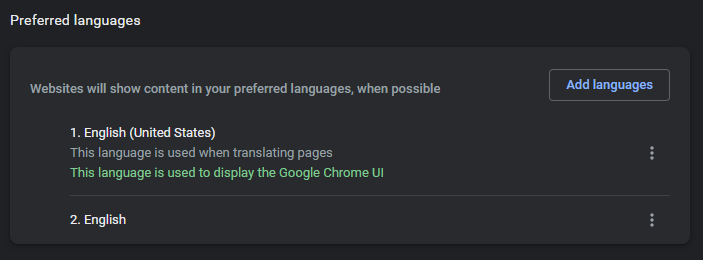
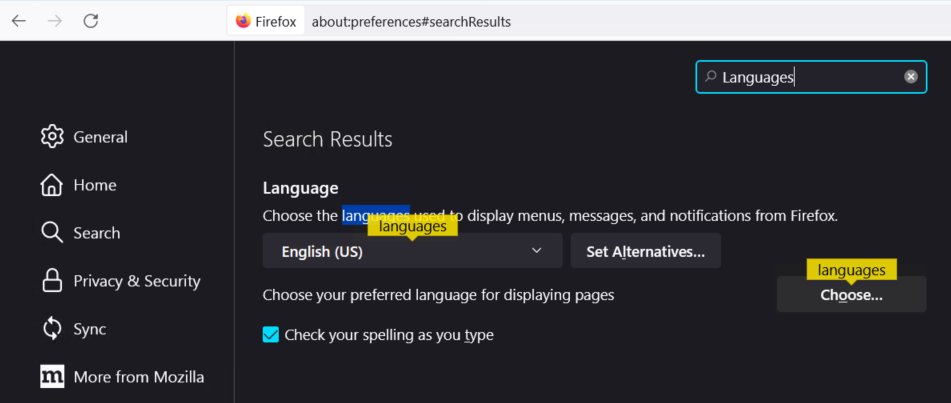
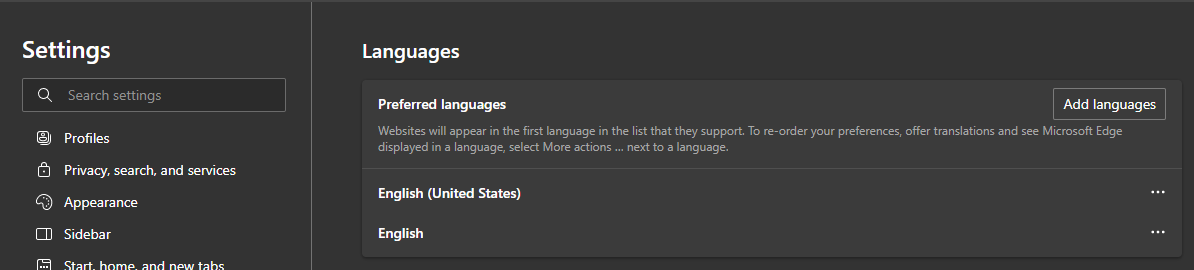
ブラウザの言語設定を英語に変更します。
クロム:
クロム:
1.新しいタブで、「chrome://settings/languages」と入力します。
FireFox:
1.新しいタブで、「 about:preferences
2 」と入力します。検索言語
2 」と入力します。検索言語
Edge:
1.新しいタブで、「 edge://settings/profiles
2 」と入力します。言語を検索するか、左側のメニューから選択します。
2 」と入力します。言語を検索するか、左側のメニューから選択します。
Affected Products
NetWorker FamilyArticle Properties
Article Number: 000200446
Article Type: Solution
Last Modified: 08 رمضان 1447
Version: 2
Find answers to your questions from other Dell users
Support Services
Check if your device is covered by Support Services.