자격 증명을 입력한 후 로그인 자격 증명이 중단된 NWUI(NetWroker Web UI)
Summary: 자격 증명을 입력한 후 로그인 자격 증명이 중단된 NWUI(NetWroker Web UI)
This article applies to
This article does not apply to
This article is not tied to any specific product.
Not all product versions are identified in this article.
Symptoms
자격 증명을 입력한 후 NWUI(NetWorker Web User Interface) 로그인 화면이 중단된 것으로 나타납니다.
브라우저에서 브라우저 retuns 로캘이 지원되지 않는 오류를 반환합니다.
브라우저에서 브라우저 retuns 로캘이 지원되지 않는 오류를 반환합니다.
Cause
현재는 NWUI에서 영어로만 지원됩니다.
Resolution
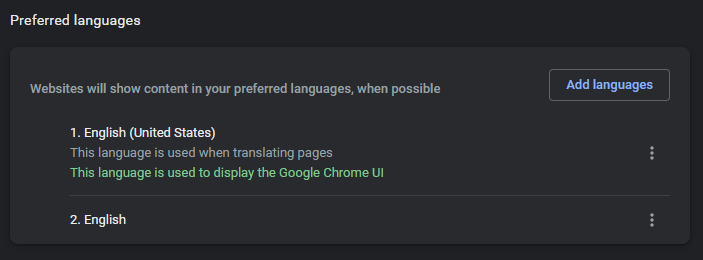
브라우저 언어 설정을 영어로 변경합니다.
크롬:
크롬:
1. 새 탭에서 chrome://settings/languages 입력합니다.
FireFox:
1. 새 탭에서 about:preferences
2를 입력합니다. 언어 검색
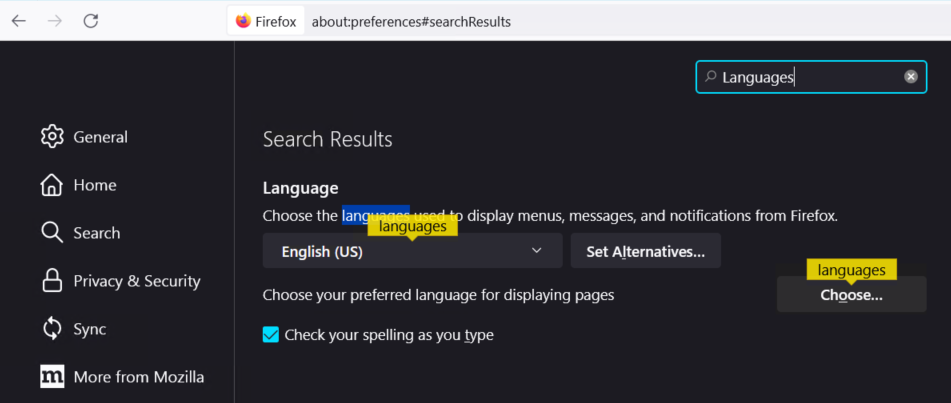
2를 입력합니다. 언어 검색
Edge:
1. 새 탭에서 edge://settings/profiles
2를 입력합니다. 언어를 검색하거나 왼쪽 메뉴에서 선택합니다.
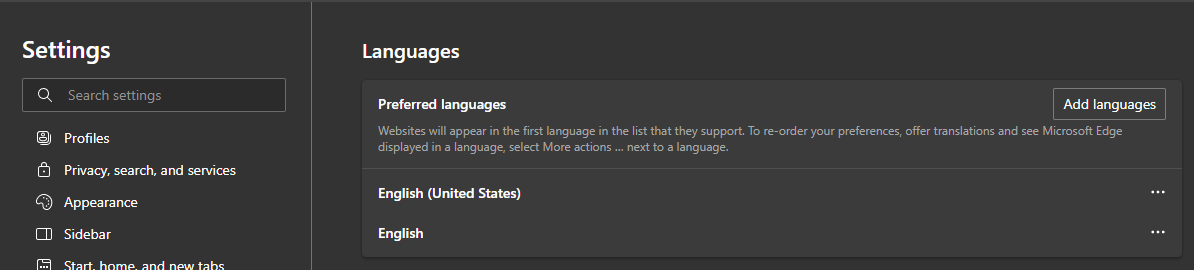
2를 입력합니다. 언어를 검색하거나 왼쪽 메뉴에서 선택합니다.
Affected Products
NetWorker FamilyArticle Properties
Article Number: 000200446
Article Type: Solution
Last Modified: 08 رمضان 1447
Version: 2
Find answers to your questions from other Dell users
Support Services
Check if your device is covered by Support Services.