How to Identify the CrowdStrike Falcon Sensor Version
Shrnutí: Learn to identify the CrowdStrike Falcon Sensor version for issue solutions, process changes, or system requirements. Follow the steps for Windows, Mac, or Linux.
Tento článek se vztahuje na
Tento článek se nevztahuje na
Tento článek není vázán na žádný konkrétní produkt.
V tomto článku nejsou uvedeny všechny verze produktu.
Příznaky
Knowing the CrowdStrike Falcon Sensor version allows you to:
- Identify known issues
- Understand process changes
- Understand system requirements
Affected Products:
- CrowdStrike Falcon Sensor
Affected Operating Systems:
- Windows
- Mac
- Linux
Příčina
Not applicable
Řešení
For instructions about how to identify the CrowdStrike Falcon Sensor version, click on Windows, Mac, or Linux.
Note:
- The CrowdStrike Falcon Sensor must be installed before identifying the version. For information about the installation process, reference How to Install CrowdStrike Falcon Sensor.
- For more information about checking the CrowdStrike Falcon Sensor, reference https://supportportal.crowdstrike.com/s/article/Checking-Falcon-Sensor-Version-Locally
.
Windows
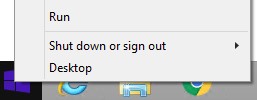
- Right-click the Windows start menu, and then click Run.
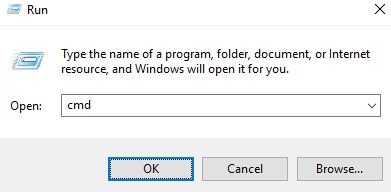
- In the Run UI, type
cmd, and then press OK.
- In Command Prompt, type
"C:\Program Files\CrowdStrike\CSSensorSettings.exe" –versionand then press Enter.

- Record the Version. In the example, 7.04.17605.0 is the Version.

Note: The Version of your sensor may differ from the above screenshot.
Mac
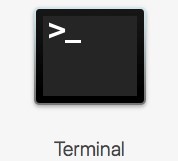
- Locate and then double-click Terminal.
- In Terminal, type
sysctl cs.versionand then press Enter.

- Record the version. In the example, the version is 4.18.8013.0.

Note: The Version of your sensor may differ from the above screenshot.
Linux
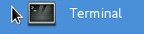
- On the targeted endpoint, open Terminal.
- In Terminal, type
sudo /opt/CrowdStrike/falconctl -g --versionand then press Enter.

- Populate the sudo account Password and then press Enter.
- Record the version. In the example, 4.20.6602.0 is the version.

Note: The Version of your sensor may differ from the above screenshot.
To contact support, reference Dell Data Security International Support Phone Numbers.
Go to TechDirect to generate a technical support request online.
For additional insights and resources, join the Dell Security Community Forum.
Dotčené produkty
CrowdStrikeVlastnosti článku
Číslo článku: 000126120
Typ článku: Solution
Poslední úprava: 26 led 2024
Verze: 21
Najděte odpovědi na své otázky od ostatních uživatelů společnosti Dell
Služby podpory
Zkontrolujte, zda se na vaše zařízení vztahují služby podpory.