Informace o páskové jednotce nebo knihovně PowerVault – Pásková knihovna ML6000: Troubleshooting General Mechanical Issues
Shrnutí: Tento článek obsahuje informace o páskové jednotce nebo knihovně PowerVault – Pásková knihovna ML6000: Troubleshooting General Mechanical Issues".
Tento článek se vztahuje na
Tento článek se nevztahuje na
Tento článek není vázán na žádný konkrétní produkt.
V tomto článku nejsou uvedeny všechny verze produktu.
Příznaky
Obsah:
- Situace
- Possible RAS Tickets
- General Troubleshooting and Possible Resolution
- RAS Tickets Still Occurring
| Problém 1. |
|
Possible Environment as follows:
- Modely ML6000
- ML6010
- ML6020
- ML6030
- ML6030++
- Pásková jednotka
- LTO3
- LTO4
- LTO5
- LTO6
- Type of Data Connector:
- SCSI
- SAS
- Fibre channel
Possible Situations as follows:
- A RAS (Reliability, Availability, and Serviceability) Ticket is
seen describing an obstruction or motion error. - This RAS Ticket message could have been seen on the ML6000's
Display (LCD) describing an obstruction or motion error. - A RAS Ticket message could have seen via the Web Interface or
RMU (Remote Management Unit) describing an obstruction or
motion error. - An email was received describing a RAS Ticket with an obstruction
or motion error.
| Problém 2. |
|
The following are examples of possible RAS Tickets; but, it is
not limited to these RAS Tickets:
- T001 - Tape Cartridge Stuck in Picker, Motion OK
- T002 - Put Operation Failed, Final Cartridge Position Unknown, Motion OK
- T003 - Get Operation Failed, Final Cartridge Position Unknown, Motion OK
- T004 - Put Operation Failed, Tape Back In Source Location, Motion OK
- T005 - X, Y, Theta Motion Profile Failure, Tape in Picker, Motion NOT OK
- T006 - X, Y, Theta Motion Profile Failure, No Tape In Picker, Motion NOT OK
- T007 - X, Y, Theta Motion Obstruction, Motion OK
- T008 - Cannot Home, Motion OK
| Problém 3. |
|
 |
Poznámka: |
| If at any time during any of these steps, there is any issue, doubt of what is being done, or possible thought of breaking hardware - please contact Dell Technical Support for assistance. |
This section describes general troubleshooting steps
that can be taken:
- Before any of these steps are performed, gather a snapshot from the tape library
and clear the RAS Tickets.- Use the following link on how-to gather a library snapshot:
Informace o páskové jednotce nebo knihovně PowerVault – Pásková knihovna ML6000: Jak stáhnout snapshot
This might be requested by Dell Technical Support, if a support call is
initiated. - Clear RAS Tickets:
- Web Interface > Tools > All RAS Tickets > go into each RAS Ticket >
Click Resolve (to each one) - Operator Panel > Tools > All RAS Tickets > go into each RAS Ticket >
Select Resolve (to each one)
- Web Interface > Tools > All RAS Tickets > go into each RAS Ticket >
- Use the following link on how-to gather a library snapshot:
- Firstly, and, if possible, stop the backups and backup
software services or processes. - If not, then wait until the currently backup(s) finish
completing before taking any other steps. - After the backup job(s) and backup software services
or processes have been stopped - power down the library.- This can be done through the Display (or LCD) > Operations > Shutdown
- Web Interface > Operations > System Shutdown
- Once the library has been powered down, disconnect the data cables between
the library and the host(s) or server(s).
Do not remove the network cable from the Library Control Module. - While the library is powered down, open the I/E (Import/Export) Station Door(s); and
then, open the Control Module (CM) and/or any Expansion Module Doors.
See the picture below: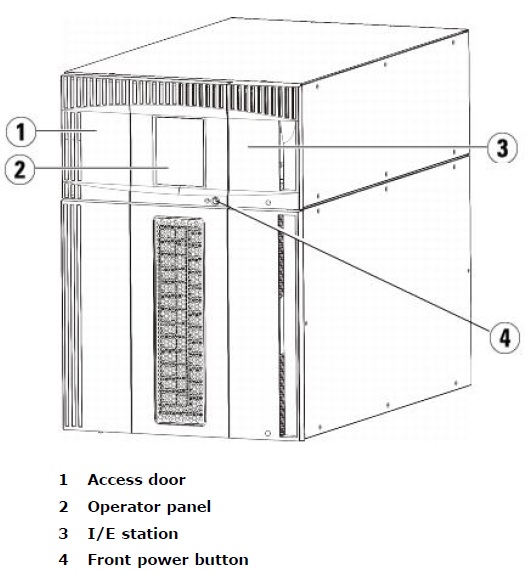
- After the doors of the ML6000 Tape Library are opened, check for the following:
- Media in the picker tape slot.
- Tape(s) or media out-of-place, such as not completely in the tape slot. Check all
slots. Consider tapping each media slot to ensure the slots that have media are
fully in the slot. - If necessary, remove all media from the library. This can be difficult to accomplish
if there is more than just the Control Module involved. - Look for any media or tapes, or objects under the robot / picker. When the library is powered
off, the "robot" or picker should be resting at the bottom of the floor of a
module.
If the robot or picker is not at the bottom of the library, a parking tab might be causing the
robot from moving down the rails of the library. See parking tab picture below. - Check for any media that has been ejected from a tape drive that has not been moved
back to a storage and/or I/E slot.
- Look for any other foreign objects in the library that might be causing a motion failure.
Examples of this might be as follows:- Barcode labels
- Post Notes
- Heavy dust, "dust bunnies", dry wall dust, etc.
- If any of the following is found, please remove as deemed necessary when
dealing with sensitive electronic equipment.
An example of this would be using a can of air to remove heavy dust from the
library.
- Make sure that the parking tab, as pictured below, is in an un-parked position, and not causing
interference or robotic movement.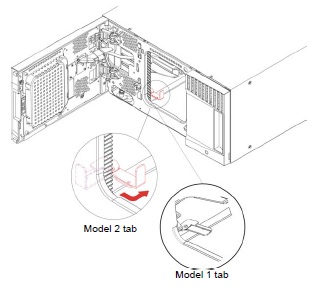
- If this is a new installation, or a new module has been added to an existing ML6000 tape library,
check for the following:- Check for any packing material.
- Raise the robot, and make sure it can move in a level manner.
In newer firmware, there is a RAS ticket for a robot that is unlevel. If this RAS Ticket, T083 -
Unlevel Robot Assembly Not Level; then, the robot / picker will need to be re-leveled.
Call Dell Technical Support this RAS Ticket is presented, and it does not seem that it can be resolved. - Confirm that all rails inside the library are connected and secure between each module of the library.
- Confirm that media or tapes where not introduced where media was taken by the picker to a tape drive.
If so, a destination full message (RAS Ticket) might be produced. Remove the media, or move the media
to a different and empty storage slot. - Once these general troubleshooting steps have been performed, power on the ML6000 Tape Library.
Leave the data cables disconnected from the tape library until the issue is resolved. - If the RAS Ticket still occurs or presented, see if the tape library firmware is out-of-revision.
- If the firmware is behind, try to update it using the following link:
Informace o páskové jednotce nebo knihovně PowerVault – Pásková knihovna ML6000: Jak aktualizovat firmware páskové jednotky?
| Problém 4. |
|
If the same or different RAS Ticket(s) is still occurring, please gather a snapshot from the library,
and call Dell Technical Support.
Příklad pro stažení snapshotu ML6000:
Informace o páskové jednotce nebo knihovně PowerVault – Pásková knihovna ML6000: Jak stáhnout snapshot
 |
Poznámka: |
| Having the snapshot(s) and mentioning the steps performed above will help expedite or move the technical support case further to resolution. |
Příčina
Řešení
Dotčené produkty
PowerVault ML6000Vlastnosti článku
Číslo článku: 000137530
Typ článku: Solution
Poslední úprava: 12 led 2026
Verze: 6
Najděte odpovědi na své otázky od ostatních uživatelů společnosti Dell
Služby podpory
Zkontrolujte, zda se na vaše zařízení vztahují služby podpory.