PowerFlex 3.X: Add Storage Only Existing Service can fail VXFM00665
Shrnutí: During deployment, an existing SO service failed with the message "Could not connect to the SDS xxx over SSH due to a timeout. (VXFM00665)" All connectivity between PFxM appliance, gateway, and gateway to SDS data IPs is working and manual SSH was working. ...
Příznaky
When you use "Add Existing Service" to add an existing storage-only service, PowerFlex Manager must SSH to storage-only nodes on the PowerFlex Data networks through the PowerFlex Gateway. The user can either create new OS credentials as a part of this wizard or choose existing credentials that have already been created in Settings -> Credential Management in the PowerFlex Manager UI.
If the SSH operation fails with an authentication error, you receive the error seen in the screenshot: "Could not connect to the SDS Sds-hostname over SSH due to a timeout. (VXFM00665)"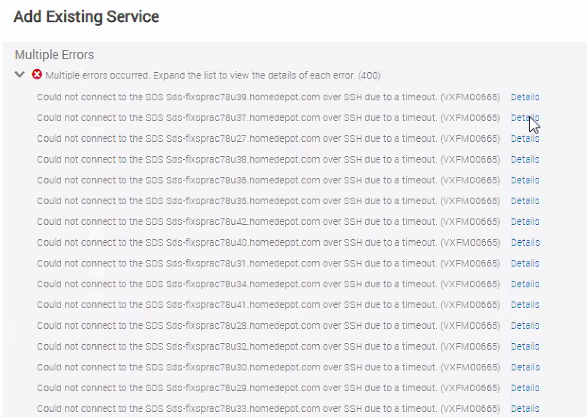
You can also see these SSH failures as "Auth failed" in the /opt/Dell/ASM/logs/asmManager.log file:
2021-06-07 13:27:13,745 ERROR [pool-19-thread-6,tid=717] (ProcessStorageOnlyHostMgmtIP.java:102): Unexpected SSH connection error occurred while connecting to SDS [SDSNAME]!
com.jcraft.jsch.JSchException: Auth fail
	at com.jcraft.jsch.Session.connect(Session.java:519)
	at com.dell.asm.asmcore.asmmanager.tasks.brownfield.ProcessStorageOnlyHostMgmtIP.call(ProcessStorageOnlyHostMgmtIP.java:90)
	at com.dell.asm.asmcore.asmmanager.tasks.brownfield.ProcessStorageOnlyHostMgmtIP.call(ProcessStorageOnlyHostMgmtIP.java:37)
	at java.util.concurrent.FutureTask.run(FutureTask.java:266)
	at java.util.concurrent.ThreadPoolExecutor.runWorker(ThreadPoolExecutor.java:1149)
	at java.util.concurrent.ThreadPoolExecutor$Worker.run(ThreadPoolExecutor.java:624)
	at java.lang.Thread.run(Thread.java:748)
Příčina
- This authentication failure can be caused by choosing a credential with the wrong username and password during the "Add Existing Service" wizard.
- This failure can also be occur if the SO node is using the gssapi-with-mic SSH authentication mechanism. We do not expect other authentication methods as password authentication is used for this workflow.
Řešení
Configure all the SO nodes' SSH configuration to exclude gssapi-with-mic authentication. To do this SSH to each of the SO nodes and edit the "/etc/ssh/sshd_config" file to set:
Edit /etc/ssh/sshd_config and set:
GSSAPIAuthentication no
Then restart sshd with:
systemctl restart sshd
Once this has been completed for all the nodes, retry the "Add Existing Service" operation in PowerFlex Manager.