PowerStore: Migration session sync status is failed
Shrnutí: Migration session sync will get into Failed state when iSCSI connection between appliances is not established.
Tento článek se vztahuje na
Tento článek se nevztahuje na
Tento článek není vázán na žádný konkrétní produkt.
V tomto článku nejsou uvedeny všechny verze produktu.
Příznaky
PowerStore Manager will display migration session status as Failed, with details as:
Transit object with Handle 96f91040-09bd-46c3-b47a-a516d21a7a75:751:686 : status not available.
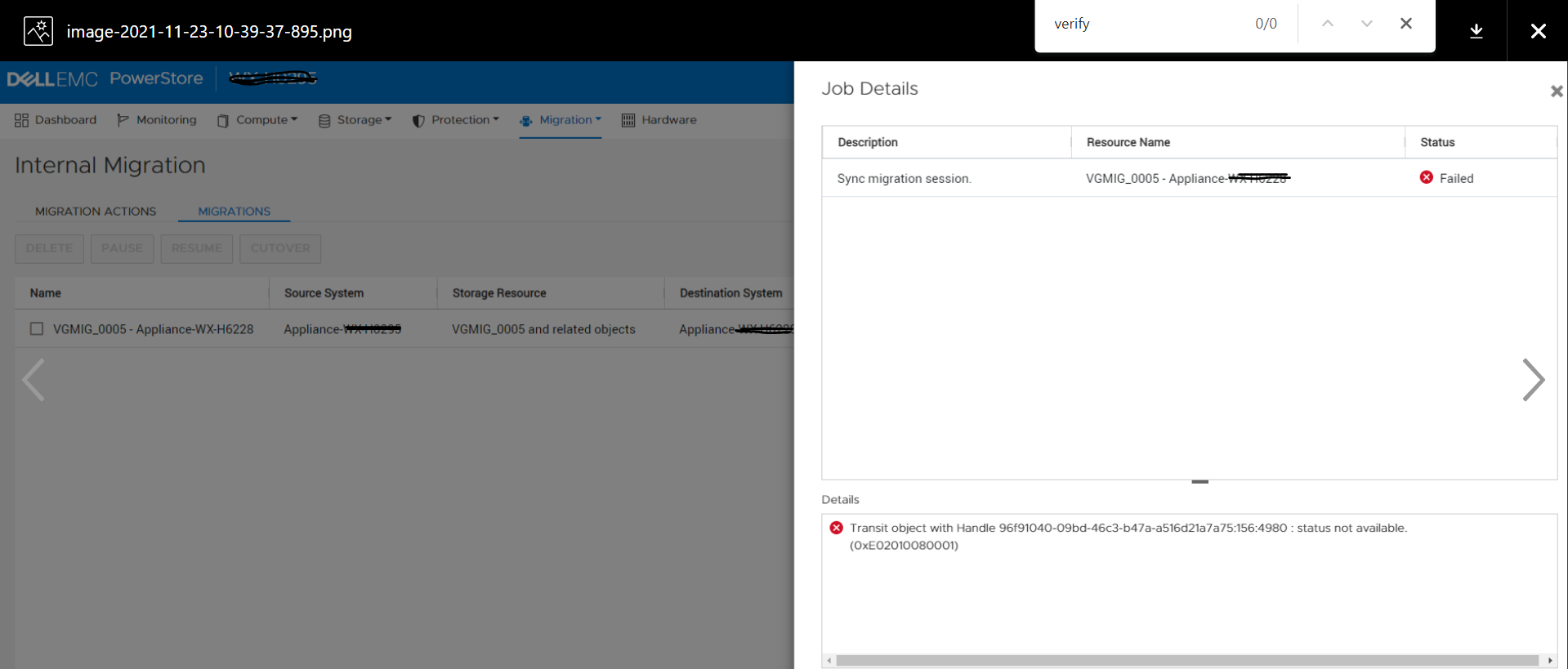
![]()
Transit object with Handle 96f91040-09bd-46c3-b47a-a516d21a7a75:751:686 : status not available.
Příčina
iSCSI connection between appliances may not be established if the appliances (belonging to the same cluster) are not brought up at the same time or if there was a network connectivity issue between appliances. In this scenario if migration session sync is attempted, it's status will change to Failed.
Řešení
The issue of this KB article is planned to be fixed in a future release. Please contact Technical Support for further assistance.
Dotčené produkty
PowerStoreVlastnosti článku
Číslo článku: 000195834
Typ článku: Solution
Poslední úprava: 23 úno 2022
Verze: 1
Najděte odpovědi na své otázky od ostatních uživatelů společnosti Dell
Služby podpory
Zkontrolujte, zda se na vaše zařízení vztahují služby podpory.