NetWorker:REST API 请求失败,并显示错误消息:HTTP 状态 404 - 未找到“请求的资源不可用”
Shrnutí: NetWorker REST API 查询失败,并显示错误消息:HTTP 状态 404 - 未找到“请求的资源不可用。源服务器未找到目标资源的当前表示形式,或者不愿意披露存在该资源。”
Tento článek se vztahuje na
Tento článek se nevztahuje na
Tento článek není vázán na žádný konkrétní produkt.
V tomto článku nejsou uvedeny všechny verze produktu.
Příznaky
NetWorker REST API 请求失败,并显示错误消息:HTTP 状态 404 - 未找到“请求的资源不可用”
[root@NETWORKER_SERVER]:~# curl -ik GET -u **userid**:'***Password***' -H "Content-Type: application/json" 'https://NETWORKER_SERVER:9090/nwrestapi/v3/global/clients'
curl: (6) Could not resolve host: GET; Name or service not known
HTTP/1.1 404
Content-Type: text/html;charset=utf-8
Content-Language: en
Content-Length: 790
Date: Tue, 04 Jul 2023 12:11:41 GMT
Server: NSR SERVICES for Authentication
HTTP Status 404 – Not Foundbody {font-family:Tahoma,Arial,sans-serif;} h1, h2, h3, b {color:white;background-color:#525D76;} h1 {font-size:22px;} h2 {font-size:16px;} h3 {font-size:14px;} p {font-size:12px;} a {color:black;} .line {height:1px;background-color:#525D76;border:none;}
HTTP Status 404 – Not Found
Type Status Report
Message The requested resource [/nwrestapi/v3/global/clients] is not available
Description The origin server did not find a current representation for the target resource or is not willing to disclose that one exists.
Apache Tomcat/9.0.52 NetWorker 服务器安装缺少 nwrestapi 目录。
Linux: /nsr/authc/webapps/nwrestapi/

Windows: C:\Program Files\EMC NetWorker\nsr\authc-server\tomcat\webapps\nwrestapi
restapi.log 不存在或未更新:
Linux: /nsr/logs/restapi/restapi.log

Windows: C:\Program Files\EMC NetWorker\nsr\logs\restapi\restapi.log
Příčina
nwrestapi 路径不存在。REST API 查询无法找到任何端点或关联它应如何显示来自其他 NetWorker 数据库的数据。
Řešení
nwrestapi 与使用 Java Runtime Environment 的 NetWorker authc 服务一起配置。建议在配置 authc 时使用 NetWorker Runtime Environment (NRE) 以避免潜在的 Java 相关问题。可从 戴尔支持 NetWorker 驱动程序和下载 页面下载最新的 NRE 软件包。
Linux:
Windows:
提醒:可能已安装多个 Java 实例。例如,NRE 和 Oracle JRE 都可以安装在服务器上。以上步骤确认 NetWorker 正在使用的 Java 安装。
Linux:
- 登录到 NetWorker 服务器并切换到 root:
sudo su -
- 确认是否安装了 NRE 以及哪些 Java 实例 NetWorker 配置为使用:
rpm -qa | grep nre
cat /nsr/authc/conf/installrc

[root@networker-mc]:~# rpm -qa | grep nre
nre-8.0.15-1.x86_64
[root@networker-mc]:~#
[root@networker-mc]:~# cat /nsr/authc/conf/installrc
JAVA_HOME=/opt/nre/java/latest
提醒:可能已安装多个 Java 实例。例如,NRE 和 Oracle JRE 都可以安装在服务器上。上述步骤确认 NetWorker 正在使用什么 Java 安装。
- 运行以下脚本以重新配置 NetWorker authc 服务器。
/opt/nsr/authc-server/scripts/authc_configure.sh

[root@networker-mc]:~# /opt/nsr/authc-server/scripts/authc_configure.sh

Specify the directory where the Java Standard Edition Runtime Environment (JRE) software is installed [/opt/nre/java/latest]:

The installation process will install an Apache Tomcat instance. For optimum security, EMC NetWorker Authentication Service will use a non-root user (nsrtomcat) to start the Apache Tomcat instance.
If your system has special user security requirements, ensure that proper operational permissions are granted to this non-root user (nsrtomcat).
Please refer to NetWorker Installation Guide.

WARNING: Port 9090 is already in use.

Do you wish to specify a different port number [y]? n

The Apache Tomcat will use "networker-mc.emclab.local" as the host name.
The Apache Tomcat will use "9090" as the port number.

The NetWorker Authentication Service requires a keystore file to configure encryption and to provide SSL support.

EMC recommends that you specify a keystore password that has a minimum of six characters.

Do you want to use the existing keystore /nsr/authc/conf/authc.keystore [y]?

Specify password for the existing keystore:
The install will use the existing certificate "emcauthctomcat" for Apache Tomcat.
The install will use the existing certificate "emcauthcsaml" for Authentication Service.

Creating the installation log in /opt/nsr/authc-server/logs/install.log.

Performing initialization. Please wait...

The installation completed successfully.
提醒:需要重新启动 NetWorker 服务才能重新加载 authc。这可以通过以下 systemctl 命令完成:
systemctl stop networker
and
systemctl start networker.
- 确认已创建以下文件夹:
/nsr/authc/webapps/nwrestapi

[root@networker-mc]:~# ls -l /nsr/authc/webapps/nwrestapi/
total 0
drwx------. 2 nsrtomcat nsrtomcat  44 Jul  6 12:22 META-INF
drwx------. 3 nsrtomcat nsrtomcat  21 Jul  6 12:22 v1
drwx------. 3 nsrtomcat nsrtomcat  21 Jul  6 12:22 v2
drwx------. 3 nsrtomcat nsrtomcat  21 Jul  6 12:22 v3
drwx------. 6 nsrtomcat nsrtomcat 107 Jul  6 12:22 WEB-INF
- 如果创建了 nwrestapi 目录,请运行 REST API 查询。
Windows:
- 确认是否安装了 NRE 以及哪些 Java 实例 NetWorker 配置为使用:
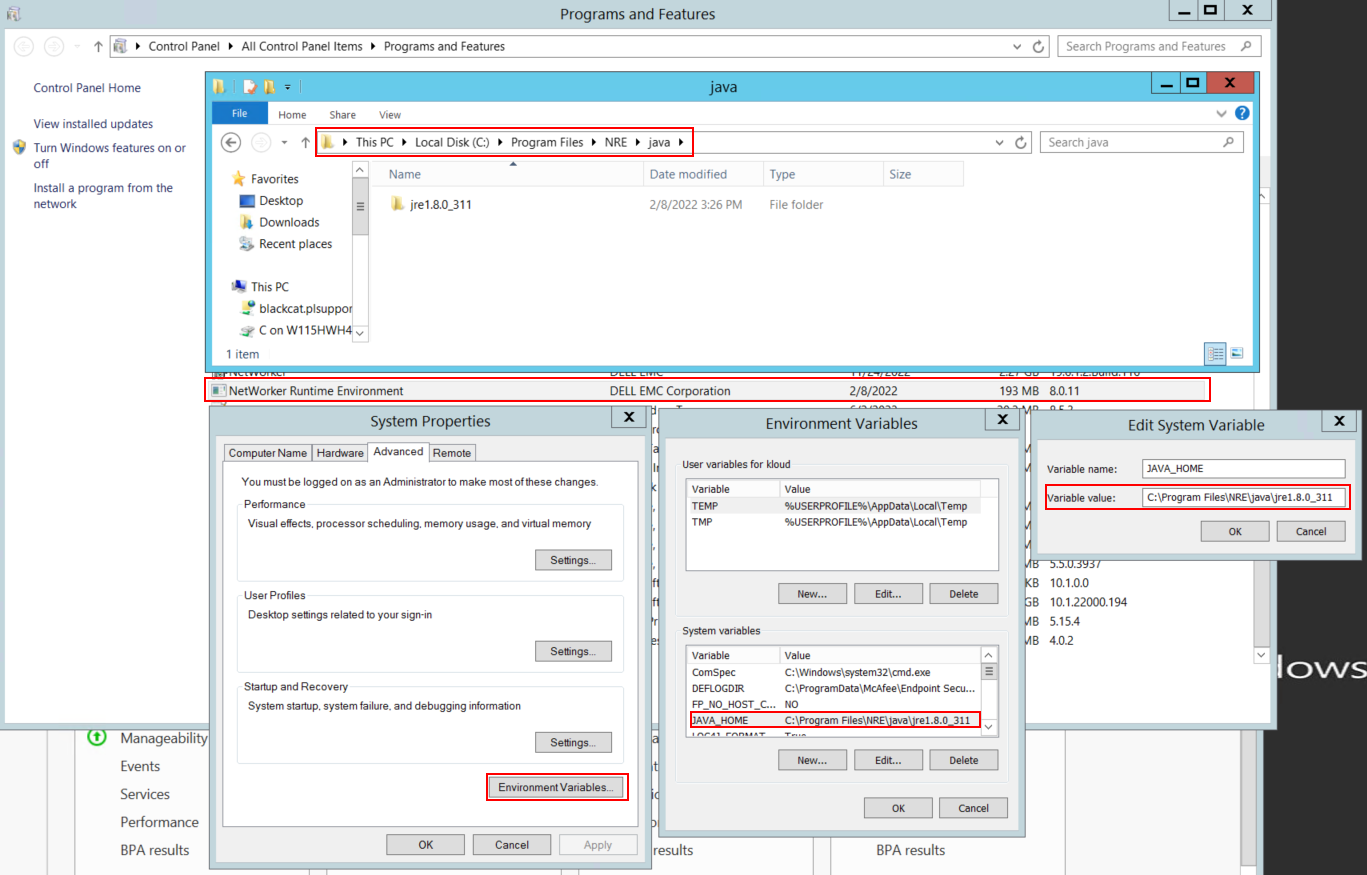
图 1:确认正在使用的 Java 实例 NetWorker。
提醒:可能已安装多个 Java 实例。例如,NRE 和 Oracle JRE 都可以安装在服务器上。以上步骤确认 NetWorker 正在使用的 Java 安装。
- 卸载 NetWorker 软件包。这不会删除任何 NetWorker 数据库或配置资源。
- 通过现有安装路径重新安装 NetWorker。重新安装 NetWorker 将重新配置 NetWorker 的身份验证服务。
- 确认存在以下路径:
C:\Program Files\EMC NetWorker\nsr\authc-server\tomcat\webapps\nwrestapi
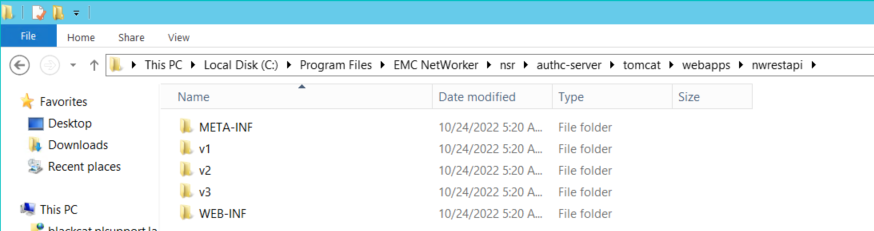
图 2:确认 NetWorker authc 路径存在。
- 如果创建了 nwrestapi 目录,请运行 REST API 查询。
Dotčené produkty
NetWorkerProdukty
NetWorker Family, NetWorker SeriesVlastnosti článku
Číslo článku: 000215602
Typ článku: Solution
Poslední úprava: 27 bře 2025
Verze: 7
Najděte odpovědi na své otázky od ostatních uživatelů společnosti Dell
Služby podpory
Zkontrolujte, zda se na vaše zařízení vztahují služby podpory.