Avamar: How to find and download Avamar scripts and tools from the Dell Central Avamar page
Shrnutí: This article provides instructions for locating and downloading Avamar scripts and tools to troubleshoot and manage the Avamar backup environment.
Tento článek se vztahuje na
Tento článek se nevztahuje na
Tento článek není vázán na žádný konkrétní produkt.
V tomto článku nejsou uvedeny všechny verze produktu.
Pokyny
Open the Dell Central page to access customer-accessible scripts in the Avamar-Scripts solution.
Sign in to the Dell Central site with your Dell credentials, or create an account if necessary.

The following screen appears including the entire list of scripts and tools that able to be shared with customer level:
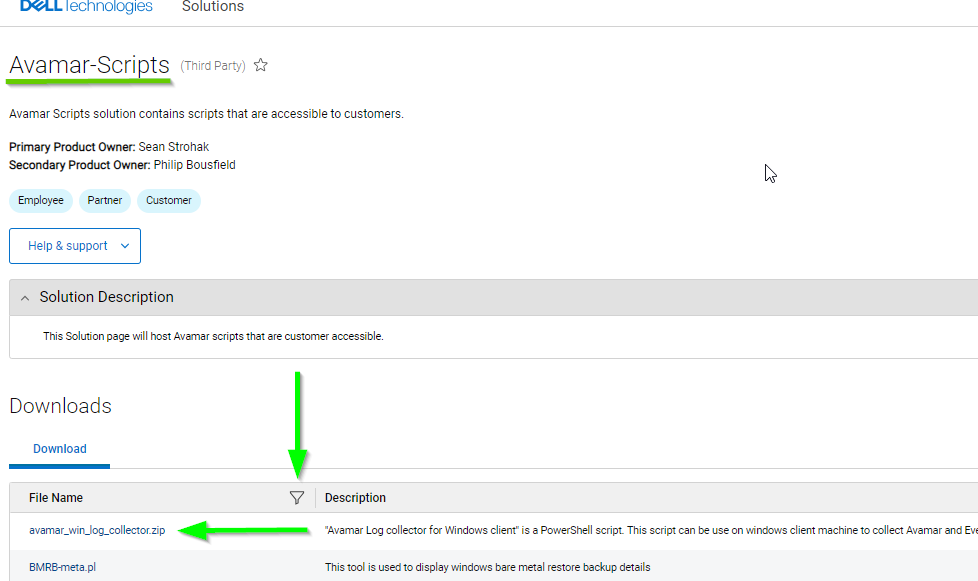
To search for an item, click the search icon and type the item name or part of it:

Another example:

To download an item click the script or tool’s name and, it downloads to the default download folder.
Notes:
Sign in to the Dell Central site with your Dell credentials, or create an account if necessary.
The following screen appears including the entire list of scripts and tools that able to be shared with customer level:
To search for an item, click the search icon and type the item name or part of it:
Another example:
To download an item click the script or tool’s name and, it downloads to the default download folder.
Notes:
- The Dell Central link requires "Sign In" with the Dell support credentials to search and download items.
- These steps are specific to the Avamar product.
- In case the item is not found, contact the Dell Avamar Support team.
Dotčené produkty
AvamarVlastnosti článku
Číslo článku: 000225258
Typ článku: How To
Poslední úprava: 07 Jun 2024
Verze: 3
Najděte odpovědi na své otázky od ostatních uživatelů společnosti Dell
Služby podpory
Zkontrolujte, zda se na vaše zařízení vztahují služby podpory.