Dell Premier Reports
Zusammenfassung: Discover the Dell Premier reports, our exclusive service designed to provide you with the information you need to make informed decisions and drive business success.
Dieser Artikel gilt für
Dieser Artikel gilt nicht für
Dieser Artikel ist nicht an ein bestimmtes Produkt gebunden.
In diesem Artikel werden nicht alle Produktversionen aufgeführt.
Weisungen
Dell Premier Reports have been developed as an exclusive service for our valued customers. Users with reporting access can view various options related to current and past Dell purchases. To discuss report availability and determine which report is best suited for your organization, contact your Dell Account Team.
You can access your reports through the Premier Account page Overview or by selecting "Reports" in the left-hand navigation menu. The list of available reports depends on the setup configured by your Dell Account Team. Note: For users with a Shopper-No-Price role, only the Buy Again (US)/Recent Online Orders report will be displayed, regardless of the reporting setup for the account.
Our customers often use the following reports:
Build Your Own Report
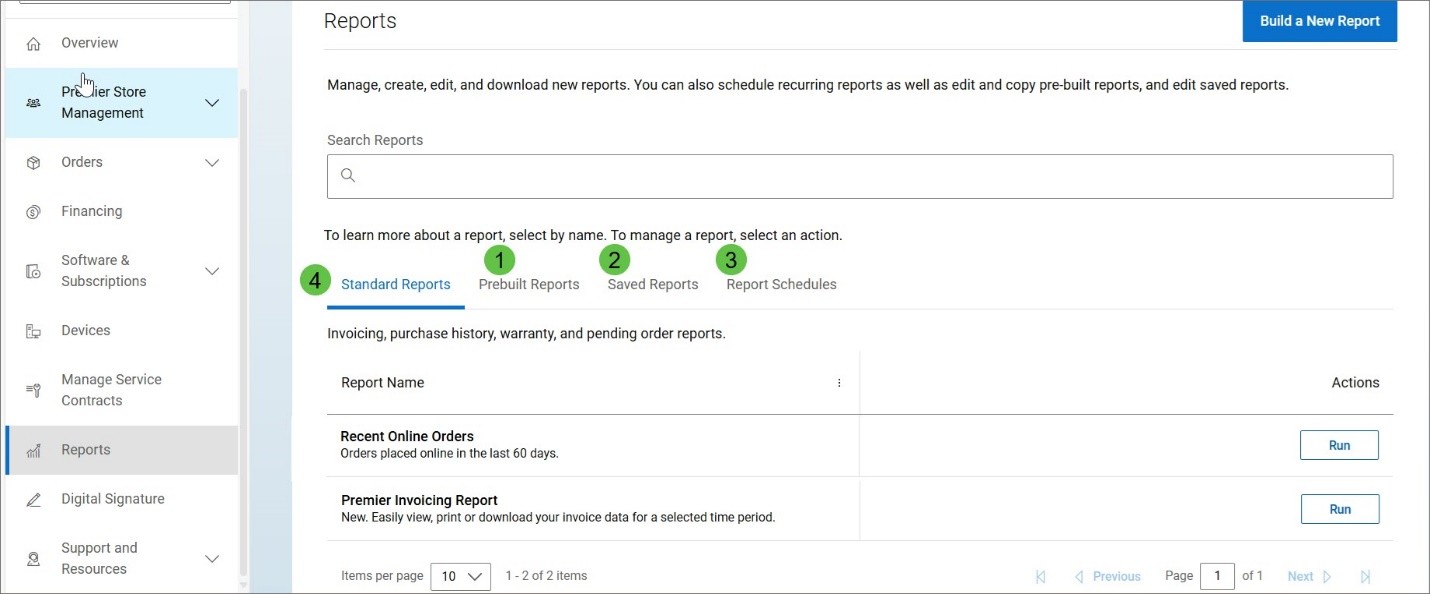
Picture 1: Build your own report
This feature allows you to simply build a customized report from all available order, customer, and tracking and delivery details. Create and run a report once or save as a personal (for your use) or enterprise template (for all users with permission).
1. 'Prebuilt Reports': Run, edit, copy, or save report templates linked to your account
2. 'Saved Reports': Create and manage reports built by you or your team which can be run, edited, or copied
3. ‘Report Schedules': Set up regularly scheduled reports that can be emailed to up to 10 recipients Learn more about building your own report
4. 'Standard Reports': Includes order status, recent orders, invoices, warranty, and other reports
Order Status Report
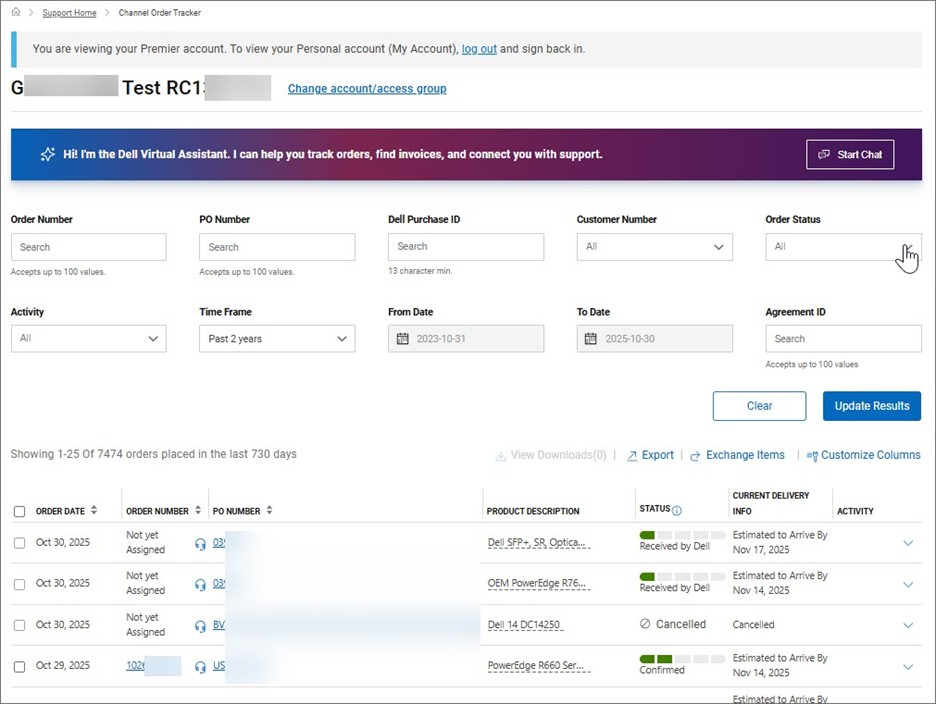
Picture 2: Order Status report (non US)
Use Premier’s comprehensive "Order Status" report to quickly check the status of your order, view various options relating to current and past Dell purchases, and engage directly with our Support agents for post-order inquiries. By clicking the order number, you can access the packing list, invoice, address details, and further options at the order detail level. Learn more about Premier Order Status in the United States / in the other countries globally
Buy Again (US) / Recent Online Orders
Access your recent online orders (placed online in the last 60 days*) and add items to Cart with a single click 'Buy Again', including at the item level. These recent online orders can be searched by item, order date, Dell Purchase ID, PO Number, currency, price, payment method, or buyer’s email. Users with Site access roles can view all site-wide recent online orders. Note: Excludes orders placed from sales-created quotes.
*30 days in Greater China
Invoices
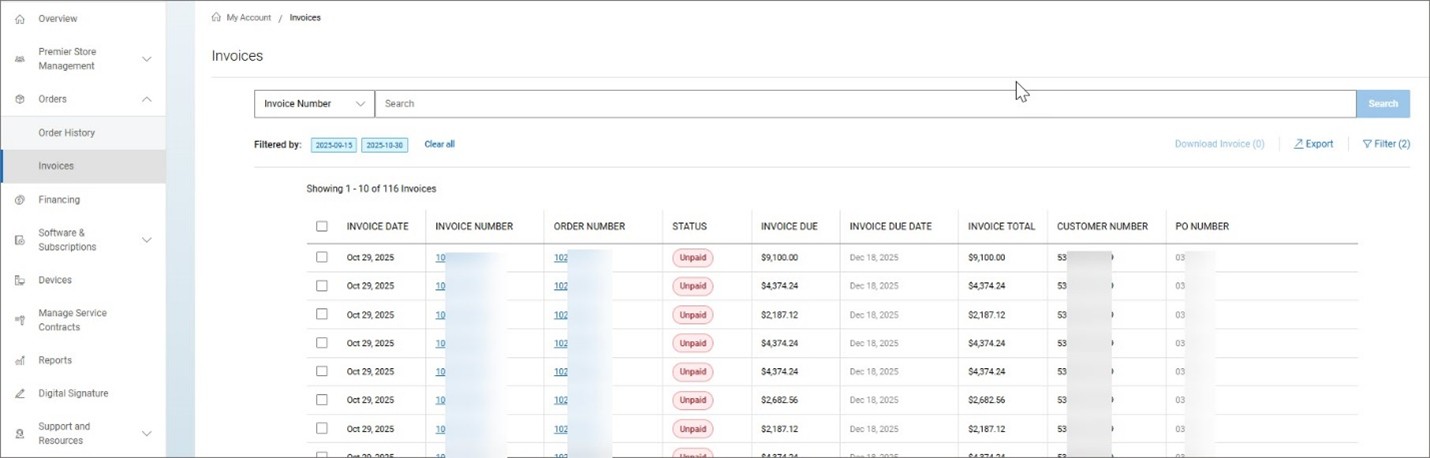
Picture 3: Invoicing report
The 'Invoices' report provides an overview of your paid and unpaid invoices. It is accessible under "Reports," or via "Invoices" within the left-hand "Orders" menu. This report offers various self-serve options such, as filtering by customer number, viewing 'Paid orders' at a glance, bulk download of up to 10 selected invoices at a time, and more. Available where the Invoices report is enabled. Learn more about the invoicing report.
Other Reports
In addition to the above, ImageWatch (related to product transitions) can be made available on your Premier pages. Contact your Dell Account Team to learn more.
If you have questions or need assistance, Engage the Dell Premier Support Teams.
Artikeleigenschaften
Artikelnummer: 000386174
Artikeltyp: How To
Zuletzt geändert: 03 Nov. 2025
Version: 3
Antworten auf Ihre Fragen erhalten Sie von anderen Dell NutzerInnen
Support Services
Prüfen Sie, ob Ihr Gerät durch Support Services abgedeckt ist.