NetWorker: How to Debug Recover Job Failures from NMC
Summary: Debugging recover job failures from NetWorker Management Console (NMC)
Αυτό το άρθρο ισχύει για
Αυτό το άρθρο δεν ισχύει για
Αυτό το άρθρο δεν συνδέεται με κάποιο συγκεκριμένο προϊόν.
Δεν προσδιορίζονται όλες οι εκδόσεις προϊόντων σε αυτό το άρθρο.
Instructions
The following procedure details how to enable debugging during a recovery action of a traditional client from the NMC
- In the Recover window, right-click the recover configuration and select Recover Again.
- Click the Back button until you reach the Select the Recover Options window.
- Select Advanced Options.
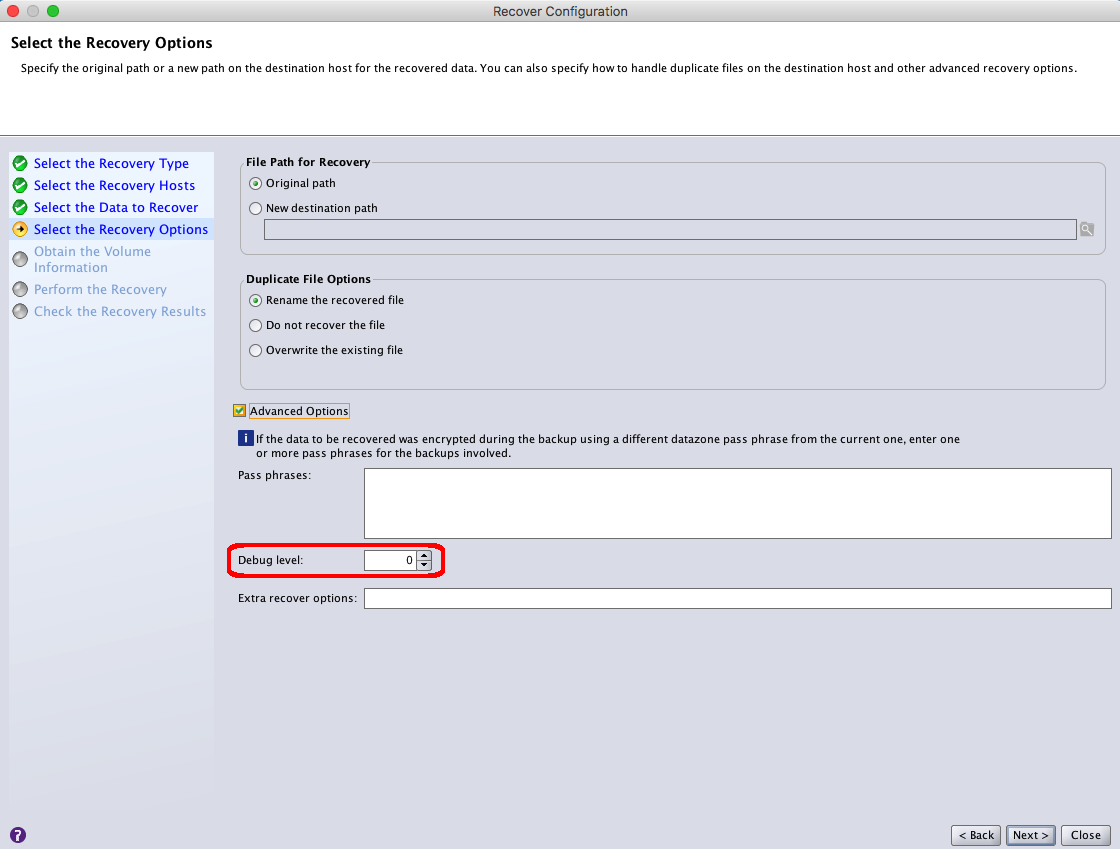
- Increase the value in the Debug level attribute to enable debugging. The higher the value, the more the debug output that appears in the recover log file.
NOTE: Change the level of debug output generated in the recovery logs. The default value of 0 represents normal recovery output. The highest Debug Level can be set to up to Level 9.
- Click Next until you reach the Perform the Recover window.
- In the Recover name field, provide a new name for the recovery configuration.
- Click Run Recover.
- Monitor the status of the recovery job in the option in the Recover window.
- When the recover completes, review the recover log file.
- Linux:
/nsr/logs/recover - Windows (Default):
C:\Program Files\EMC NetWorker\nsr\logs\recover
Some recover jobs are logged under adhoc:
- Linux:
/nsr/logs/adhoc - Windows (Default):
C:\Program Files\EMC NetWorker\nsr\logs\adhoc
Additional details about the recover jobs can be found in the jobsdb:
- From an elevated prompt on the NetWorker server, run:
jobquery - From the jobquery prompt, run:
print type: recover job
NOTE:
jobquery only contains job details from within the jobsdb retention (default 72 hours).
Additional Information
Επηρεαζόμενα προϊόντα
NetWorkerΠροϊόντα
NetWorkerΙδιότητες άρθρου
Article Number: 000019360
Article Type: How To
Τελευταία τροποποίηση: 28 Ιαν 2026
Version: 6
Βρείτε απαντήσεις στις ερωτήσεις σας από άλλους χρήστες της Dell
Υπηρεσίες υποστήριξης
Ελέγξτε αν η συσκευή σας καλύπτεται από τις Υπηρεσίες υποστήριξης.