How to Identify the Dell Data Guardian Version
Summary: Learn how to identify the version of Dell Data Guardian by following these step-by-step instructions.
Αυτό το άρθρο ισχύει για
Αυτό το άρθρο δεν ισχύει για
Αυτό το άρθρο δεν συνδέεται με κάποιο συγκεκριμένο προϊόν.
Δεν προσδιορίζονται όλες οι εκδόσεις προϊόντων σε αυτό το άρθρο.
Instructions
Note:
- As of December 2019, Dell Data Guardian has reached End of Support. This product and its articles are no longer updated by Dell. For more information, reference Product Life Cycle (End of Support and End of Life) Policy for Dell Data Security. If you have any questions on alternative articles, either reach out to your sales team or contact endpointsecurity@dell.com.
- Reference Endpoint Security for additional information about current products.
Knowing the version of Dell Data Guardian allows you to:
- Identify known issues
- Determine UI differences
- Understand workflow changes
Affected Products:
- Dell Data Guardian
Affected Versions:
- 1.2 and later
Affected Operating Systems:
- Windows
- Mac
Note: Dell Data Guardian must be installed before identifying versions.
To identify the version of Dell Data Guardian, click Windows or Mac.
Windows
- In the Windows System Tray, right-click the Dell Data Guardian icon and then select About.
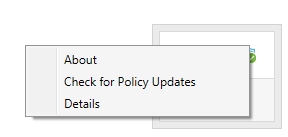
- Record the complete Version of Dell Data Guardian.
 Note: The version of your client may differ from the above screenshot.
Mac
- Open the Dell Data Guardian application.
- Enter an authorized user’s Email and Password and then click Login.
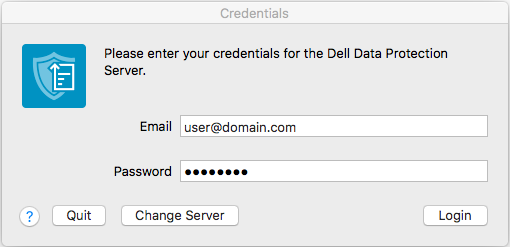 Note:
Note:- An authorized UPN may be used instead of an email.
- In the menu bar, select Dell Data Guardian and then click About Dell Data Guardian.
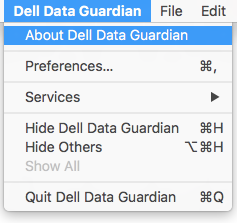
- Record the complete Version of Dell Data Guardian.
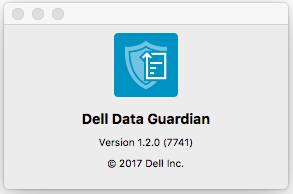 Note: The version of your client may differ from the above screenshot.
Επηρεαζόμενα προϊόντα
Dell Data GuardianΙδιότητες άρθρου
Article Number: 000124602
Article Type: How To
Τελευταία τροποποίηση: 19 Απρ 2026
Version: 13
Βρείτε απαντήσεις στις ερωτήσεις σας από άλλους χρήστες της Dell
Υπηρεσίες υποστήριξης
Ελέγξτε αν η συσκευή σας καλύπτεται από τις Υπηρεσίες υποστήριξης.