How to Obtain the CrowdStrike Customer Identification
Summary: Learn how to find your CrowdStrike Customer Identification (CID) by following these instructions. These instructions support Windows, Mac, and Linux.
Αυτό το άρθρο ισχύει για
Αυτό το άρθρο δεν ισχύει για
Αυτό το άρθρο δεν συνδέεται με κάποιο συγκεκριμένο προϊόν.
Δεν προσδιορίζονται όλες οι εκδόσεις προϊόντων σε αυτό το άρθρο.
Instructions
The CrowdStrike Customer Identification (CID) is used to:
- Activate the CrowdStrike Falcon Sensor
- Troubleshoot the CrowdStrike Falcon Console
Affected Products:
- CrowdStrike
Affected Operating Systems:
- Windows
- Mac
- Linux
Locate your customer ID (CID) in the CrowdStrike Falcon Console by following these instructions.
- In a Google Chrome or Microsoft Edge browser, go to your Falcon Console login URL.
- Falcon US-1: https://falcon.crowdstrike.com/login/
- Falcon US-2: https://falcon.us-2.crowdstrike.com/login/
- Falcon EU-1: https://falcon.eu-1.crowdstrike.com/login/
- Falcon US-GOV-1: https://falcon.laggar.gcw.crowdstrike.com/login/
- Falcon US-1: https://falcon.crowdstrike.com/login/
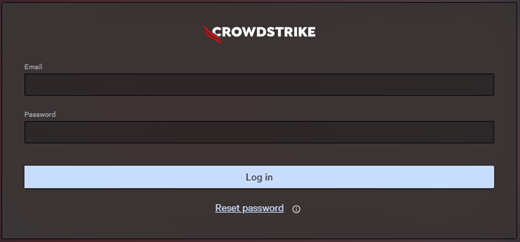
- Populate the CrowdStrike account holder’s credentials, and then click Log In.
- In the left menu pane, select the Host setup and management app icon and then select Sensor downloads.
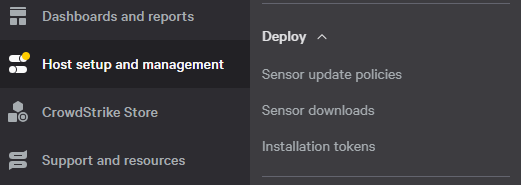 Note: The layout in the example may differ slightly from your environment.
 - Under HOW TO INSTALL, document the Customer ID.
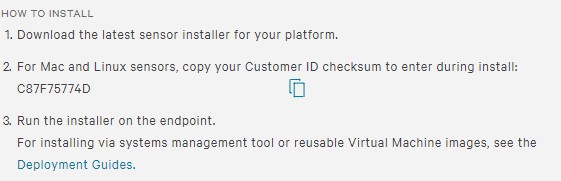 Note:
Note:- The Customer ID differs in your environment.
- In the example, C87F75774D is the Customer ID.

Επηρεαζόμενα προϊόντα
CrowdStrikeΙδιότητες άρθρου
Article Number: 000129349
Article Type: How To
Τελευταία τροποποίηση: 23 Ιουλ 2026
Version: 19
Βρείτε απαντήσεις στις ερωτήσεις σας από άλλους χρήστες της Dell
Υπηρεσίες υποστήριξης
Ελέγξτε αν η συσκευή σας καλύπτεται από τις Υπηρεσίες υποστήριξης.