Add Users One by One in the Microsoft Setup Wizard
Summary: You will have the option to add a user/s during the Microsoft Setup Wizard.
Αυτό το άρθρο ισχύει για
Αυτό το άρθρο δεν ισχύει για
Αυτό το άρθρο δεν συνδέεται με κάποιο συγκεκριμένο προϊόν.
Δεν προσδιορίζονται όλες οι εκδόσεις προϊόντων σε αυτό το άρθρο.
Instructions
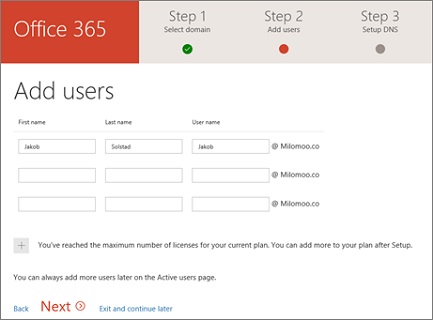
To do this, enter the new user's first and last name and username of choice to generate an account for them.
 Get Started
To add a user using the Microsoft Setup Wizard, follow these steps:
-
Log in to Microsoft Online Portal
 .
. -
Select Go to setup from the landing page and follow the prompts to the Add User step.
-
Enter the new users first and last name and desired username. As you have previously added your domain details the email address will automatically reference your domain.
-
Select Next to continue.
 |
After a user has been added, you will be presented with their new user information. This includes their display name, username, and password. You can choose to:
|
Επηρεαζόμενα προϊόντα
Microsoft 365 from DellΙδιότητες άρθρου
Article Number: 000184379
Article Type: How To
Τελευταία τροποποίηση: 08 Μαΐ 2026
Version: 7
Βρείτε απαντήσεις στις ερωτήσεις σας από άλλους χρήστες της Dell
Υπηρεσίες υποστήριξης
Ελέγξτε αν η συσκευή σας καλύπτεται από τις Υπηρεσίες υποστήριξης.