Windows 11 Onjuiste versie van besturingssysteem gemeld
Summary: Meer informatie over de specifieke applicaties en computerinstellingen in Windows 11 detecteert het besturingssysteem als Windows 10.
Αυτό το άρθρο ισχύει για
Αυτό το άρθρο δεν ισχύει για
Αυτό το άρθρο δεν συνδέεται με κάποιο συγκεκριμένο προϊόν.
Δεν προσδιορίζονται όλες οι εκδόσεις προϊόντων σε αυτό το άρθρο.
Symptoms
In meerdere applicaties en computerinstellingen wordt Windows 11 geïdentificeerd als Windows 10 om incompatibiliteit met applicaties te voorkomen.
Systeeminstellingen die worden aangeduid als Windows 10.
- Microsoft Edge en andere op Chromium gebaseerde browsers, zoals Google Chrome, Brave, enzovoort, tonen Windows 10 in de tekenreeks van de user-agent.
- Mozilla/5.0 (Windows NT 10.0; Win64; x64) AppleWebKit/537.36 (KHTML, zoals Gecko) Chrome/95.0.4638.69 Safari/537.36
- Websites die de tekenreeks van de user-agent gebruiken om de werkelijke Windows-versie voor digitale inhoud te identificeren, zoals downloads van stuurprogramma's en zelfhulp, kunnen naar onjuiste inhoud leiden.
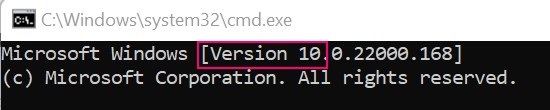
- Windows-opdrachtprompt wordt aangeduid als versie 10.
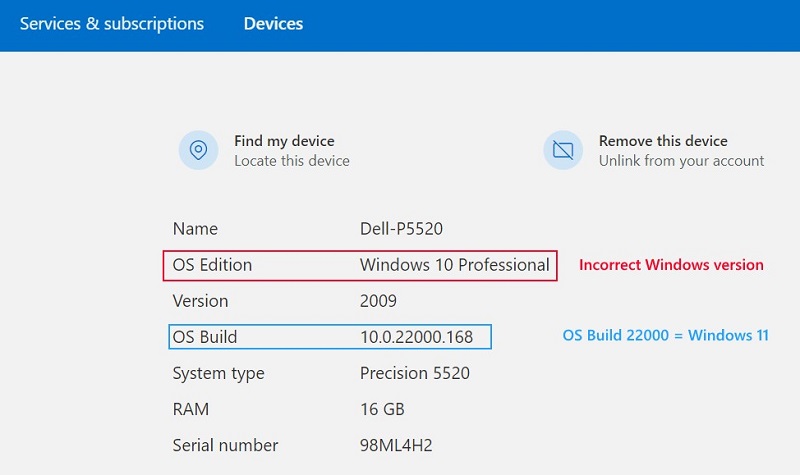
- Apparaateigenschappen Microsoft-account
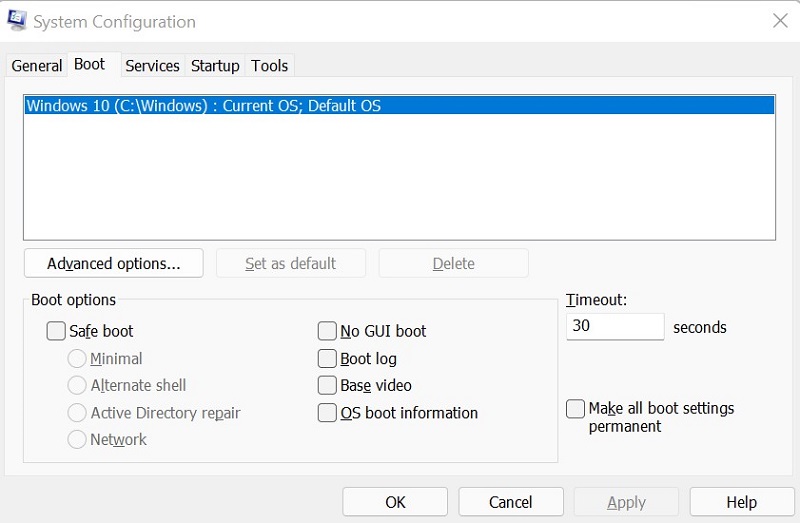
- Systeemconfiguratie (MSCONFIG)
Cause
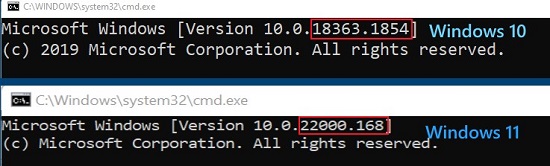
Windows gebruikt het interne buildnummer om onderscheid te maken tussen Windows 11 (Build 22000 en hoger) en Windows 10 (Build lager dan 22000).
Resolution
Gebruik Winver om de Windows-versie correct op uw computer te identificeren. Raadpleeg het Microsoft Knowledge Base-artikel voor instructies: Welke versie van het Windows-besturingssysteem gebruik
Επηρεαζόμενα προϊόντα
Alienware, Inspiron, OptiPlex, Vostro, XPS, G Series, G Series, Alienware, Inspiron, Latitude, Vostro, XPS, Fixed Workstations, Mobile WorkstationsΠροϊόντα
Vostro, XPS, Vostro, XPSΙδιότητες άρθρου
Article Number: 000193571
Article Type: Solution
Τελευταία τροποποίηση: 12 Μαΐ 2026
Version: 8
Βρείτε απαντήσεις στις ερωτήσεις σας από άλλους χρήστες της Dell
Υπηρεσίες υποστήριξης
Ελέγξτε αν η συσκευή σας καλύπτεται από τις Υπηρεσίες υποστήριξης.