How To Enable or Disable Windows Virtualization on Dell Systems
Summary: Learn how to enable or disable virtualization in Windows 10, including how to turn off virtualization, enable Virtual Machine Platform, and troubleshoot BIOS settings for virtualization. ...
Αυτό το άρθρο ισχύει για
Αυτό το άρθρο δεν ισχύει για
Αυτό το άρθρο δεν συνδέεται με κάποιο συγκεκριμένο προϊόν.
Δεν προσδιορίζονται όλες οι εκδόσεις προϊόντων σε αυτό το άρθρο.
Instructions
Enable or Disable Windows Virtualization:
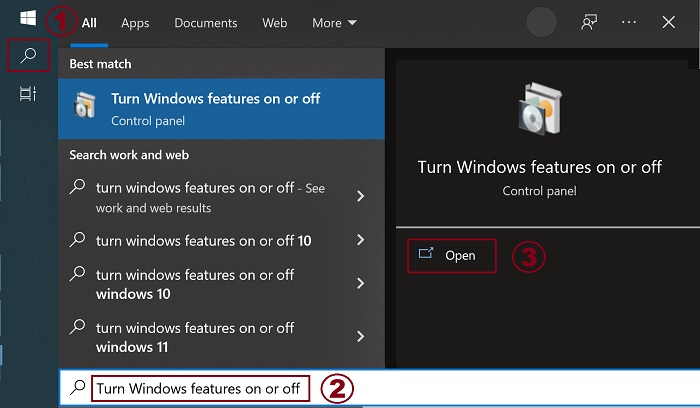
- Launch the Windows Features tool:
- Click the Search icon.
- Type Turn Windows features on or off in the search field.
- Click Open.
- Check (or clear) the Virtual Machine Platform and Windows Hypervisor Platform options.
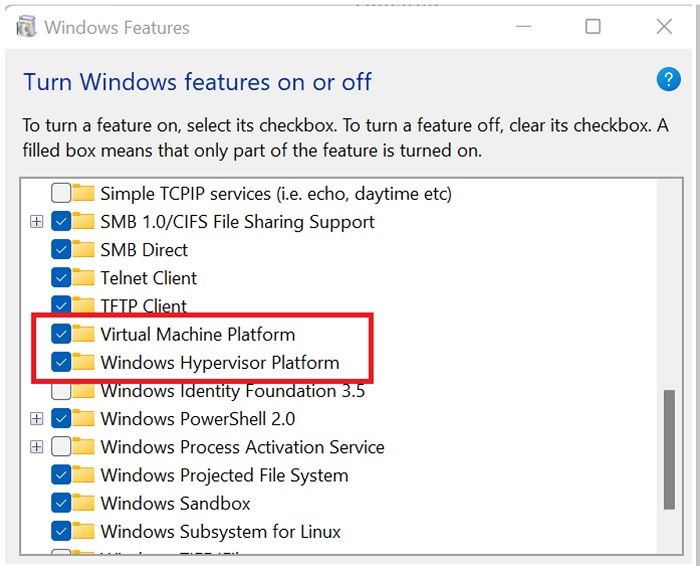
- Click OK.
- Windows adds the required VMP dependencies and asks to reboot.
Additional Information
Επηρεαζόμενα προϊόντα
Desktops & All-in-Ones, Dell All-in-One, Dell Pro Max Micro, Dell Pro Max Slim, Dell Pro Max Tower, Dell Pro Micro, Dell Pro Slim, Dell Pro Tower, Dell Slim, Dell Tower, Laptops, Dell Plus, Dell Pro, Dell Pro Max, Dell Pro Plus, Dell Pro Premium
, Dell Pro Rugged, Workstations
...
Ιδιότητες άρθρου
Article Number: 000195980
Article Type: How To
Τελευταία τροποποίηση: 13 Μαΐ 2026
Version: 11
Βρείτε απαντήσεις στις ερωτήσεις σας από άλλους χρήστες της Dell
Υπηρεσίες υποστήριξης
Ελέγξτε αν η συσκευή σας καλύπτεται από τις Υπηρεσίες υποστήριξης.