NVIDIA RTX Desktop Manager holder skrivebordet åbent
Summary: Denne artikel indeholder oplysninger om det nyoprettede skrivebordsproblem for NVIDIA RTX Desktop Manager kan ikke lukkes.
Αυτό το άρθρο ισχύει για
Αυτό το άρθρο δεν ισχύει για
Αυτό το άρθρο δεν συνδέεται με κάποιο συγκεκριμένο προϊόν.
Δεν προσδιορίζονται όλες οι εκδόσεις προϊόντων σε αυτό το άρθρο.
Symptoms
Dell-computere med dedikeret NVIDIA GPU kan opleve, at NVIDIA RTX Desktop Manager ikke kan lukke den nyoprettede stationære pc.
- Åbn NVIDIA RTX Desktop Manager, og klik på ENABLE RTX DESKTOP MANAGER™, mens programmet opretter Desktop 1 som standard.
- Klik på knappen nyt skrivebord for at oprette et andet skrivebord.
- Klik på X-ikonet i øverste højre hjørne af Desktop 2 , men find ud af, at det ikke kan lukkes.
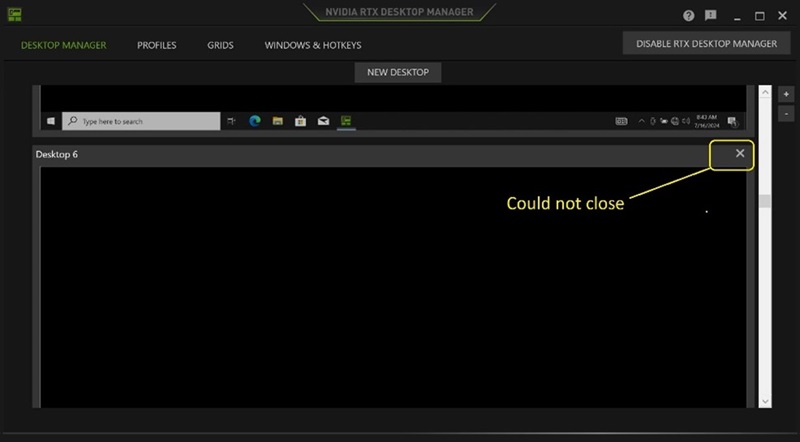
(Figur 1 - NVIDIA RTX Desktop Manager)
Berørte platforme:
- Precision 7780
- Precision 7680
- Precision 7770
- Precision 7670
- Precision 7560
- Precision 7760
- Precision 7550
- Precision 7750
- Precision 7540
- Precision 7740
- Precision 7530
- Precision 7730
- Precision 7520
- Precision 7720
- Precision 5480
- Precision 5490
- Latitude 3490
- Latitude 3480
- Latitude 3470
- Latitude 3550
- Latitude 3530
- Latitude 3520
Cause
Ikke tilgængelig
Resolution
Opdatering af NVIDIA Graphic Driver til version 552.84 eller nyere på computeren løser problemet. For at downloade og installere driveren henvises til Sådan downloades og installeres Dell-drivere.
Επηρεαζόμενα προϊόντα
Dell Latitude 3480/3488, Latitude 3490, Latitude 3520, Latitude 3530, Latitude 3550, Latitude 3470, Precision 5480, Precision 5490, Precision 7520, Precision 7530, Precision 7540, Precision 7550, Precision 7560, Precision 7670, Precision 7680
, Precision 7720, Precision 7730, Precision 7740, Precision 7750, Precision 7760, Precision 7770, Precision 7780
...
Ιδιότητες άρθρου
Article Number: 000227614
Article Type: Solution
Τελευταία τροποποίηση: 21 Μαΐ 2026
Version: 3
Βρείτε απαντήσεις στις ερωτήσεις σας από άλλους χρήστες της Dell
Υπηρεσίες υποστήριξης
Ελέγξτε αν η συσκευή σας καλύπτεται από τις Υπηρεσίες υποστήριξης.