O NVIDIA RTX Desktop Manager mantém a área de trabalho aberta
Summary: Este artigo apresenta informações sobre o problema em que o recém-criado Desktop Manager NVIDIA RTX Desktop não pode ser fechado.
Αυτό το άρθρο ισχύει για
Αυτό το άρθρο δεν ισχύει για
Αυτό το άρθρο δεν συνδέεται με κάποιο συγκεκριμένο προϊόν.
Δεν προσδιορίζονται όλες οι εκδόσεις προϊόντων σε αυτό το άρθρο.
Symptoms
Os computadores Dell com GPU discreta NVIDIA podem experimentar o NVIDIA RTX Desktop Manager ao não conseguir fechar o desktop recém-criado.
- Abra o NVIDIA RTX Desktop Manager e clique em ENABLE RTX DESKTOP MANAGER. O aplicativo cria o Desktop 1 como padrão.
- Clique no botão Nova área de trabalho para criar uma segunda área de trabalho.
- Clique no ícone X no canto superior direito do Desktop 2 , mas veja que ele não pode ser fechado.
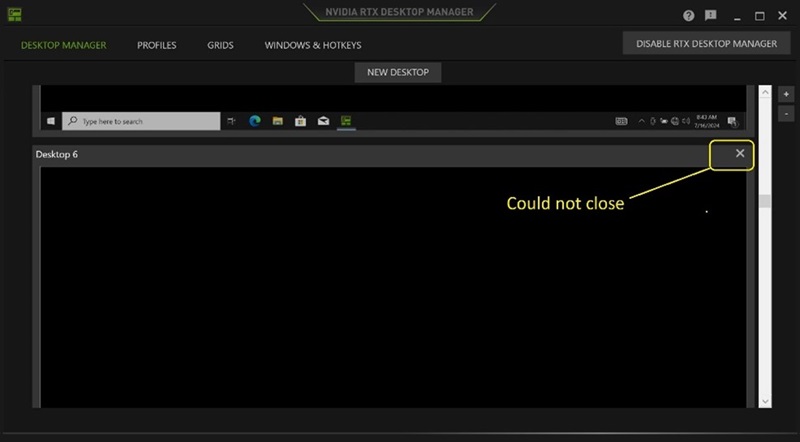
(Figura 1 — NVIDIA RTX Desktop Manager)
Plataformas afetadas:
- Precision 7780
- Precision 7680
- Precision 7770
- Precision 7670
- Precision 7560
- Precision 7760
- Precision 7550
- Precision 7750
- Precision 7540
- Precision 7740
- Precision 7530
- Precision 7730
- Precision 7520
- Precision 7720
- Precision 5480
- Precision 5490
- Latitude 3490
- Latitude 3480
- Latitude 3470
- Latitude 3550
- Latitude 3530
- Latitude 3520
Cause
N/D
Resolution
Atualizar a unidade gráfica NVIDIAr para a versão 552.84 ou posterior no computador resolve o problema. Para fazer download e instalar o driver, consulte Como fazer download e instalar os drivers Dell.
Επηρεαζόμενα προϊόντα
Dell Latitude 3480/3488, Latitude 3490, Latitude 3520, Latitude 3530, Latitude 3550, Latitude 3470, Precision 5480, Precision 5490, Precision 7520, Precision 7530, Precision 7540, Precision 7550, Precision 7560, Precision 7670, Precision 7680
, Precision 7720, Precision 7730, Precision 7740, Precision 7750, Precision 7760, Precision 7770, Precision 7780
...
Ιδιότητες άρθρου
Article Number: 000227614
Article Type: Solution
Τελευταία τροποποίηση: 21 Μαΐ 2026
Version: 3
Βρείτε απαντήσεις στις ερωτήσεις σας από άλλους χρήστες της Dell
Υπηρεσίες υποστήριξης
Ελέγξτε αν η συσκευή σας καλύπτεται από τις Υπηρεσίες υποστήριξης.