Dell Guidelines on Company Administrator Assignment
Summary: This article explains Dell guidelines on company administrator assignment.
Instructions
Company administrator guidelines
Infrastructure and enterprise customers are required to have defined administrators within their organization online at Dell Support. Organizations with fewer than five employees need to identify at least one company administrator. Organizations with five or more employees need to identify at least three company administrators.
These guidelines help make sure we apply current security practices across your digital properties. To meet the guidance, organizations can assign company administrators or Dell may automatically assign a user to the role. Company administrators may promote a different user to the role or add additional company administrators.
How to promote a company administrator
1. Sign-in to the Manage Company Information section of the online support site.
2. Review the user-base for your organization and decide which users to assign as company administrators.
- If you are an administrator, proceed to the next step.
- If you are a standard user, contact an existing administrator found under View Contacts.
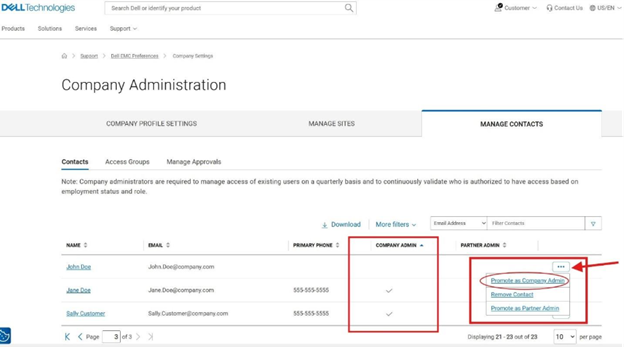
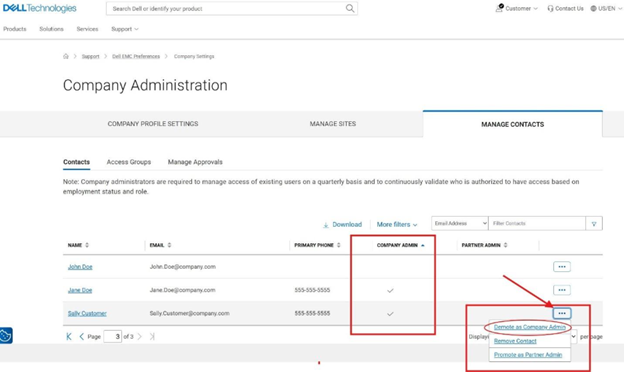
3. Promote or demote users found in your contact list until the appropriate number of administrators have been assigned. Choose at least one company administrator if your organization has under five users. Choose at least three company administrators if your organization has more than five users.
- Select the menu at the end of the row for the user record that you want to change.
- Select Promote or Demote.
Promote as Company Admin:
Demote as Company Admin:
Reach out to your business account manager or sign in with your credentials to contact Administrative Support for further assistance.