Dell NativeEdge: Radius certificate name not displayed in side panel
Summary: In Dell NativeEdge version 4.1.0.0, the Radius server certificate name was not displayed in the side panel as expected. Users can now view complete Radius certificate details from the Certificate page under the Security section. ...
Αυτό το άρθρο ισχύει για
Αυτό το άρθρο δεν ισχύει για
Αυτό το άρθρο δεν συνδέεται με κάποιο συγκεκριμένο προϊόν.
Δεν προσδιορίζονται όλες οι εκδόσεις προϊόντων σε αυτό το άρθρο.
Symptoms
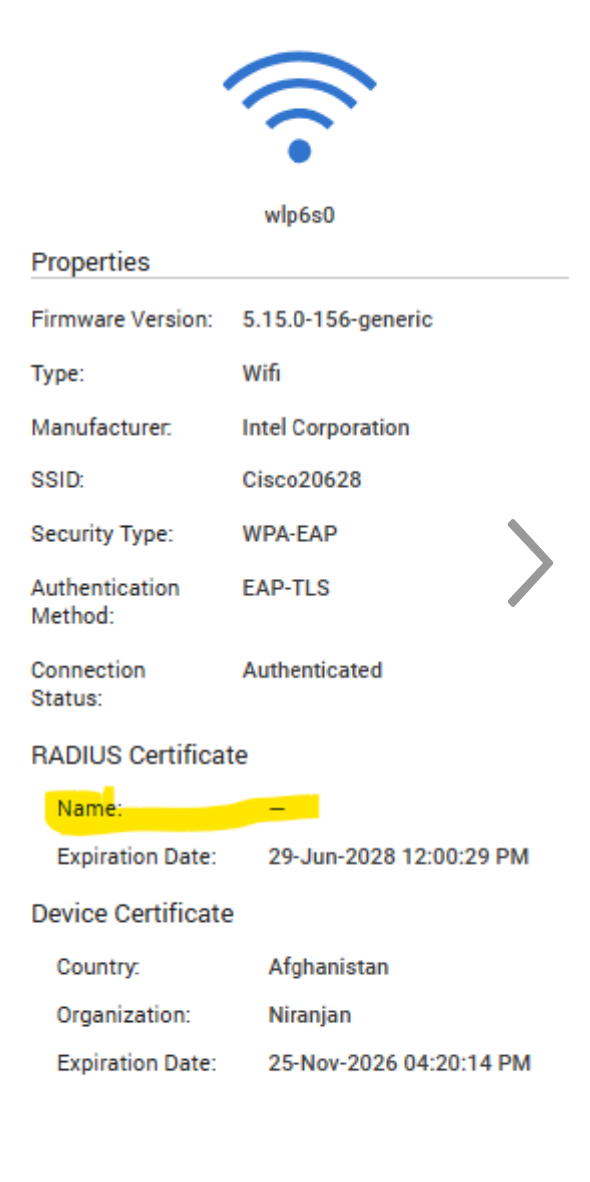
- In Dell NativeEdge version 4.1.0.0, the Radius server certificate name is missing from the side panel in the user interface.
- Other certificate details such as expiry date and organization were visible.
- No functional impact on authentication or connectivity
Cause
The user interface does not include the Radius certificate name in the side panel due to missing updates in the inventory and API payload.
Resolution
-
Resolution in Dell NativeEdge v4.1.0.0 Release:
- The Radius certificate details are now accessible from the Security → Certificate page.
- No additional configuration is required.
-
A permanent solution will be in the future NativeEdge releases.
Επηρεαζόμενα προϊόντα
Dell Distributed Private CloudΙδιότητες άρθρου
Article Number: 000398896
Article Type: Solution
Τελευταία τροποποίηση: 10 Φεβ 2026
Version: 1
Βρείτε απαντήσεις στις ερωτήσεις σας από άλλους χρήστες της Dell
Υπηρεσίες υποστήριξης
Ελέγξτε αν η συσκευή σας καλύπτεται από τις Υπηρεσίες υποστήριξης.