VxRail:判斷 Dell VxRail 是否需要更換 PSU
Summary: 本文提供透過 VxRail Manager、vCenter 或 iDRAC,以及透過命令行介面 (CLI) 檢視電源供應單元 (PSU) 狀態的方法,以判斷是否需要更換您的 Dell VxRail PSU。
This article applies to
This article does not apply to
This article is not tied to any specific product.
Not all product versions are identified in this article.
Instructions
方法 1:透過 VxRail Manager 的主控台 UI
一旦 VxRail Manager Web 附掛程式將 PSU 標示為故障後,您可能會看到該裝置無法使用或處於故障狀態。在 vCenter 中,您可以看到下列訊息顯示電源輸入和備援中斷:
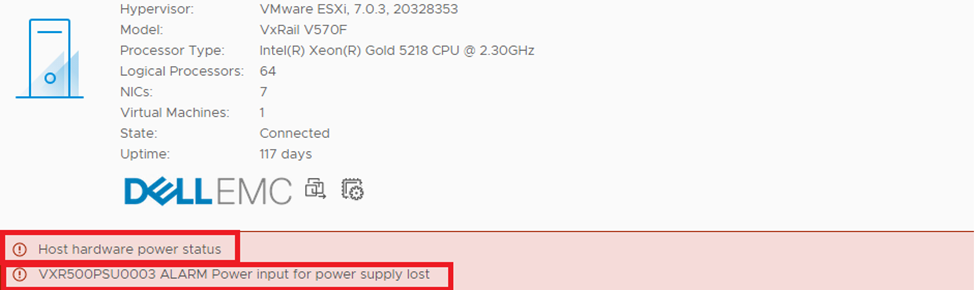
vCenter 主控台顯示電源供應單元故障
iDRAC 會反映裝置標示為故障,電源輸入顯示為遺失,事件標籤顯示相同內容:
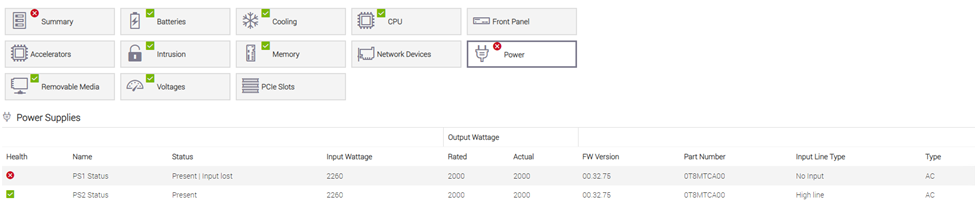

顯示故障電源供應單元的 iDRAC UI
方法 2:CLI
使用 PuTTY 連線至受影響的節點。
使用 PuTTY 執行下列命令,檢查哪個 PSU 發生故障:
/opt/vxrail/tools/ipmitool sdr elist


PSU1 Status      | E0h | ok  | 10.1 | Presence detected, Failure detected
PSU2 Status      | E1h | ok  | 10.2 | Presence detected

PS1 PG FAIL      | 09h | ok  |  7.1 | State Deasserted
PS2 PG FAIL      | 0Ah | ok  |  7.1 | State Deasserted
故障的 PSU1 系統事件記錄項目 (偵測到是否存在、偵測到故障、狀態已取消判斷)
您應該會看到以下訊息: "Failure detected" 或”FAIL“狀態。
在上述情況下,故障的電源供應器是 PSU1 (頂部的電源供應器)。
在節點上執行下列命令,然後搜尋電源供應器故障:
/opt/vxrail/tools/ipmitool sel elist

Line 41:   29 | 11/24/2016 | 11:42:11 | Power Supply PSU Redundancy | Redundancy Lost | Asserted
Line 42:   2a | 11/24/2016 | 11:42:21 | Power Supply PSU2 Status | Power Supply AC lost | Deasserted
Line 42:   2a | 11/24/2016 | 11:42:21 | Power Supply PSU2 Status | Power Supply AC lost | Deasserted
Line 43:   2b | 11/24/2016 | 11:42:21 | Power Supply PSU Redundancy | Fully Redundant | Asserted
Line 60:   3c | 08/13/2017 | 12:43:08 | Power Supply PSU1 Status | Failure detected | Asserted
故障的 PSU1 系統事件記錄項目 (偵測到故障,已斷言)
故障診斷:
若要判斷電源供應器是否故障,請參閱下列文章中的步驟:PowerEdge PSU:如何針對伺服器電源供應單元
進行故障診斷本指南提供詳細步驟,以判斷 Dell PowerEdge 伺服器的電源供應器是否有硬體故障。通常,電源供應器的故障率較低,而且可能存在與硬體無關的軟問題或間歇性電源供應器訊息。在這種情況下,當懷疑硬體故障時,Dell Technologies 建議您聯絡 Dell 支援部門,並引用此文章編號,以確認需要更換硬體。
Additional Information
Affected Products
VxRail, VxRail Appliance Family, VxRail D560, VxRail D560F, VxRail E460, VxRail E560, VxRail E560F, VxRail E560N, VxRail E660, VxRail E660F, VxRail E660N, VxRail E665, VxRail E665F, VxRail E665N, VxRail G560, VxRail G560F, VxRail P470, VxRail P570
, VxRail P570F, VxRail P580N, VxRail P670F, VxRail P670N, VxRail P675F, VxRail P675N, VxRail S470, VxRail S570, VxRail S670, VxRail V470, VxRail V570, VxRail V570F, VXRAIL V670F, VxRail VD-4510C, VxRail VD-4520C, VxRail VE-660, VxRail VE-6615, VxRail VP-760, VxRail VP-7625, VxRail VS-760
...
Products
VxRail 460 and 470 Nodes, VxRail Appliance Family, VxRail Appliance Series, VxRail G Series Nodes, VxRail E Series Nodes, VxRail P Series NodesArticle Properties
Article Number: 000004068
Article Type: How To
Last Modified: 28 Jul 2025
Version: 19
Find answers to your questions from other Dell users
Support Services
Check if your device is covered by Support Services.