Avamar: Understanding the Avamar Gen4s Network Configuration
Summary: This article provides an overview of an Avamar Gen4S grid Network Configuration.
This article applies to
This article does not apply to
This article is not tied to any specific product.
Not all product versions are identified in this article.
Instructions
Avamar server has four types of traffic:
- Internal (Nodes internal communication, ex: GSAN and Avamar Services Control Daemon (ASCD))
- Backups
- Management Console Server (MCS)
- Replication (For outgoing traffic only)
The first two types (Internal + Backups): Traffic passes on all nodes (including the storage nodes)
The second two types (Management + Replication): Traffic passes on utility node only.
The second two types (Management + Replication): Traffic passes on utility node only.
Avamar bonding configuration:
-
All nodes (storage and utility) should have the same connection as in the figure below
-
Utility and Storage nodes connected through BOND0 (eth0+eth2) to the external customer switches
-
Utility and Storage nodes are connected through BOND1 (eth1+eth3) to the Internal Switches (Switch-A + Switch-B)
-
The accelerator node does not connect to internal switch
Eth1 + Eth3 = Bond1 (Internal switches)
Eth0 + Eth2 = Bond0 (External Switches)
Eth0 + Eth2 = Bond0 (External Switches)
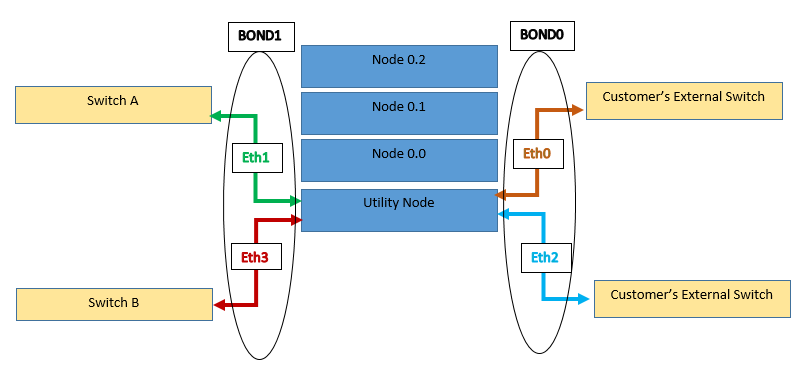
Note:
Eth0=NIC1
Eth1=NIC2
Eth2=NIC3
Eth3=NIC4
Eth0=NIC1
Eth1=NIC2
Eth2=NIC3
Eth3=NIC4
- Bonds can be either configured as Load Balancing or Active-Passive (but Avamar only supports Active-Passive).
- Load Balancing: The network traffic is equally balanced over the Network Interface Controllers (NICs) of the machine
- Active Passive: There is one Network Interface Controller (NIC) active while another NIC is asleep. If the active NIC goes down, another NIC becomes active. This supports fault tolerance
- Active-Backup gives fault tolerance without load balancing and sends all packets through the single active interface. The interface changes only if the active interface fails.
To verify the bonding configuration:
1. Log in to the Avamar Utility Node as admin
2. Load the admin keys per Avamar: How to Log in to an Avamar Server and Load Various Keys.
3. Run the following command or commands for the interface to be checked:
cat /proc/net/bonding/bond0
cat /proc/net/bonding/bond1
Example of a Load-Balancing Bond (Not supported in Avamar):
cat /proc/net/bonding/bond1 | grep Mode
Bonding Mode: adaptive load balancing
Example of an Active-Backup Bond:
cat /proc/net/bonding/bond1 | grep Mode
Bonding Mode: fault-tolerance (active-backup)
For high-availability configurations plus replication and management traffic options:
A dedicated network can be configured for outgoing replication or Administration traffic as per the figure below:

Configuring the Remote Monitoring and Management (RMM) Port:
- Remote Monitoring and Management (RMM) is remote management application software
- On an Avamar node, it is a service run on each node to provide tools to monitor, troubleshoot, and potentially make repairs over the customer network
- RMM can be configured as a Shared Port or Dedicated Port
The figure below is an example of a dedicated port:
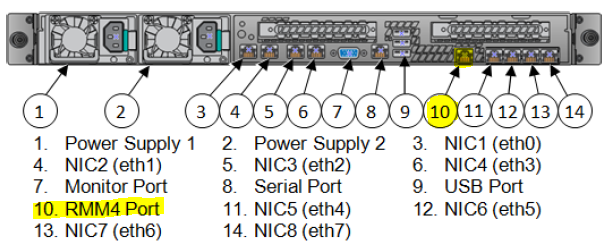
- If RMM4 functionality is used and set to shared, the default shared port is NIC1 (eth0) on each node.
To check RMM settings, use the commands below for the appropriate channel
For shared port (channel 1):
mapall --user=root --noerror --all+ 'ipmitool lan print 1 | egrep "Address|Mask|Gateway" | egrep -v "MAC|Backup" '
-- Or --
mapall --noerror --user=root --all+ 'hostname && ipmitool lan print 1 | grep "IP\|Mask" |grep -v "Header\|Source"'
For dedicated port (channel 3):
mapall --user=root --noerror --all+ 'ipmitool lan print 3 | egrep "Address|Mask|Gateway" | egrep -v "MAC|Backup" '
-- Or --
mapall --noerror --user=root --all+ 'hostname && ipmitool lan print 3 | grep "IP\|Mask" |grep -v "Header\|Source"'
Additional Information
- For more information regarding the Network configurations, check the articles below:
- For Gen4 Single Node grid: Avamar Data-Store Gen4 Single Node Customer Installation Guide (Page 34)
- For Gen4 Multi-Node grid: Avamar Data-Store Gen4 Multi Node Customer Installation Guide (Page 45)
- For Gen4s Single and Multi-Node grid: Avamar Data-Store Gen4S Comprehensive Reference Guide (Chapter 3, Page 29)
Affected Products
AvamarProducts
Avamar, Avamar Data Store Gen4, Avamar Data Store Gen4SArticle Properties
Article Number: 000019367
Article Type: How To
Last Modified: 17 Jun 2025
Version: 8
Find answers to your questions from other Dell users
Support Services
Check if your device is covered by Support Services.