Alienware Command Center Description and Schematics Out of Sync
Summary: Learn about how to resolve incorrect Alienware Command Center (AWCC) AlienFX descriptions and schematics for an Alienware m16 R2 or Alienware m18 R2.
This article applies to
This article does not apply to
This article is not tied to any specific product.
Not all product versions are identified in this article.
Symptoms
The Alienware Command Center AlienFX page’s description numbers and the numbers on the image do not match. The AlienFX image shows Power Button (1), Alien Head (2), Stadium (3), but the description only shows (1) Alien Head and (2) Stadium.
Below is an example image of AlienFX.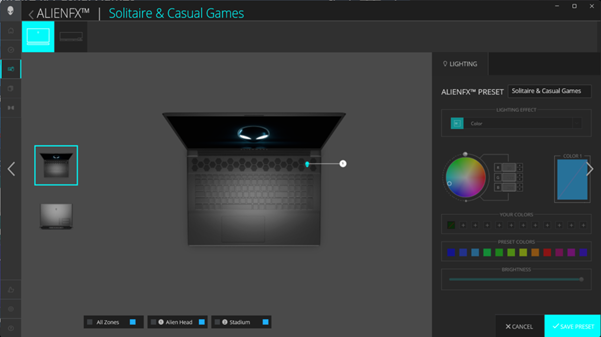
Below is an example image of the AlienFX description.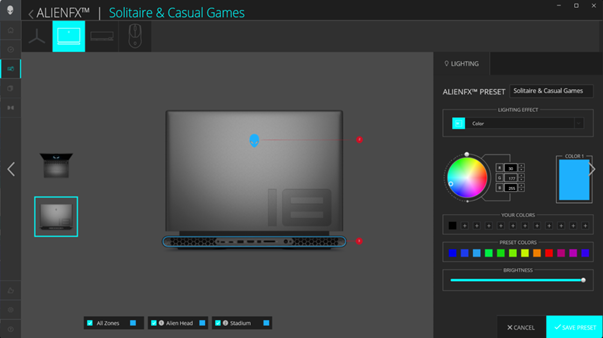
Affected Platforms:
- Alienware Command Center
- Alienware m16 R2
- Alienware m18 R2
Cause
Alienware Command Center has incorrect design information when viewed from the AlienFX page. There is no power button - Alien Head (C-cover) in the description beginning with Alienware Command Center 6.0.
Resolution
Updating to Alienware Command Center version 6.2.7 or later on the computer resolves the issue.
Affected Products
Alienware Command Center, Alienware m16 R2, Alienware m18 R2Article Properties
Article Number: 000221038
Article Type: Solution
Last Modified: 24 Apr 2025
Version: 3
Find answers to your questions from other Dell users
Support Services
Check if your device is covered by Support Services.