Connectrix DCNM: How to Map Multiple Active Directory User Groups to Multiple Roles as LDAP Authentication Mode
Summary: How to map multiple Active Directory User Groups to multiple roles as Lightweight Directory Access Protocol (LDAP) authentication mode.
This article applies to
This article does not apply to
This article is not tied to any specific product.
Not all product versions are identified in this article.
Instructions
In the Map to DCNM Role field, enter the name of the DCNM role that is being mapped to the user.
To map multiple Active Directory User Groups to multiple roles, use the following format:

Generally, network-admin or network-operator is the most typical role.
For example:
Role Admin Group: dcnm-admins
Map to DCNM Role: network-admin
This example maps the Active Directory User Group dcnm-admins to the network-admin role.
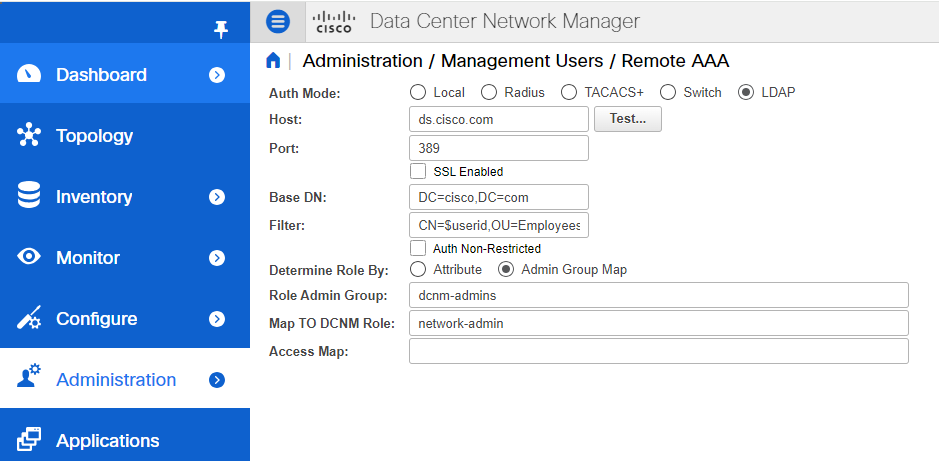
To map multiple Active Directory User Groups to multiple roles, use the following format:
Role Admin Group:
Map To DCNM Role: dcnm-admins:network-admin;dcnm-operators:network-operatorAffected Products
Connectrix MDS-Series Data Center Network ManagerArticle Properties
Article Number: 000226240
Article Type: How To
Last Modified: 11 Sept 2024
Version: 2
Find answers to your questions from other Dell users
Support Services
Check if your device is covered by Support Services.