Avamar: How to Increase the Event Management Row Display Limit in Avamar Administrator
Summary: How to increase the event management query limit in Avamar Administrator.
This article applies to
This article does not apply to
This article is not tied to any specific product.
Not all product versions are identified in this article.
Instructions
In Avamar Administrator > Administration > Event Management > Query or Monitor.
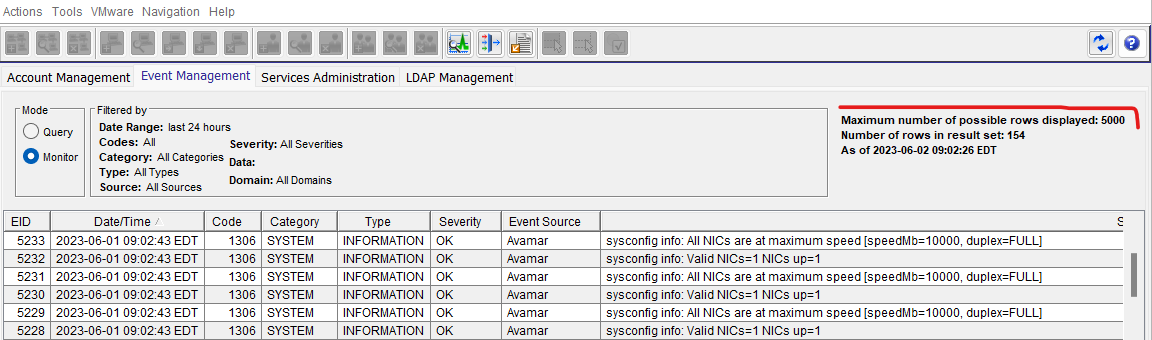
Figure 1: Screenshot of Avamar Administrator Event Monitor
On the machine that has Avamar Administrator installed, go to the following folder:
Edit the .xml file for Avamar Administrator preferences.
Change the following value from 5000, to a chosen larger number. For example, set 10000 as the event monitor display limit:
Figure 1: Screenshot of Avamar Administrator Event Monitor
On the machine that has Avamar Administrator installed, go to the following folder:
C:\Users\<username>\.avamardata\var\mc\gui_data\prefs
Edit the .xml file for Avamar Administrator preferences.
mcclient.xml
Change the following value from 5000, to a chosen larger number. For example, set 10000 as the event monitor display limit:
<entry key="event_monitor_display_limit" value="10000"/>
Affected Products
AvamarArticle Properties
Article Number: 000214559
Article Type: How To
Last Modified: 17 Aug 2023
Version: 4
Find answers to your questions from other Dell users
Support Services
Check if your device is covered by Support Services.