Avamar:如何在 Avamar 系統管理員中增加事件管理列顯示限制
Summary: 如何在 Avamar 系統管理員中增加事件管理查詢限制。
This article applies to
This article does not apply to
This article is not tied to any specific product.
Not all product versions are identified in this article.
Instructions
在 Avamar Administrator >管理 > 事件管理 > 查詢或監視器中。
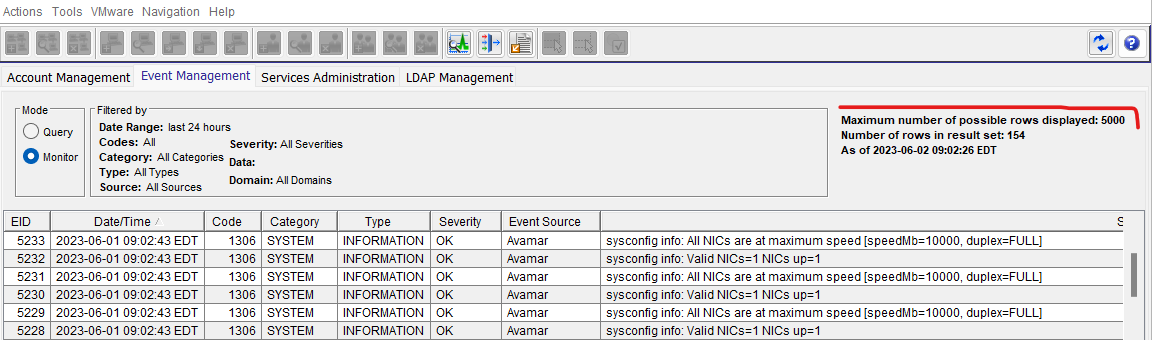
圖 1:Avamar 系統管理員事件監視的螢幕擷取畫面
在已安裝 Avamar 系統管理員的機器上,前往下列資料夾:
編輯 Avamar 系統管理員偏好設定的 .xml 檔案。
將下列值從 5000 變更為所選的更大數量。例如,將 10000 設定為事件監視器顯示限制:
圖 1:Avamar 系統管理員事件監視的螢幕擷取畫面
在已安裝 Avamar 系統管理員的機器上,前往下列資料夾:
C:\Users\\.avamardata\var\mc\gui_data\prefs
編輯 Avamar 系統管理員偏好設定的 .xml 檔案。
mcclient.xml
將下列值從 5000 變更為所選的更大數量。例如,將 10000 設定為事件監視器顯示限制:
Affected Products
AvamarArticle Properties
Article Number: 000214559
Article Type: How To
Last Modified: 17 Aug 2023
Version: 4
Find answers to your questions from other Dell users
Support Services
Check if your device is covered by Support Services.