Data Domain Virtual Edition running on Azure has system disk which is not for the operating system or NVRAM
Summary: Data Domain Virtual Edition (DDVE) deployed in Microsoft Azure Cloud requires an operating disk, NVRAM disk, and as many metadata disks as necessary for storing backups. However, initially after deployment and with no storage manually added, a "System" disk appears which is not for DDVE, the operating system, or the NVRAM. ...
This article applies to
This article does not apply to
This article is not tied to any specific product.
Not all product versions are identified in this article.
Symptoms
Data Domain Virtual Edition (DDVE) running on Microsoft Azure requires the following storage to work (note details may change in later DDOS versions):
In the above instance, the DDVE does not use the 600.0 GiB disk. It is not for the operating system, the NVRAM, or storage for local metadata backups.
- One 250 GiB Standard HDD or Premium SSD root disk, for the DDVE and DDOS operating system
- One 10 GiB Standard HDD or Premium SSD NVRAM disk
- As many as necessary 1 TiB or 2 TiB Standard HDD or Premium SSD for local backup metadata
Disk   Slot        Manufacturer/Model         Firmware   Serial No.   Capacity    Type
       (pci/idx)
----   ---------   ------------------------   --------   ----------   ---------   ----
dev1   2:0         Msft    Virtual_Disk       n/a        (unknown)    250.0 GiB   SAS  <<-- OS disk
dev2   3:0         Msft    Virtual_Disk       n/a        (unknown)    600.0 GiB   SAS  <<-- Azure disk
dev3   1:0         Msft    Virtual_Disk       n/a        (unknown)    10.0 GiB    SAS  <<-- NVRAM disk
dev4   1:1         Msft    Virtual_Disk       n/a        (unknown)    1.0 TiB     SAS  <<-- Metadata disk #1
dev5   1:2         Msft    Virtual_Disk       n/a        (unknown)    1.0 TiB     SAS  <<-- Metadata disk #2
dev6   1:3         Msft    Virtual_Disk       n/a        (unknown)    1.0 TiB     SAS  <<-- Metadata disk #3
----   ---------   ------------------------   --------   ----------   ---------   ----
In the above instance, the DDVE does not use the 600.0 GiB disk. It is not for the operating system, the NVRAM, or storage for local metadata backups.
Cause
Azure adds this disk when creating a new VM. For most of the VM types, Azure has on offer, including the VM types used when deploying DDVE from the marketplace.
For example, for DDOS 7.11, if creating a DDVE with up to 96 TiB storage capacity, a "Standard_D16ds_v5" type of Azure VM is used for deployment. Details of storage requirements are found in the "Dell PowerProtect DDVE in the Azure Cloud 7.11 Installation and Administration Guide." Shown below for reference is the table from the guide which outlines the VM resources:
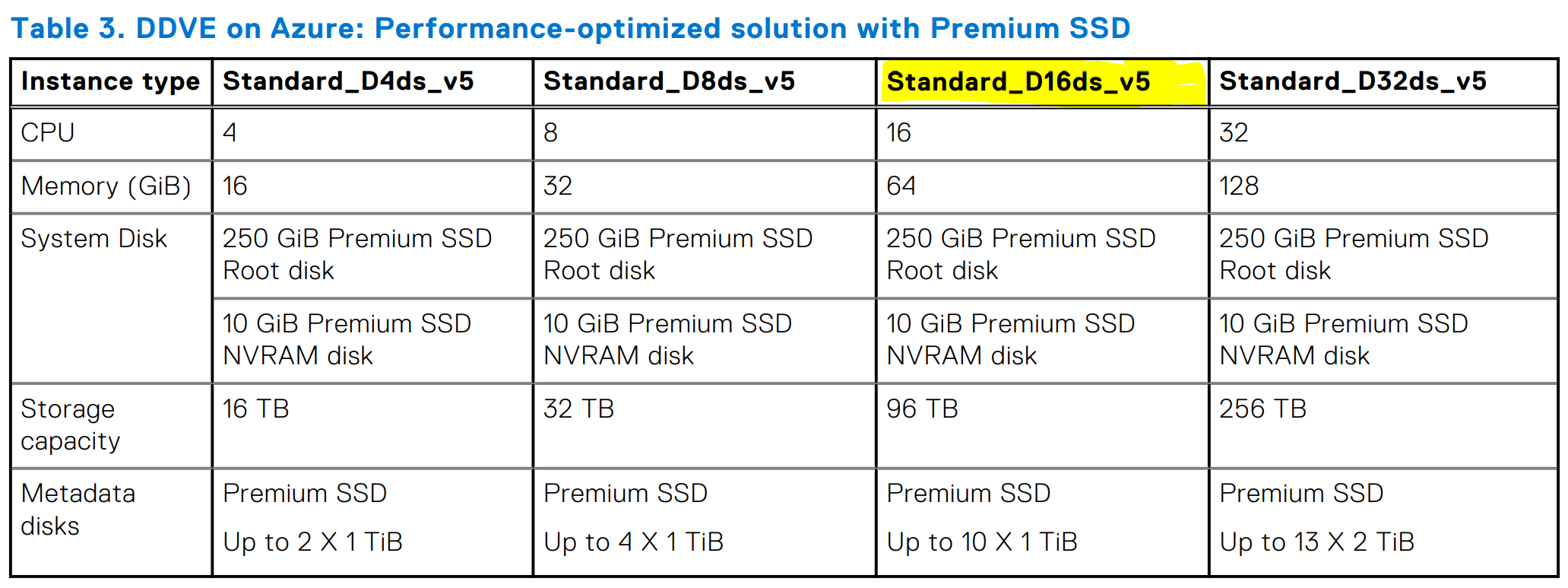
Figure 1: Table showing required VM resources from the Administration Guide
The Azure documentation for the VM type used is found below. A screenshot of the relevant information is also added for reference: Microsoft Ddv5 and Ddsv5-series documentation
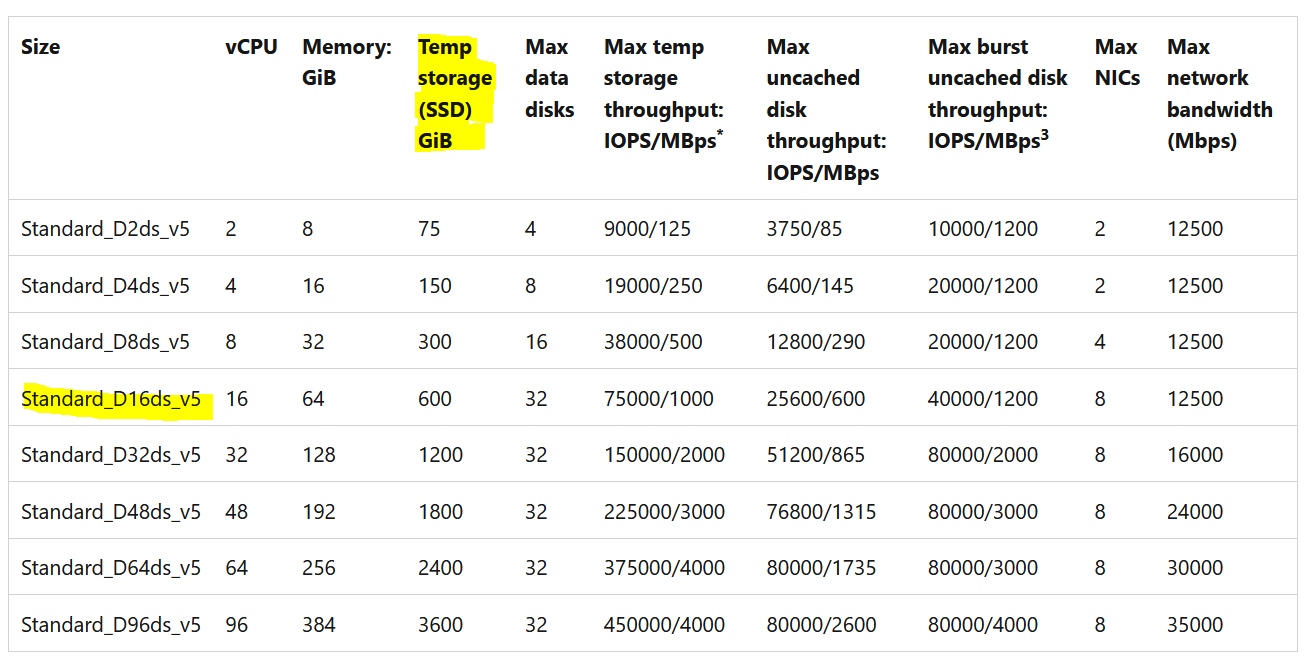
Figure 2: Azure VM details
As shown in the table above, for the VM type used for installing DDVE, Azure adds a "Temp storage (SSD)" of 600 GiB to the DDVE VM, even if DDVE does not have any use for it.
For example, for DDOS 7.11, if creating a DDVE with up to 96 TiB storage capacity, a "Standard_D16ds_v5" type of Azure VM is used for deployment. Details of storage requirements are found in the "Dell PowerProtect DDVE in the Azure Cloud 7.11 Installation and Administration Guide." Shown below for reference is the table from the guide which outlines the VM resources:
Figure 1: Table showing required VM resources from the Administration Guide
The Azure documentation for the VM type used is found below. A screenshot of the relevant information is also added for reference: Microsoft Ddv5 and Ddsv5-series documentation
Figure 2: Azure VM details
As shown in the table above, for the VM type used for installing DDVE, Azure adds a "Temp storage (SSD)" of 600 GiB to the DDVE VM, even if DDVE does not have any use for it.
The Microsoft Azure documentation describing this temporary disk is linked and quoted below:
From the Microsoft Azure documentation:

   Temporary disk

   Most VMs contain a temporary disk, which is not a managed disk.

   The temporary disk provides short-term storage for applications and processes, and is intended to only store data such as page files, swap files, or SQL Server tempdb.

   Data on the temporary disk may be lost during a maintenance event or when you redeploy a VM.

   During a successful standard reboot of the VM, data on the temporary disk will persist.

   For more information about VMs without temporary disks, see Azure VM sizes with no local temporary disk.
Resolution
There is no action required on the Data Domain DDVE side. The additional disk can be ignored. It is not being used by DDOS at all.
The disk is added as an integral part of the Azure VM type used by DDVE, and should not be modified, altered, or deleted.
The Microsoft Azure cloud provider does this itself and hence, if there are doubts, we recommend contacting Microsoft Azure support for more details.
The disk is added as an integral part of the Azure VM type used by DDVE, and should not be modified, altered, or deleted.
The Microsoft Azure cloud provider does this itself and hence, if there are doubts, we recommend contacting Microsoft Azure support for more details.
Affected Products
Data Domain, DD OS 7.11, DD OS 7.7, Data Domain Virtual EditionArticle Properties
Article Number: 000215391
Article Type: Solution
Last Modified: 17 Jul 2023
Version: 3
Find answers to your questions from other Dell users
Support Services
Check if your device is covered by Support Services.