PowerEdge: A Basic Introduction to the Catalog in Dell Repository Manager
Summary: Systems Management training video that provides a basic introduction to the catalog in Dell Repository Manager (DRM).
This article applies to
This article does not apply to
This article is not tied to any specific product.
Not all product versions are identified in this article.
Instructions
The following video provides a basic introduction to the catalog in Dell Repository Manager.
This video helps you understand the requirement for and how to use the catalog in Dell Repository Manager.
Components of a Catalog:
Download Location.
- Located on line 2
- The online catalog looks like this:
Manifest baseLocation="downloads.dell.com"
-
The offline Catalog looks like this:
Manifest baseLocation=""
-
This means look at the location of the catalog for the Firmware Updates
Note: If an offline catalog populates the Manifest baseLocation with downloads.dell.com, then most update methods go online to download the updates. OM Enterprise will not since it is hard coded the local path.
Download Protocol.
- Located on line 2
- This should be HTTPS
baseLocationAccessProtocols="HTTPS"
System Bundles
- This should be one bundle per System Model
- Example from Online Catalog:
<Display lang="en">System Bundle (Windows x64)PER840 v728</Display>
- Underneath each bundle, is a section for Contents which is a list of all valid updates for that model
- Example from Online Catalog:
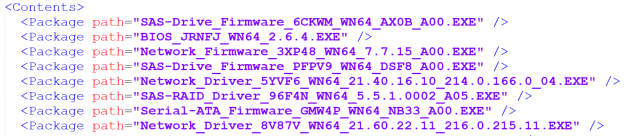
Note: This is the best way to solve the problem of why an update is not showing up during a catalog-based update.
Software Component Section
- Each Update has its own definition in the catalog
- Key Components to each Individual Update:
1. path="FOLDER06204306M/1/BIOS_JRNFJ_WN64_2.6.4.EXE"
This is the path to the DUP in relationship to the catalog.
2. rebootRequired="true"
This records whether or not the update needs a reboot.
3. vendorVersion="2.6.4"
This is the version that all software uses to display the update version for Firmware (FW) Compliance.
4. <SupportedSystems>
List of supported System Models for this update
Note: This section provides extensive data to identify Catalog issues and should be used to address inconsistencies with downloading updates or ensuring update compliance.
System Bundle (Windows x64) PER840 v728
-
Underneath each bundle, is a section for Contents which is a list of all valid updates for that model
Affected Products
C Series, HS Series, Modular Infrastructure, Rack Servers, Tower Servers, XR Servers, PowerEdge XR2, Poweredge C4140, PowerEdge C6400, PowerEdge C6420, PowerEdge C6520, PowerEdge C6525, PowerEdge C6600, PowerEdge C6615, PowerEdge C6620
, PowerEdge FC640, PowerEdge HS5610, PowerEdge HS5620, PowerEdge M640, PowerEdge M640 (for PE VRTX), PowerEdge M7701, PowerEdge M7725, PowerEdge MX5016s, PowerEdge MX7000, PowerEdge MX740C, PowerEdge MX750c, PowerEdge MX760c, PowerEdge MX840C, PowerEdge R240, PowerEdge R250, PowerEdge R260, PowerEdge R340, PowerEdge R350, PowerEdge R360, PowerEdge R440, PowerEdge R450, PowerEdge R470, PowerEdge R540, PowerEdge R550, PowerEdge R570, PowerEdge R640, PowerEdge R6415, PowerEdge R650, PowerEdge R650xs, PowerEdge R6515, PowerEdge R6525, PowerEdge R660, PowerEdge R660xs, PowerEdge R6615, PowerEdge R6625, PowerEdge R670, PowerEdge R740, PowerEdge R740XD, PowerEdge R740XD2, PowerEdge R7415, PowerEdge R7425, PowerEdge R750, PowerEdge R750XA, PowerEdge R750xs, PowerEdge R7515, PowerEdge R7525, PowerEdge R760, PowerEdge R760XA, PowerEdge R760xd2, PowerEdge R760xs, PowerEdge R7615, PowerEdge R7625, PowerEdge R770, PowerEdge R7715, PowerEdge R7725, PowerEdge R840, PowerEdge R860, PowerEdge R940, PowerEdge R940xa, PowerEdge R960, PowerEdge T140, PowerEdge T150, PowerEdge T160, PowerEdge T340, PowerEdge T350, PowerEdge T360, PowerEdge T40, PowerEdge T440, PowerEdge T550, PowerEdge T560, PowerEdge T640, PowerEdge XR11, PowerEdge XR12, PowerEdge XR4000r, PowerEdge XR4000w, PowerEdge XR4000z, PowerEdge XR4510c, PowerEdge XR4520c, PowerEdge XR5610, PowerEdge XR7620, PowerEdge XR8000r, PowerEdge XR8610t, PowerEdge XR8620t, Dell EMC Repository Manager - Current Versions, Dell EMC Repository Manager 3.0, Dell EMC Repository Manager 3.0.1, Dell EMC Repository Manager 3.1, Dell EMC Repository Manager 3.2
...
Article Properties
Article Number: 000183934
Article Type: How To
Last Modified: 16 May 2025
Version: 9
Find answers to your questions from other Dell users
Support Services
Check if your device is covered by Support Services.