PowerStore:使用 LDAP 凭据登录 PowerStore Manager 时超时
Summary: 错误消息:Unable to load system configuration data.Contact your service provider for assistance: 错误:请求超时
This article applies to
This article does not apply to
This article is not tied to any specific product.
Not all product versions are identified in this article.
Symptoms
用户可以间歇性登录,但大多数情况下登录失败。
错误消息是“Unable to load system configuration data.Contact your service provider for assistance: 错误:请求超时。”

图 1:错误消息“Unable to load system configuration data.Contact your service provider for assistance: 错误:请求超时。”
错误消息是“Unable to load system configuration data.Contact your service provider for assistance: 错误:请求超时。”
图 1:错误消息“Unable to load system configuration data.Contact your service provider for assistance: 错误:请求超时。”
Cause
未启用全局目录服务器。
Resolution
启用全局目录服务器。
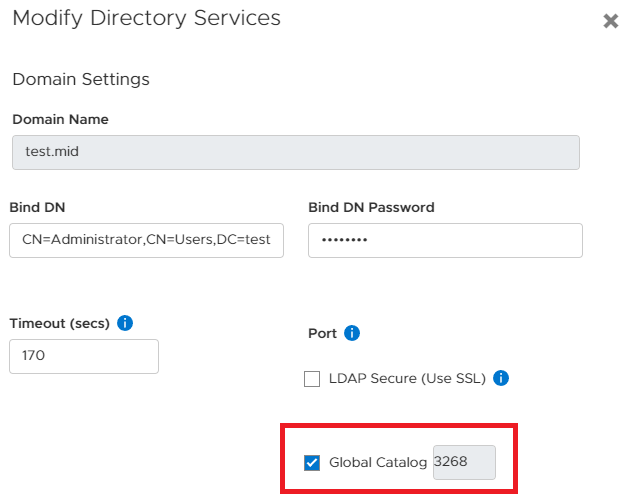
图 2:启用全局目录服务器
如果问题仍然存在,请将嵌套组搜索级别(例如,减少为 2)。数字 0 表示嵌套组数量不受限制:
设置 > 用户 > 目录服务 > 编辑 LDAP 配置 > 高级设置。
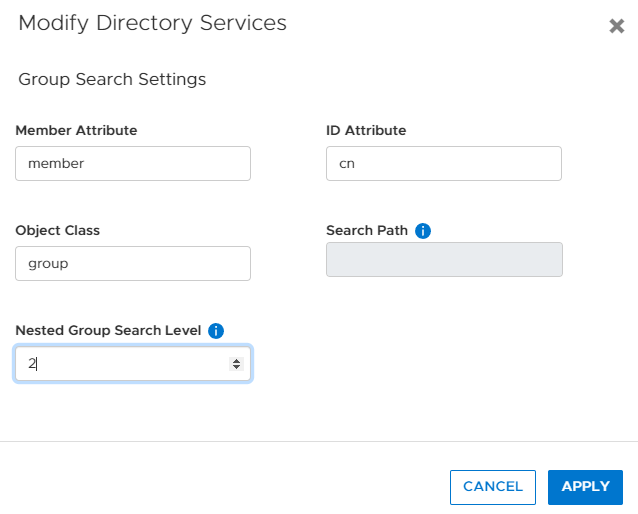
图 3:减少目录服务中嵌套组搜索的数量。
图 2:启用全局目录服务器
如果问题仍然存在,请将嵌套组搜索级别(例如,减少为 2)。数字 0 表示嵌套组数量不受限制:
设置 > 用户 > 目录服务 > 编辑 LDAP 配置 > 高级设置。
图 3:减少目录服务中嵌套组搜索的数量。
Affected Products
PowerStore 1000X, PowerStore 1000T, PowerStore 3000X, PowerStore 3000T, PowerStore 5000X, PowerStore 5000T, PowerStore 500T, PowerStore 7000X, PowerStore 7000T, PowerStore 9000X, PowerStore 9000TArticle Properties
Article Number: 000200079
Article Type: Solution
Last Modified: 28 Jun 2023
Version: 3
Find answers to your questions from other Dell users
Support Services
Check if your device is covered by Support Services.