NetWorker: File Index Could Not be Obtained Due to Error Message, "Unable to do Index lookup of path 'path'. The Index session is invalid"
Summary: Incremental backup fails with error: "File index could not be obtained due to. The Index session is invalid."
Symptoms
Full backup is completing successfully without any errors while incremental backup does not complete with the following error:
174422:save: Step (5 of 6) for PID-13894010: Reading the save sets and writing to the target device.
100690:save:<path>: File index could not be obtained due to <Unable to do Index lookup of path 'path'. The Index session is invalid
This could also include messages similar to the below in the Policy logs:
Saving in pool '<Pool_Name>'.
Server enabled for immediate mode
...
RPC Authentication: <Client> failed to obtain RPCSEC_GSS credentials: Authentication error; why = Server rejected credential. Could not get a session key for GSS authentication.  Perhaps this authentication method is not allowed/supported by both the local and remote machines.
Failed to create lgto_auth credential for RPCSEC_GSS: Could not get session key from <Client> for GSS authentication with <NWS>: Authentication error; why = Server rejected credential.
Unable to acquire the user credentials for direct save nsrmmd authentication: Could not get session key from <Client> for GSS authentication with <NWS>: Authentication error; why = Server rejected credential.
175297:save: Unable to set up the direct save with server '<NWS>': Could not get session key from <Client> for GSS authentication with <Client>: Authentication error; why = Server rejected credential.
98520:save: Falling back to agent-assisted indirect save
Cause
NetWorker only backs up renamed directories with unchanged files and subfolders when you explicitly list directory names in the save set attribute of the Client resource and if backup renamed Directory is enabled.
For example, if the save set field contains E:\ and you rename the E:\test directory to E:\test1, NetWorker does not back up the E:\test1 directory without Backup renamed directories being enabled.
When the save set field contains E:\test and you rename the E:\test directory to E:\test1, NetWorker performs a backup of the E:\test1 directory when you enable Backup renamed directories.
NetWorker carries out an index check for the Directory changes since the last Full, but this can be reliant on a Client Direct connection completing successfully before we get to this stage.
Resolution
Select Backup renamed Directories.
By default, if the name of a directory changes after a full backup, but no files or subfolders in the directory change, NetWorker does not include the renamed directory in subsequent incremental backups. To include renamed directories in an incremental backup, select the Backup renamed directories attribute in the Client resource.
This setting is changed from the NetWorker Management Console, by opening the Client Properties:
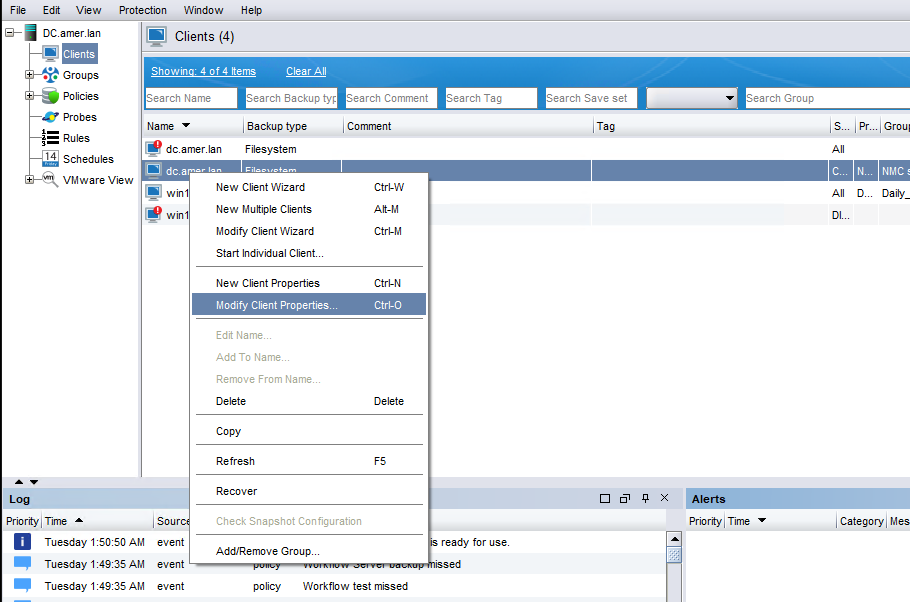
Figure 1: Screenshot of Client Properties tab in NetWorker Management Console
The General tab in NetWorker Management Console has a checkbox for Backup renamed directories:
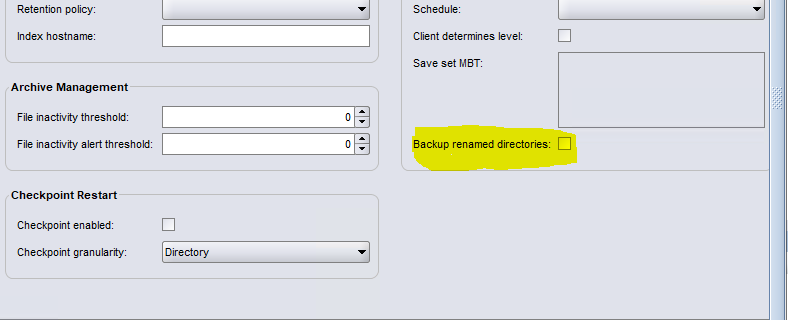
Figure 2: Screenshot of Checkbox for Backup Renamed Directories in the General tab of NetWorker Management Console
Fix Client Direct connection between the Client and the Data Domain.
Having direct communications between the Client and the PowerProtect DD is normally preferable so we should ensure that any connectivity issues between the Client and PowerProtect DD are resolved:
Update Host Resolution:
Ensure that the /etc/hosts file or Domain Name System (DNS) entries on the Client and Data Domain are correctly configured.
Both systems must resolve each other’s hostnames accurately.
NetWorker: Name Resolution Troubleshooting Best Practices
Verify Network Connectivity:
Engage your Network Team to ensure that the following ports are open and accessible in both directions:
111
2049
2051
2052
Once the connectivity issues have been resolved, run the backup for the client to verify that the backup completes successfully without errors.
Ports and name resolution can be verified on NetWorker systems using the nsrports command:
nsrports -t HOSTNAME -p PORTDisable Client Direct in the Client properties
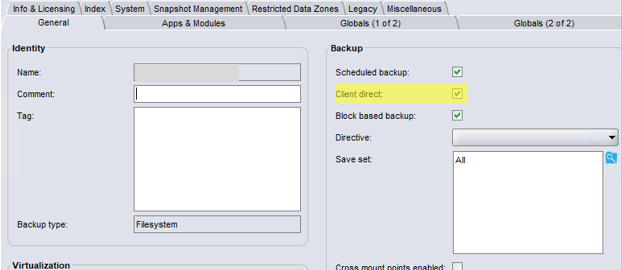
If you are unable to carry out Client Direct backups from the Client to the Data Domain and you are unable to fix the direct link then it may be necessary to disable Client Direct all together in the Client properties General tab: