Data Domain: How to power-off or restart a DDVE system
Summary: This article details the recommended procedure to power-off or reboot/restart a Data Domain Virtual Edition (DDVE) system.
This article applies to
This article does not apply to
This article is not tied to any specific product.
Not all product versions are identified in this article.
Instructions
How to power off or reboot a Data Domain Virtual Edition (DDVE) system from vSphere:
- Use only 'Shut Down Guest OS' or 'Restart Guest' (as needed).
- Avoid using 'Power Off or Reset' options as these act like pulling the power cable on a bare metal machine and may result in Data Loss or Integrity issues.
- DDVE does not support the 'Suspend' operation - Using 'Suspend' may cause unexpected results.
Procedure from vSphere Web/Client
- Right Click the required DDVE Virtual Machine (VM)
- Select Power > 'Shut Down Guest OS' ---> to power off the DDVE device
OR
- Select Power > 'Restart Guest OS' ---> to reboot/restart the DDVE device
The operations highlighted in the red box must be avoided.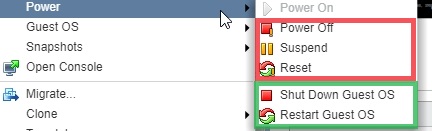
Affected Products
Data DomainProducts
Data Domain, Data Domain Virtual EditionArticle Properties
Article Number: 000010643
Article Type: How To
Last Modified: 26 Sept 2025
Version: 4
Find answers to your questions from other Dell users
Support Services
Check if your device is covered by Support Services.