Dell EMC Unity: Limitaciones del sistema de arreglos (corregibles por el usuario).
Summary: Dell EMC Unity: Limitaciones del sistema de arreglos (corregibles por el usuario).
This article applies to
This article does not apply to
This article is not tied to any specific product.
Not all product versions are identified in this article.
Instructions
Cada modelo de arreglo está definido por ciertas limitaciones del sistema; máximo de ranuras de unidad, máximo de LUN configurables, etc.
Para ver los límites del sistema, consulte las listas de matriz de soporte, Unisphere, recolección de datos, UEMCLI u objetos de propiedades del controlador.
- Matriz de soporte
Vaya a la matriz de soporte y revise las tablas 6, 7 y 8. Haga clic aquí Matriz de soporte.
- Unisphere
-
Inicie Unisphere ingresando la dirección IP de administración del SP y, a continuación, inicie sesión.
-
Haga clic en Configuración.
-
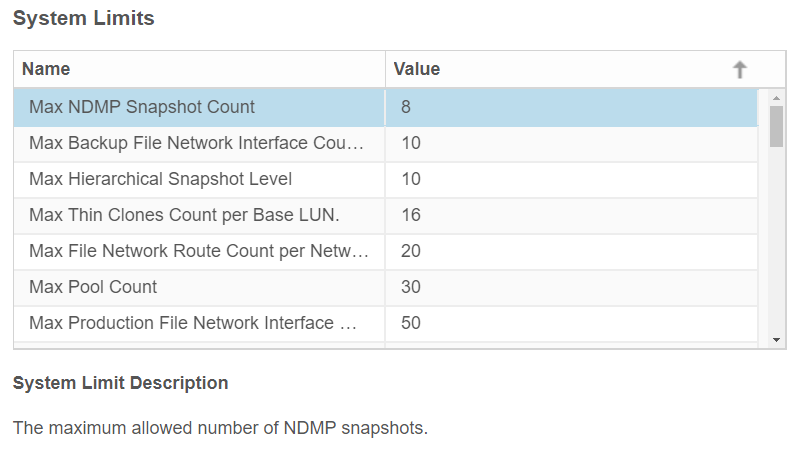
En la pestaña Software y licencias , busque los límites del sistema.
-
Haga clic en Límites del sistema.
Ejemplo de Unity 350F:

- UEMCLI
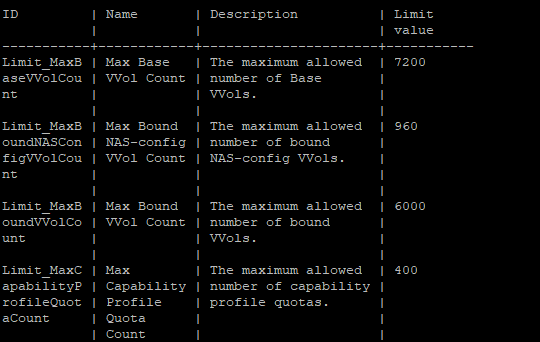
service@spa:~/user# uemcli /sys/limit show -output table -wrap
Ejemplo de Unity 350F:
- Lista de objetos de propiedades del controlador
service@spa:~/user# svc_storagecheck --list | grep -i Max_
O bien,
service@spa:~/user# svc_storagecheck --list | sed -n '/Lista de objetos de propiedades del controlador/,/<< nuevos objetos >>/p'
Max_Pools : 30
Max_LUs : 1500
Max_DrivesPerPool : 250
Max_DrivesPerOperation : 250
Max_DrivesUsableForAllPools : 250
Max_LUSizeInBlocks : 549755813888 (0x8000000000)
Max_CompressLUs : 500
Max_CompressBackgroundProcesses : 10
Max_PrivateFLUs : 126
Max_LUs : 1500
Max_DrivesPerPool : 250
Max_DrivesPerOperation : 250
Max_DrivesUsableForAllPools : 250
Max_LUSizeInBlocks : 549755813888 (0x8000000000)
Max_CompressLUs : 500
Max_CompressBackgroundProcesses : 10
Max_PrivateFLUs : 126
Additional Information
Este contenido está traducido en 15 idiomas:
| https://downloads.dell.com/TranslatedPDF/DE_KB540548.pdf |
| https://downloads.dell.com/TranslatedPDF/ES_KB540548.pdf |
| https://downloads.dell.com/TranslatedPDF/ES-XL_KB540548.pdf |
| https://downloads.dell.com/TranslatedPDF/FR_KB540548.pdf |
| https://downloads.dell.com/TranslatedPDF/IT_KB540548.pdf |
| https://downloads.dell.com/TranslatedPDF/JA_KB540548.pdf |
| https://downloads.dell.com/TranslatedPDF/KO_KB540548.pdf |
| https://downloads.dell.com/TranslatedPDF/NL_KB540548.pdf |
| https://downloads.dell.com/TranslatedPDF/PT_KB540548.pdf |
| https://downloads.dell.com/TranslatedPDF/PT-BR_KB540548.pdf |
| https://downloads.dell.com/TranslatedPDF/RU_KB540548.pdf |
| https://downloads.dell.com/TranslatedPDF/SV_KB540548.pdf |
| https://downloads.dell.com/TranslatedPDF/ZH-CN_KB540548.pdf |
| https://downloads.dell.com/TranslatedPDF/ZH-TW_KB540548.pdf |
| https://downloads.dell.com/TranslatedPDF/AR_KB540548.pdf |
Affected Products
Dell EMC Unity Family |Dell EMC Unity All FlashProducts
Dell Unity 300, Dell EMC Unity 300F, Dell EMC Unity 350F, Dell EMC Unity XT 380, Dell EMC Unity XT 380F, Dell EMC Unity 400, Dell EMC Unity 400F, Dell EMC Unity 450F, Dell EMC Unity XT 480, Dell EMC Unity XT 480F, Dell EMC Unity 500
, Dell EMC Unity 500F, Dell EMC Unity 600, Dell EMC Unity 600F, Dell EMC Unity 650F, Dell EMC Unity XT 680, Dell EMC Unity XT 880, Dell EMC Unity XT 880F, Dell EMC Unity Family |Dell EMC Unity All Flash, Dell EMC Unity Hybrid, Dell EMC UnityVSA Professional Edition/Unity Cloud Edition
...
Article Properties
Article Number: 000021404
Article Type: How To
Last Modified: 17 Apr 2026
Version: 6
Find answers to your questions from other Dell users
Support Services
Check if your device is covered by Support Services.