Dell EMC Unity: Limitazioni del sistema di array (correggibile dall'utente).
Summary: Dell EMC Unity: Limitazioni del sistema di array (correggibile dall'utente).
This article applies to
This article does not apply to
This article is not tied to any specific product.
Not all product versions are identified in this article.
Instructions
Ogni modello di array è definito da alcune limitazioni di sistema; numero massimo di slot per unità, numero massimo di LUN configurabili e così via
Per visualizzare i limiti del sistema, fare riferimento agli elenchi Support Matrix, Unisphere, Data Collects, UEMCLI o Driver Properties Objects.
- Support Matrix
Passare alla Support Matrix e controllare le tabelle 6, 7 e 8. Clicca qui Support Matrix.
- Unisphere
-
Avviare Unisphere immettendo l'indirizzo IP di gestione degli SP e accedere.
-
Fare clic su Impostazioni.
-
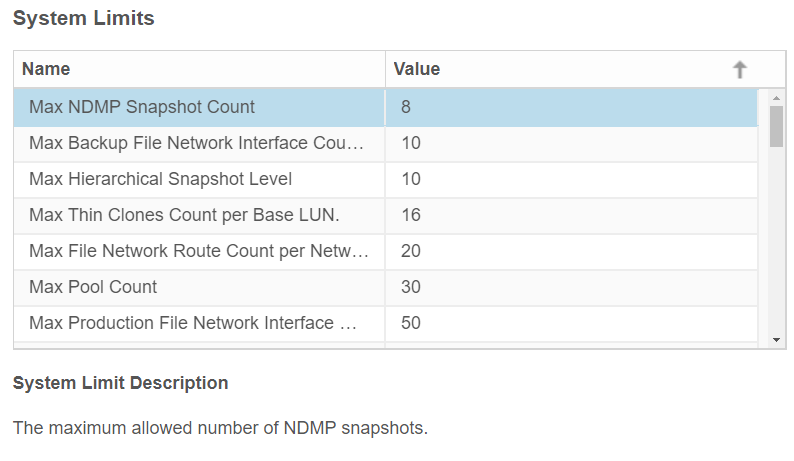
Nella scheda Software e licenze individuare i limiti di sistema.
-
Cliccare su System limits.
Esempio da Unity 350F:

- UEMCLI
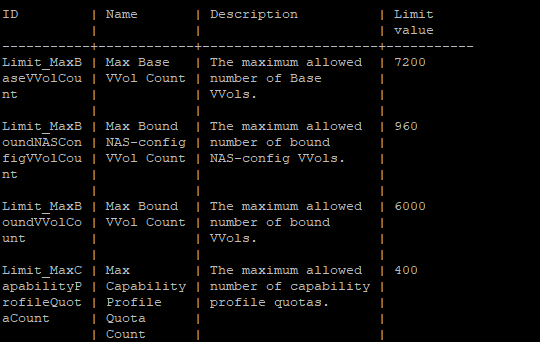
service@spa:~/user# uemcli /sys/limit show -output table -wrap
Esempio da Unity 350F:
- Elenco di oggetti delle proprietà del driver
service@spa:~/user# svc_storagecheck --list | grep -i Max_
Oppure
service@spa:~/user# svc_storagecheck --list | sed -n '/Driver Properties Object List/,/<< new objects >>/p'
Max_Pools : 30
Max_LUs : 1500
Max_DrivesPerPool : 250
Max_DrivesPerOperation : 250
Max_DrivesUsableForAllPools : 250
Max_LUSizeInBlocks : 549755813888 (0x8000000000)
Max_CompressLUs : 500
Max_CompressBackgroundProcesses : 10
Max_PrivateFLUs : 126
Max_LUs : 1500
Max_DrivesPerPool : 250
Max_DrivesPerOperation : 250
Max_DrivesUsableForAllPools : 250
Max_LUSizeInBlocks : 549755813888 (0x8000000000)
Max_CompressLUs : 500
Max_CompressBackgroundProcesses : 10
Max_PrivateFLUs : 126
Additional Information
Questo contenuto è tradotto in 15 lingue:
| https://downloads.dell.com/TranslatedPDF/DE_KB540548.pdf |
| https://downloads.dell.com/TranslatedPDF/ES_KB540548.pdf |
| https://downloads.dell.com/TranslatedPDF/ES-XL_KB540548.pdf |
| https://downloads.dell.com/TranslatedPDF/FR_KB540548.pdf |
| https://downloads.dell.com/TranslatedPDF/IT_KB540548.pdf |
| https://downloads.dell.com/TranslatedPDF/JA_KB540548.pdf |
| https://downloads.dell.com/TranslatedPDF/KO_KB540548.pdf |
| https://downloads.dell.com/TranslatedPDF/NL_KB540548.pdf |
| https://downloads.dell.com/TranslatedPDF/PT_KB540548.pdf |
| https://downloads.dell.com/TranslatedPDF/PT-BR_KB540548.pdf |
| https://downloads.dell.com/TranslatedPDF/RU_KB540548.pdf |
| https://downloads.dell.com/TranslatedPDF/SV_KB540548.pdf |
| https://downloads.dell.com/TranslatedPDF/ZH-CN_KB540548.pdf |
| https://downloads.dell.com/TranslatedPDF/ZH-TW_KB540548.pdf |
| https://downloads.dell.com/TranslatedPDF/AR_KB540548.pdf |
Affected Products
Dell EMC Unity Family |Dell EMC Unity All FlashProducts
Dell Unity 300, Dell EMC Unity 300F, Dell EMC Unity 350F, Dell EMC Unity XT 380, Dell EMC Unity XT 380F, Dell EMC Unity 400, Dell EMC Unity 400F, Dell EMC Unity 450F, Dell EMC Unity XT 480, Dell EMC Unity XT 480F, Dell EMC Unity 500
, Dell EMC Unity 500F, Dell EMC Unity 600, Dell EMC Unity 600F, Dell EMC Unity 650F, Dell EMC Unity XT 680, Dell EMC Unity XT 880, Dell EMC Unity XT 880F, Dell EMC Unity Family |Dell EMC Unity All Flash, Dell EMC Unity Hybrid, Dell EMC UnityVSA Professional Edition/Unity Cloud Edition
...
Article Properties
Article Number: 000021404
Article Type: How To
Last Modified: 17 Apr 2026
Version: 6
Find answers to your questions from other Dell users
Support Services
Check if your device is covered by Support Services.