Dell EMC Unity: Limitações do sistema do array (corrigíveis pelo usuário).
Summary: Dell EMC Unity: Limitações do sistema do array (corrigíveis pelo usuário).
This article applies to
This article does not apply to
This article is not tied to any specific product.
Not all product versions are identified in this article.
Instructions
Cada modelo de array é definido por determinadas limitações do sistema; Máximo de slots de unidade, máximo de LUNs configuráveis etc.
Para visualizar os limites do sistema, consulte as listas Support Matrix, Unisphere, Data Collects, UEMCLI ou Driver Properties Objects.
- Matriz de suporte
Navegue até a matriz de suporte e verifique as tabelas 6, 7 e 8. Clique aqui na matriz de suporte.
- Unisphere
-
Inicie o Unisphere digitando o endereço IP de gerenciamento da controladora de armazenamento e, em seguida, faça log-in.
-
Clique em Configurações.
-
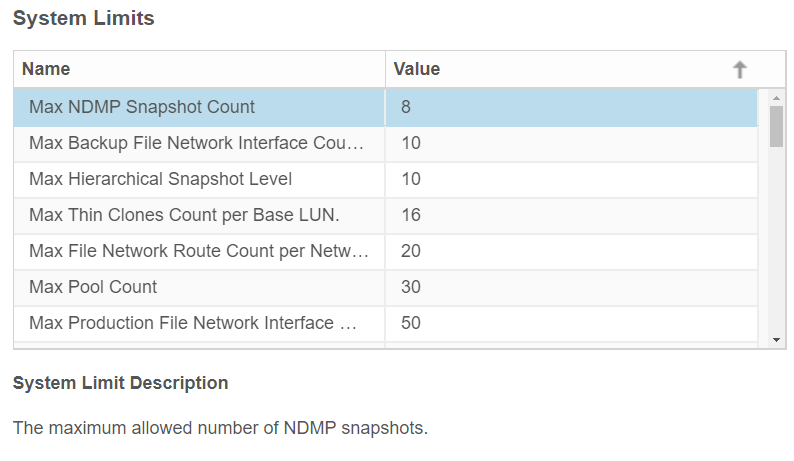
Na guia Software e licenças , localize os limites do sistema.
-
Clique em System limits.
Exemplo do Unity 350F:

- UEMCLI
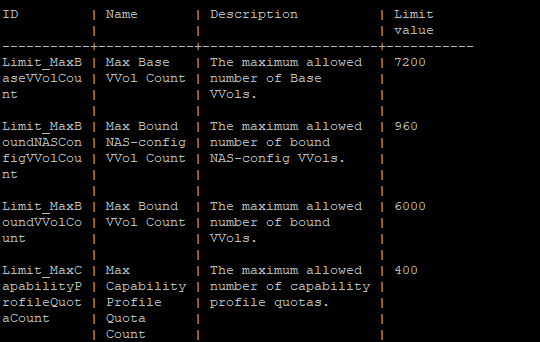
service@spa:~/user# uemcli /sys/limit show -output table -wrap
Exemplo do Unity 350F:
- Lista de objetos de propriedades do driver
service@spa:~/user# svc_storagecheck --list | grep -i Max_
Ou
service@spa:~/user# svc_storagecheck --list | sed -n '/Driver Properties Object List/,/<< new objects >>/p'
Max_Pools : 30
Max_LUs : 1500
Max_DrivesPerPool : 250
Max_DrivesPerOperation : 250
Max_DrivesUsableForAllPools : 250
Max_LUSizeInBlocks : 549755813888 (0x8000000000)
Max_CompressLUs : 500
Max_CompressBackgroundProcesses : 10
Max_PrivateFLUs : 126
Max_LUs : 1500
Max_DrivesPerPool : 250
Max_DrivesPerOperation : 250
Max_DrivesUsableForAllPools : 250
Max_LUSizeInBlocks : 549755813888 (0x8000000000)
Max_CompressLUs : 500
Max_CompressBackgroundProcesses : 10
Max_PrivateFLUs : 126
Additional Information
Este conteúdo está traduzido 15 idiomas:
| https://downloads.dell.com/TranslatedPDF/DE_KB540548.pdf |
| https://downloads.dell.com/TranslatedPDF/ES_KB540548.pdf |
| https://downloads.dell.com/TranslatedPDF/ES-XL_KB540548.pdf |
| https://downloads.dell.com/TranslatedPDF/FR_KB540548.pdf |
| https://downloads.dell.com/TranslatedPDF/IT_KB540548.pdf |
| https://downloads.dell.com/TranslatedPDF/JA_KB540548.pdf |
| https://downloads.dell.com/TranslatedPDF/KO_KB540548.pdf |
| https://downloads.dell.com/TranslatedPDF/NL_KB540548.pdf |
| https://downloads.dell.com/TranslatedPDF/PT_KB540548.pdf |
| https://downloads.dell.com/TranslatedPDF/PT-BR_KB540548.pdf |
| https://downloads.dell.com/TranslatedPDF/RU_KB540548.pdf |
| https://downloads.dell.com/TranslatedPDF/SV_KB540548.pdf |
| https://downloads.dell.com/TranslatedPDF/ZH-CN_KB540548.pdf |
| https://downloads.dell.com/TranslatedPDF/ZH-TW_KB540548.pdf |
| https://downloads.dell.com/TranslatedPDF/AR_KB540548.pdf |
Affected Products
Dell EMC Unity Family |Dell EMC Unity All FlashProducts
Dell Unity 300, Dell EMC Unity 300F, Dell EMC Unity 350F, Dell EMC Unity XT 380, Dell EMC Unity XT 380F, Dell EMC Unity 400, Dell EMC Unity 400F, Dell EMC Unity 450F, Dell EMC Unity XT 480, Dell EMC Unity XT 480F, Dell EMC Unity 500
, Dell EMC Unity 500F, Dell EMC Unity 600, Dell EMC Unity 600F, Dell EMC Unity 650F, Dell EMC Unity XT 680, Dell EMC Unity XT 880, Dell EMC Unity XT 880F, Dell EMC Unity Family |Dell EMC Unity All Flash, Dell EMC Unity Hybrid, Dell EMC UnityVSA Professional Edition/Unity Cloud Edition
...
Article Properties
Article Number: 000021404
Article Type: How To
Last Modified: 17 Apr 2026
Version: 6
Find answers to your questions from other Dell users
Support Services
Check if your device is covered by Support Services.