Dell EMC VxRail: event code: VXR500SWC5008
Summary: The intent of this KB is to provide solution for when alarm occurs.
This article applies to
This article does not apply to
This article is not tied to any specific product.
Not all product versions are identified in this article.
Instructions
Dell EMC VxRail: event code: VXR500SWC5008
Similar messages:
"This event code indicates "Unable to access the System Controller (SC) because of a hardware error condition."
"This is an iDRAC internal error. Unable to access Front LED Panel because of a hardware error condition. "
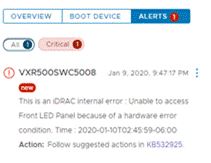
Resolution:
- Collect TSR (iDrac logs) on troubled node to verify there is no hardware issue present. (Support can be engaged if needed for assistance)
- If no hardware issue visible, reset iDrac and reset alarm to green.
Similar messages:
"This event code indicates "Unable to access the System Controller (SC) because of a hardware error condition."
"This is an iDRAC internal error. Unable to access Front LED Panel because of a hardware error condition. "
Resolution:
- Collect TSR (iDrac logs) on troubled node to verify there is no hardware issue present. (Support can be engaged if needed for assistance)
- Chat: https://onlinesupport.emc.com/LiveChat
- Phone: 1- 800-782-4362
- Create a Service Request: https://onlinesupport.emc.com/SRCreate
- If no hardware issue visible, reset iDrac and reset alarm to green.
Reset via iDRAC GUI (13G)
The Graphical User Interface (GUI) of the iDRAC provides an option to perform a soft reset:
- Connect to the iDRAC
- Log into the interface by entering the username and password
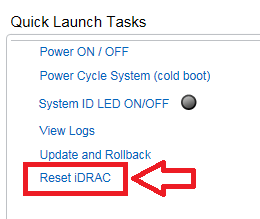
- In the lower right corner of the overview screen, the Quick Launch Tasks are shown
- Click on Reset iDRAC .
- Confirm the action
- The iDRAC won't be reachable for few minutes, while the system performance is not affected
Reset via iDRAC GUI (14G)
The Graphical User Interface (GUI) of the iDRAC provides an option to perform a soft reset:
- Connect to the iDRAC
- Log into the interface by entering the username and password
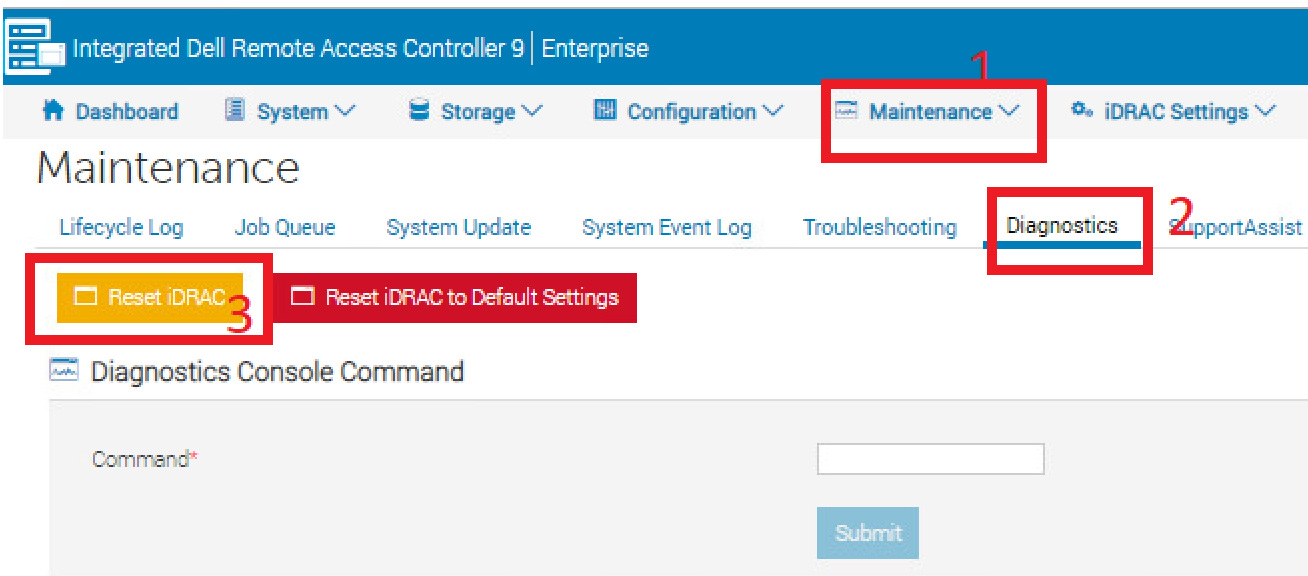
- Click "Maintenance" tab on top
- Click "Diagnostics" sub-tab
- Click on Reset iDRAC .
- Confirm the action
- The iDRAC won't be reachable for few minutes, while the system performance is not affected.
Affected Products
VxRail Appliance FamilyArticle Properties
Article Number: 000022309
Article Type: How To
Last Modified: 06 Apr 2026
Version: 5
Find answers to your questions from other Dell users
Support Services
Check if your device is covered by Support Services.