NetWorker: How to read Data Domain statistics for a NetWorker save set
Summary: Use mminfo to extract deduplication statistics for a NetWorker save set on a Data Domain; the output follows version:cloneid:backup:pre‑compression:post‑compression and shows deduplicate compression process. ...
This article applies to
This article does not apply to
This article is not tied to any specific product.
Not all product versions are identified in this article.
Instructions
The NetWorker media database stores the metadata for a NetWorker save set. This metadata includes the deduplication (dedupe) statistics for the save sets written to Data Domain devices.
There are two ways to display detailed deduplication statistics for a save set from the NetWorker media database:
mminfo -q ssid=save-set-id -S
This shows the save set's metadata statistics.
Or
mminfo -q ssid=save-set-id -r attrs
This shows the save set's deduplication (dedupe) details; other columns can be added as needed.
How to read the Data Domain dedup statistics:
<version>:<cloneid>:<backup size>:<pre local compression size>:<post local compression size>
For Example:
On the NetWorker server:
# mminfo -q "ssid=3190711499" -r "ssid,sumsize,totalsize"
ssid         size      total
3190711499   49 MB   50655224

# mminfo -q "ssid=3190711499" -S
ssid=3190711499 savetime=10/03/2014 10:02:55 AM (1412326975) vm-lego-231:/etc

*ss data domain backup cloneid: 1412326975;
*ss data domain dedup statistics: "v1:1412326975:50823364:1625378:738007";
On the Data Domain:
# filesys show compression "/data/col1/vm-lego-121/onetwoone/82/42/f7e023b6-00000006-be2e64cb-542e64cb-00435000-637ca656"
Total files: 1;  bytes/storage_used: 68.3
 Original Bytes:                 50,824,052              - raw bytes
 Globally Compressed:            1,626,066               - pre_lc_size
 Locally Compressed:             738,201                 - post_lc_size
 Meta-data:                      5,528
For this save set:
cloneid                          :  1412326975
backup size                      :   50823364
pre local-compression size       :   1625378
post local-compression size      :   738007
The Data Domain performs inline deduplication which accounts for the difference between the initial backup size and the 'pre local-compression size' also known as the 'Globally Compressed' size. This deduped data is then compressed.
For a complete explanation of this process, refer to the following article: Data Domain: Understanding Data Domain Compression
Additional Information
The following demonstrates how to identify NetWorker data directly on the Data Domain file system:
NetWorker Server:
- From an elevated prompt on the NetWorker server, use the
mminfocommand to identify a NetWorker save set:
[root@nsr ~]# mminfo -avot
 volume        type   client           date     time         size ssid      fl   lvl name
...
nsr.amer.lan.dddefault.001 Data Domain rhel-client03.amer.lan 05/04/2026 09:40:20 AM 10 GB 3673727428 cb full /
...
NOTE: for additional information about the
mminfo command, see the NetWorker Command Reference Guide. NetWorker documentation is available under: Support for NetWorker | Manuals & Documents (you must sign in with your Dell support account).
- Using the save set ID, use the following command to get the long-save set ID and device name:
mminfo -q ssid=SSID -r "ssid(55),device)"
Example:
[root@nsr ~]# mminfo -avot -q ssid=3673727428 -r "ssid(55),device"
 ssid                                                  device
62f4ba32-00000006-daf8a1c4-69f8a1c4-00275000-592bbe56  ddve01.amer.lan_BackupDevice01
The file path on the Data Domain uses the NetWorker "long" save set ID (SSID).
Data Domain:
- Open a sysadmin SSH session on the Data Domain.
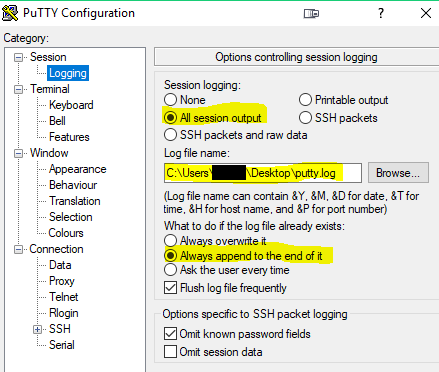
NOTE: Depending on the options chosen and the amount of data on the Data Domain, the output may exceed the session buffer. It is recommended to enable SSH session logging to log the output to a file. For example:
- From the prompt, list the mtrees on the Data Domain:
mtree list
- Using the NetWorker server mtree, generate a Data Domain
filesys report:
filesys report generate file-location path </data/col1/NETWORKER_MTREE>
This lists all save sets from the NetWorker server, optionally, you can use the device path from the NetWorker devices "Device Access Information" field:
filesys report generate file-location path /data/col1/<NETWORKER_MTREE>/<DEVICE_FOLDER>
For example, for the save set shown on the NetWorker server:
sysadmin@ddve01# filesys report generate file-location path /data/col1/nsr/BackupDevice01
--------------------------------      ----------------------      -------------     -----------------
File Name                             Location(Unit Name)         Size              Placement Time
--------------------------------      ----------------------      -------------     -------------------
...
/data/col1/nsr/BackupDevice01/09/49/notes/62f4ba32-00000006-daf8a1c4-69f8a1c4-00275000-592bbe56 Active  848.00 B        Mon May  4 09:50:41 2026
/data/col1/nsr/BackupDevice01/09/49/62f4ba32-00000006-daf8a1c4-69f8a1c4-00275000-592bbe56       Active  10.49 GiB       Mon May  4 09:40:21 2026
...
-----------------------------------------------------------------
Affected Products
Data Domain, NetWorkerProducts
NetWorker FamilyArticle Properties
Article Number: 000023290
Article Type: How To
Last Modified: 04 May 2026
Version: 5
Find answers to your questions from other Dell users
Support Services
Check if your device is covered by Support Services.