NVP-vProxy:虛擬機器備份失敗,並顯示「無法鎖定虛擬機器以供備份」
Summary: NetWorker VMware Protection (NVP) vProxy 備份失敗,因為 vProxy 無法在備份工作流程開始時鎖定虛擬機器。在執行過程中遇到問題后,以前的備份操作將 VM 鎖定屬性保留在原位。過時鎖定可防止在受影響的 VM 上啟動新的備份操作。
This article applies to
This article does not apply to
This article is not tied to any specific product.
Not all product versions are identified in this article.
Symptoms
NVP 整合使用 vProxy 裝置來執行 VM 備份。備份在工作流開始時失敗,並出現一條消息,指示另一個 vProxy 操作處於活動狀態。
vProxy 備份記錄顯示鎖定失敗:
YYYY/MM/DD HH:MM:SS INFO:  [@(#) Build number: 43] Another vProxy operation is active on VM vm-XXX: {Operation:Backup StartTime:YYYY-MM-DDTHH:MM:SSZ Proxy:[VPROXY_NAME] SessionId:4cf6f76c-ef6c-435d-880c-77fbaf49e17d}
YYYY/MM/DD HH:MM:SS ERROR: [@(#) Build number: 43] Failed to lock Virtual Machine for backup: Another vProxy operation is active on VM vm-XXX: {Operation:Backup StartTime:YYYY-MM-DDTHH:MM:SSZ Proxy:[VPROXY_NAME] SessionId:4cf6f76c-ef6c-435d-880c-77fbaf49e17d}.
VM 上當前沒有其他備份或還原操作。鎖定已過時,因為先前的備份失敗。
Cause
vProxy 備份工作流程會在每次備份開始時設定 VM 自訂屬性。這些屬性可防止在同一 VM 上執行多個 vProxy 作業。工作流程會在備份完成後移除這些屬性。
如果先前的備份在執行過程中遇到問題,則可能不會移除這些屬性。過時的鎖仍然存在,並阻止 VM 上的所有新備份操作。
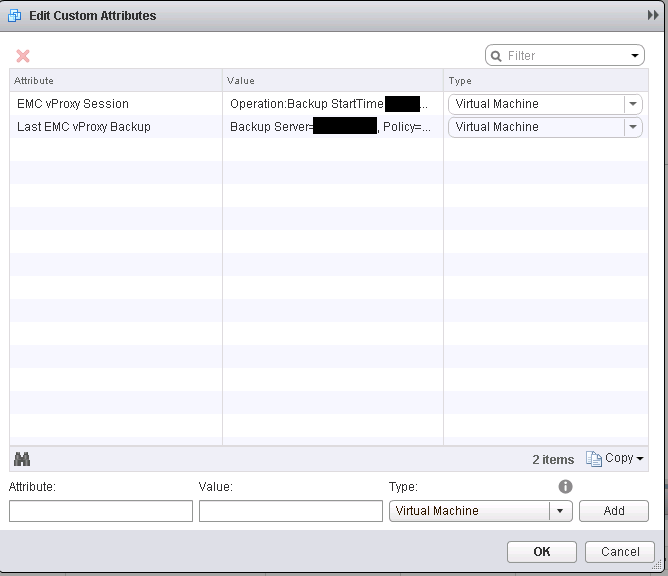
涉及的虛擬機器自訂屬性為 EMC vProxy 工作階段和上次 EMC vProxy。
Resolution
有兩種方法可以清除過時的 VM 鎖定。
方法 1 — 使用 vmconfig 公用程式清除鎖定
- 開啟連接至其中一個 vProxy 裝置的 SSH 工作階段。以根身分進行身份驗證。
- 載入 vProxy 環境變數:
source /opt/emc/vproxy/unit/vproxy.env - 查詢 VM 鎖定狀態以確認鎖定處於活動狀態:
/opt/emc/vproxy/bin/vmconfig -v <vcenter_fqdn> -u '<vcenter_user>' -p '<vcenter_password>' -c "info" -l moref -k <vm_moref> - 輸出顯示備份鎖定:如果鎖定處於活動狀態,則為 true。
- 重設備用鎖:
/opt/emc/vproxy/bin/vmconfig -v <vcenter_fqdn> -u '<vcenter_user>' -p '<vcenter_password>' -c "reset-backup" -l moref -k <vm_moref> - 再次查詢 VM 以確認已解除鎖定:
/opt/emc/vproxy/bin/vmconfig -v <vcenter_fqdn> -u '<vcenter_user>' -p '<vcenter_password>' -c "info" -l moref -k <vm_moref> - 輸出應顯示備份鎖定:false。
- 為受影響的 VM 重試備份。
方法 2 — 使用 vSphere Web Client 清除鎖定
- 登入 vSphere Web Client。
- 導航到受影響的虛擬機。
- 編輯虛擬機器的自訂屬性。
- 移除下列屬性的值:
- EMC vProxy 工作階段
- 上次 EMC vProxy
- 儲存變更,然後重試備份。
如果清除鎖定後備份仍然失敗,請聯絡 Dell 支援 以進一步調查。請參閱 KB 文章:
Additional Information
範例輸出:
myvproxyname:~ # /opt/emc/vproxy/bin/vmconfig -v vCenter_name.domain.com -u myProxyUser@vsphere.local -p myProxyPassword -c "info" -l moref -k vm-96
 VM Config
 vCenter: "vCenter_name.domain.com", User: "myProxyUser@vsphere.local", Password: "myProxyPassword", Lookup Mode: "moref", Lookup Key: "vm-96", Command: "info"
 Logged into vCenter 'vCenter_name.domain.com'.
 Connected to session on vCenter 'vCenter_name.domain.com' Version '6.5.0 build-8307201, API:6.5', Uuid:5b106da3-cb53-48e6-af57-7ac1d5154ab6.
 Found virtual machine "virtualmachine_name.domain.com" with MORef "vm-96".
 Name: "virtualmachine_name.domain.com".
 CBT Enabled: true.
 Migration Enabled: true.
 Backup Locked: true.
 Disconnected from session on vCenter 'vCenter_name.domain.com'.
 Logged out from vCenter 'vCenter_name.domain.com'.

myvproxyname:~ # /opt/emc/vproxy/bin/vmconfig -v vCenter_name.domain.com -u myProxyUser@vsphere.local -p myProxyPassword -c "reset-backup" -l moref -k vm-96
 VM Config
 vCenter: "vCenter_name.domain.com", User: "myProxyUser@vsphere.local", Password: "myProxyPassword", Lookup Mode: "moref", Lookup Key: "vm-96", Command: "reset-backup"
 Logged into vCenter 'vCenter_name.domain.com'.
 Connected to session on vCenter 'vCenter_name.domain.com' Version '6.5.0 build-8307201, API:6.5', Uuid:5b106da3-cb53-48e6-af57-7ac1d5154ab6.
 Found virtual machine "virtualmachine_name.domain.com" with MORef "vm-96".
 Clearing EMC vProxy Session lock for virtual machine "virtualmachine_name.domain.com" "vm-96", locked by "{Operation:Backup StartTime:2018-07-31 09:36:31.487334906 -0700 PDT Proxy:myvproxyname SessionId:test-lock}".
 Set custom attribute 'EMC vProxy Session' value for object vm-96 to ''.
 Backup lock is cleared.
 Initializing VDDK...
 Migration is already enabled.
 De-initializing VDDK libraries.
 Disconnected from session on vCenter 'vCenter_name.domain.com'.
 Logged out from vCenter 'vCenter_name.domain.com'.

myvproxyname:~ # /opt/emc/vproxy/bin/vmconfig -v vCenter_name.domain.com -u myProxyUser@vsphere.local -p myProxyPassword -c "info" -l moref -k vm-96
 VM Config
 vCenter: "vCenter_name.domain.com", User: "myProxyUser@vsphere.local", Password: "myProxyPassword", Lookup Mode: "moref", Lookup Key: "vm-96", Command: "info"
 Logged into vCenter 'vCenter_name.domain.com'.
 Connected to session on vCenter 'vCenter_name.domain.com' Version '6.5.0 build-8307201, API:6.5', Uuid:5b106da3-cb53-48e6-af57-7ac1d5154ab6.
 Found virtual machine "virtualmachine_name.domain.com" with MORef "vm-96".
 Name: "virtualmachine_name.domain.com".
 CBT Enabled: true.
 Migration Enabled: true.
 Backup Locked: false.
 Disconnected from session on vCenter 'vCenter_name.domain.com'.
 Logged out from vCenter 'vCenter_name.domain.com'.
myvproxyname:~ #
Article Properties
Article Number: 000031523
Article Type: Solution
Last Modified: 04 Sept 2026
Version: 5
Find answers to your questions from other Dell users
Support Services
Check if your device is covered by Support Services.