EMC M&R | Watch4net | ViPR SRM: Brakujące raporty i pulpity nawigacyjne w drzewie raportów w nowej instalacji
Summary: Po wykonaniu nowej instalacji brakuje raportów i pulpitów nawigacyjnych z powodu uszkodzonego modułu raportów ogólnych.
This article applies to
This article does not apply to
This article is not tied to any specific product.
Not all product versions are identified in this article.
Symptoms
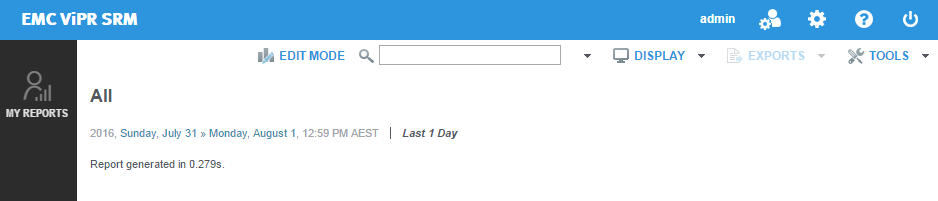
Po nowo zainstalowanym systemie Watch4net lub ViPR SRM w drzewie raportów wyświetlane są tylko węzły „My Reports”. Pozostałe raporty i pulpity nawigacyjne nie są wyświetlane:
Cause
Moduł raportów ogólnych został uszkodzony w trakcie procesu instalacji.
Resolution
Aby rozwiązać ten problem, uaktualnij moduł raportów ogólnych zgodnie z poniższym:
- SSH lub RDP do hosta front-endu.
- Uruchom polecenie module-manager w następujący sposób:
Linux: /opt/APG/bin/manage-modules.sh update generic-reports Generic-Reports
Windows: "C:\Program Files\APG\bin\manage-modules.cmd" update generic-reports Generic-Reports
Windows: "C:\Program Files\APG\bin\manage-modules.cmd" update generic-reports Generic-Reports
- Po wyświetleniu monitu o aktualizację plików zaakceptuj wartości domyślne. Przykład danych wyjściowych:
srm4fe:~ # /opt/APG/bin/manage-modules.sh update generic-reports Generic-Reports Required dependencies, in processing order: [1] java '8.0.92' v8.0.92 [2] module-manager '1.10u1' v1.10u1 [3] generic-event-sender 'Default' v1.3u1 [4] webapps-resources 'Default' v1.7u1 [5] jdbc-drivers 'Default' v2.7u1 [6] whatif-scenario-cli 'Default' v1.4u1 [7] U generic-reports 'Generic-Reports' v4.0 => v4.0 > 6 not modified, 1 to update > 5.4 MB space required / 114 GB available ? Enter the step to modify, 'yes' to accept them, or 'no' to cancel the operation [yes] > yes Starting update of generic-reports Generic-Reports from v4.0 to v4.0... * Gathering information... * Module found in '/opt/APG/Block/generic-reports/Generic-Reports'. * It will now be updated using 'generic-reports-4.0.pkg'. * Unpacking files... * Updating files... 100% * 88 files have been updated. * Finalizing update... ? Do you want to modify the module configuration? (yes/no) [n] > n Update complete. srm4fe:~ #
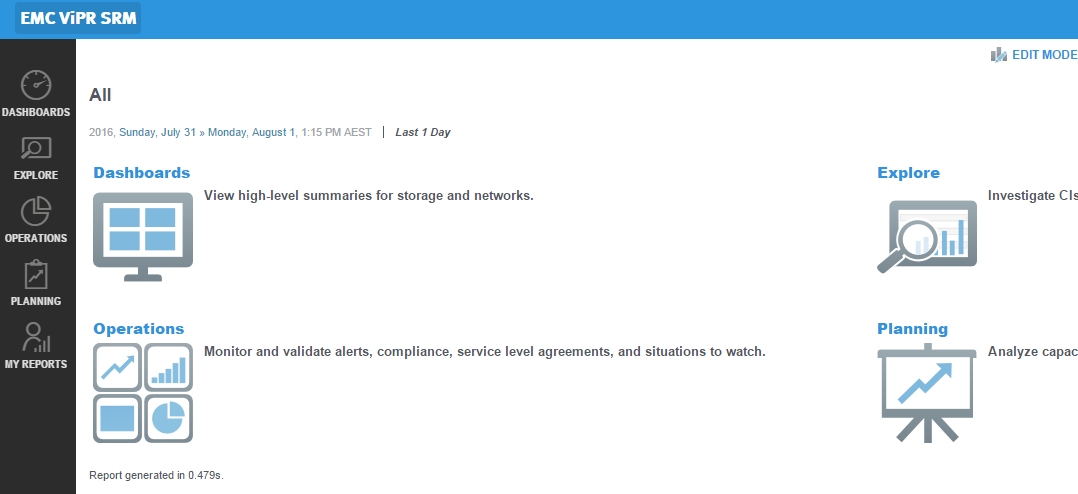
- Po zakończeniu odśwież interfejs graficzny front-endu i sprawdź, czy nowe węzły są widoczne:
Affected Products
SRMProducts
SRMArticle Properties
Article Number: 000061574
Article Type: Solution
Last Modified: 01 Mar 2021
Version: 3
Find answers to your questions from other Dell users
Support Services
Check if your device is covered by Support Services.