SourceOne 오프라인 액세스: 자동 설치에서 SourceOne 검색 서버 세부 정보를 채우지 않음
Summary: 자동 설치가 SourceOne 검색 서버 세부 정보를 채우지 않습니다.
This article applies to
This article does not apply to
This article is not tied to any specific product.
Not all product versions are identified in this article.
Symptoms
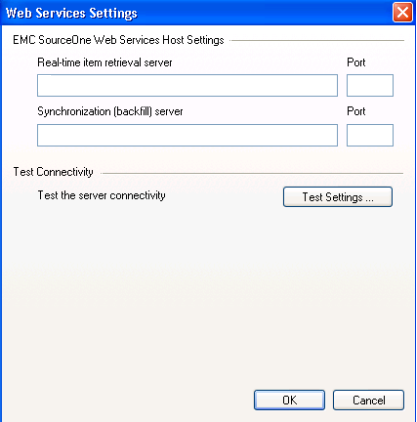
자동 설치가 SourceOne 검색 서버 세부 정보를 채우지 않습니다.
아래와 같이 오프라인 액세스 자동 설치 명령을 실행한 후(관리자 권한으로 CMD 사용):
ES1_OfflineAccess.exe /s /v"/qn /L*v C:\EMC_OfflineAccess.log INSTALLDIR=C:\Users\s1service\Downloads EX_TCP_PRIMARY_SERVER=Retrieval_SourceOne EX_TCP_PRIMARY_PORT=8001 EX_TCP_SECONDARY_SERVER=Retrieval_SourceOne EX_TCP_SECONDARY_PORT=8002 REBOOT=ReallySuppress"
오프라인 액세스 구성 설정을 검토할 때 서버 설정에 SourceOne 검색 서버에 대한 세부 정보가 포함되어 있지 않더라도 설치는 문제 없이 완료됩니다.
Cause
위의 문제 상태의 원인은 Windows 폴더에 대한 권한 부족과 관련이 있습니다. CMD를 실행하는 사용자는 C:\Windows에 대한 읽기 권한만 가지고 있었습니다 .
예를들어 로컬 관리자 그룹 구성원에게 읽기 전용 권한만 있습니다.
아래 항목은 Procmon 추적에서 찾을 수 있습니다.
RegSvr32.exe 20812 CreateFileMapping C:\Windows\System32\regsvr32.exe 판독기로만 잠긴 파일 동기화 유형: SyncTypeCreateSection, PageProtection: PAGE_EXECUTE|PAGE_NOCACHE
예를들어 로컬 관리자 그룹 구성원에게 읽기 전용 권한만 있습니다.
아래 항목은 Procmon 추적에서 찾을 수 있습니다.
RegSvr32.exe 20812 CreateFileMapping C:\Windows\System32\regsvr32.exe 판독기로만 잠긴 파일 동기화 유형: SyncTypeCreateSection, PageProtection: PAGE_EXECUTE|PAGE_NOCACHE
Resolution
오프라인 액세스에 대한 자동 설치를 실행하는 경우 C:\Windows 폴더에 대한 읽기/쓰기 권한 이상의 계정이 있는 계정을 사용하여 CMD에 로그인해야 합니다.
Affected Products
SourceOneProducts
SourceOne, SourceOne Email ManagementArticle Properties
Article Number: 000063458
Article Type: Solution
Last Modified: 02 Jun 2025
Version: 4
Find answers to your questions from other Dell users
Support Services
Check if your device is covered by Support Services.