NVP-vProxy: NetWorker workflow modification Failed: The vProxy name is invalid
Summary: Modifying a NetWorker VMware Protection (NVP) vProxy workflow reports "vProxy name is invalid." The vProxy shown is for a vProxy resource which no longer exists in NetWorker.
This article applies to
This article does not apply to
This article is not tied to any specific product.
Not all product versions are identified in this article.
Symptoms
Modifying a NetWorker VMware Protection (NVP) vProxy workflow results in the following error:
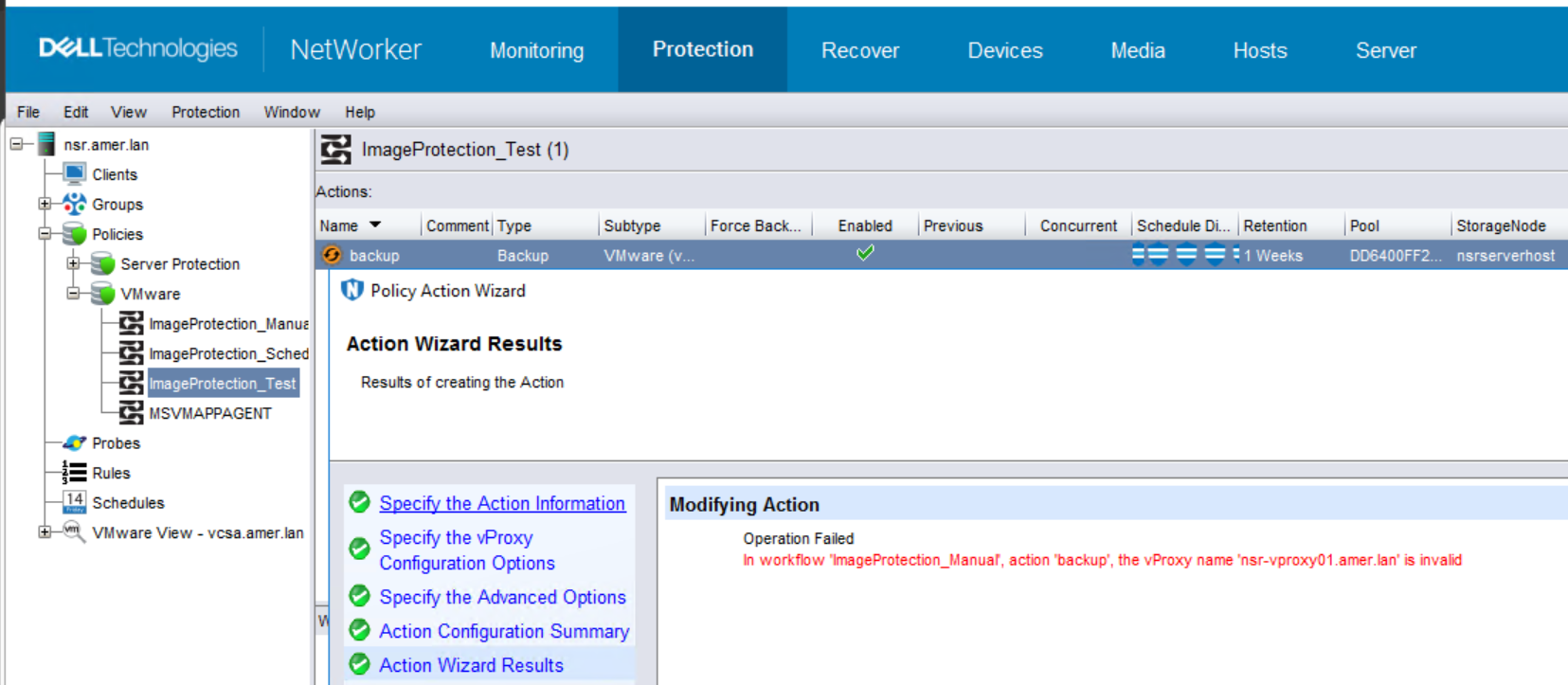
The vProxy referenced in the error no longer exists on the NetWorker server.
NOTE: The error text is: "In workflow 'WORKFLOW_NAME' action 'ACTION_NAME', the vProxy name 'VPROXY_NAME' is invalid." The error can appear when modifying a workflow in the same policy, it is not always specific to the workflow/action containing the decommissioned vProxy.
Cause
The error indicates that there is an issue with a vProxy in another workflow under the same policy. This vProxy no longer exists in this datazone.
On modifying one of the workflows, NetWorker attempts to update the whole policy. NetWorker cannot modify the policy, because there is a vProxy in another workflow which has no vProxy resource in the NetWorker resource database.
The nsrpolicy command identifies that another action is still using a deleted vProxy node:
nsrpolicy action display --policy_name=POLICY_NAME --workflow_name=WORKFLOW_NAME --action_name=ACTION_NAME
Example:
[root@nsr ~]# nsrpolicy action display --policy_name=VMware --workflow_name=ImageProtection_Manual --action_name=backup
{
    "actionName": "backup",
    "actionSpecific": {
        "actions": {
            "actionType": "backup",
            "actionBackupSubtypeSpecific": {
                "backupSubtypes": {
                    "abBackupSubtype": "vmware-vproxy",
                    "abvProxyDestinationPool": "ddve01_VMbackup",
                    "abvProxyName": "nsr-vproxy01.amer.lan",
                    "abvProxyZDDRetentionLockTime": "",
                    "abvProxyZEnableDDRetentionLock": false
                }
            },
...
...
...
}
The nsradmin command-line utility can also be used:
nsradmin
option hidden
print type: nsr protection policy; name: POLICY_NAME
Example:
nsradmin> option hidden
Hidden display option turned on

Display options:
        Dynamic: Off;
        Hidden: On;
        Raw I18N: Off;
        Resource ID: Off;
        Regexp: Off;
nsradmin> print type: nsr protection policy; name: vmware
                        type: NSR Protection Policy;
                        name: VMware;
                     comment: ;
                   start now: ;
                 restart now: ;
                    stop now: ;
         override parameters: ;
     operational information: ;
           policy definition: \
"...{\"workflowName\:\"ImageProtection_Manual\",\"synthesisRoot\":\
[\"NSR group/ImageProtection_Manual\",\"NSR Snapshot Policy/ImageProtection_Manual\"]\
,\"workflowActions\":[{\"actionName\":\"backup\",\"actionSpecific\":{\"actions\":{\"a\
ctionType\":\"backup\",\"actionBackupSubtypeSpecific\":{\"backupSubtypes\":{\"abBacku\
pSubtype\":\"vmware-vproxy\",\"abvProxyDestinationPool\":\"ddve01_VMbackup\",\"abvPro\
xyName\":\"nsr-vproxy01.amer.lan\",\"...";
...
...
...
Resolution
The vProxy must be added back to the NetWorker server. This can be done even if the vProxy Virtual Machine (VM) no longer exists. The vProxy must be added as an "NSR VMware proxy" resource in the NetWorker Server Resource Database (NSRDB); successful registration is not required. This can be done by following.
- Add Entries in the NetWorker hosts file with the vProxy name.
Linux:
Windows:
/etc/hosts
Windows:
C:\Windows\System32\drivers\etc\hosts
NOTE: The vProxy name must match how it appears in the error returned from the NMC. Similarly this can be identified in the nsradmin and
nsrpolicy command options shown in the Cause section.
- In the NetWorker Management Console (NMC), go to Devices > VMware Proxies > New.
- Right-click in the VMware Proxies window and select New.
- In the General tab, specify the name of the vProxy.
CAUTION The "name" must match exactly how it was added previously; otherwise, the process does not work.
- In the Configuration tab, select the vCenter, admin username, and password. No other fields are required, these fields are only required so that you can add the vProxy as a resource in NetWorker.
- Edit the affected workflow. Check if the "dummy" vProxy is configured in any action under any of the workflows in the policy. If the "dummy" vProxy is listed, select "auto" (or select a valid vProxy) and save the changes.
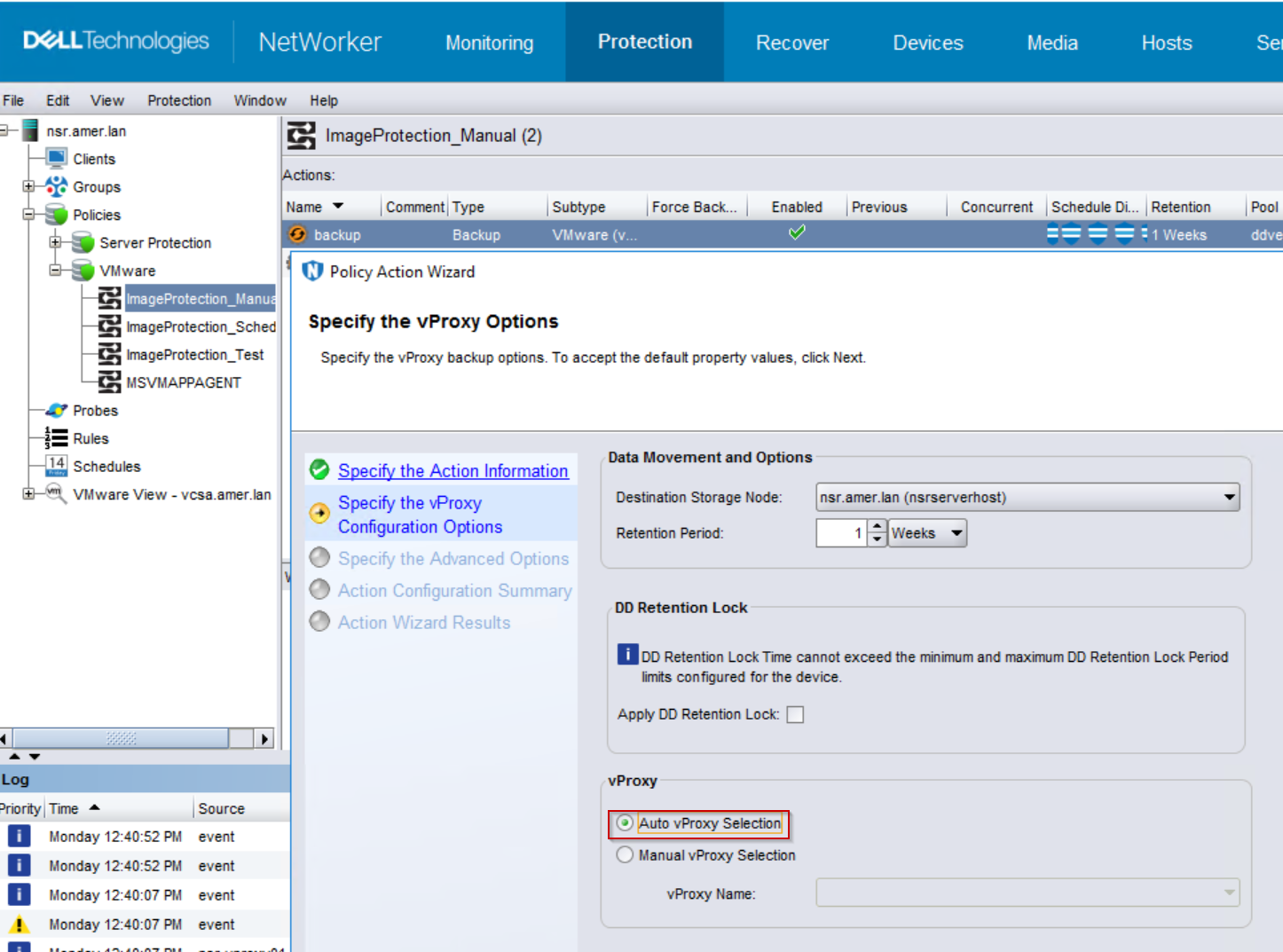
- Once the all actions referencing the decommissioned vProxy have been changed to auto selection, remove the vProxy resource from NetWorker: Open NMC > Devices > VMware Proxies > right click the vProxy > delete
Affected Products
NetWorkerProducts
NetWorkerArticle Properties
Article Number: 000081713
Article Type: Solution
Last Modified: 05 Jan 2026
Version: 6
Find answers to your questions from other Dell users
Support Services
Check if your device is covered by Support Services.