Windows Server:PowerShellを使用してUpdate Servicesをインストールする方法
Summary: この記事は、Windows PowerShell を使用して Windows Server Update Services (WSUS) ロールをインストールする方法について説明します。このガイドでは、PowerShell を使用した WSUS ロールの追加について詳しく説明し、更新プログラムの制御と同期設定のための Get-WsusUpdate などのインストールと管理のコマンドレットについて説明します。 ...
This article applies to
This article does not apply to
This article is not tied to any specific product.
Not all product versions are identified in this article.
Instructions
- 「
Start PowerShellをクリックして、Windows PowerShellを起動します。 - WSUS の役割をインストールするには、次のコマンドを実行します
Install-WindowsFeature UpdateServices
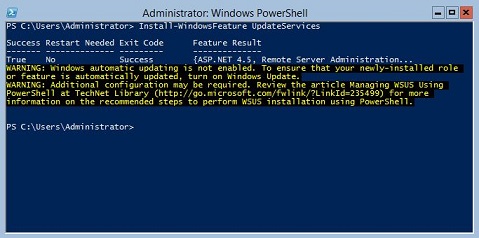
その他の情報:
次の WSUS 役割サービスは、Windows PowerShell を使用してインストールできます。
- Windows Internal Database (WID)
- WSUSサービス
- データベース
WID データベースと WSUS サービスの役割サービスは、Install-WindowsFeature UpdateSevices コマンドレットを実行した後にインストールされます。
Windows Server Core を実行しているサーバーで WSUS の役割を管理するには、次の Windows PowerShell コマンドレットを使用できます。
指定したクライアント コンピューターを指定したターゲット グループに追加します。
Add-WsusComputer
アップデートをクライアントに適用することを承認します。
Approve-WsusUpdate
導入のためのアップデートを拒否するには、次の手順を実行します。
Deny-WsusUpdate
システムで使用可能なすべての WSUS 分類の一覧を取得します。
Get-WsusClassification
クライアント コンピューターを表す WSUS コンピューター オブジェクトを取得します。
Get-WsusComputer
WSUS で入手できるすべての製品の一覧をカテゴリ別に取得します。
Get-WsusProduct
WSUS 更新サーバー オブジェクトの値を取得します。
Get-WsusServer
更新プログラムの詳細を含む WSUS 更新プログラム オブジェクトを取得します。
Get-WsusUpdate
指定した WSUS サーバーでクリーンアップのプロセスを実行します。
Invoke-WsusServerCleanup
WSUS が同期する更新プログラムの分類を有効にするか無効にするかを設定します。
Set-WsusClassification
[宛先] は、同期する更新プログラムのカテゴリを表す製品を有効にするか無効にするかを設定します。
Set-WsusProduct
WSUS) サーバーを Microsoft Update から同期するか、アップストリーム サーバーとアップストリーム サーバーのプロパティから同期するかを設定します。
Set-WsusServerSynchronizationAffected Products
Microsoft Windows 2012 Server, Microsoft Windows 2012 Server R2Products
C Series, HS Series, Modular Infrastructure, Rack Servers, Tower Servers, XE Servers, XR Servers, OEM Server Solutions, Microsoft Windows Server 2016, Microsoft Windows Server 2019, Microsoft Windows Server 2022, Microsoft Windows Server 2025Article Properties
Article Number: 000121387
Article Type: How To
Last Modified: 05 Sept 2025
Version: 8
Find answers to your questions from other Dell users
Support Services
Check if your device is covered by Support Services.