Windows Server:使用 PowerShell 安装和管理更新服务
Summary: 本文讨论如何使用 PowerShell 管理 Windows Server Update Services (WSUS) 角色。详细介绍了用于添加 WSUS 角色和执行各种管理任务的 PowerShell 命令。
This article applies to
This article does not apply to
This article is not tied to any specific product.
Not all product versions are identified in this article.
Instructions
安装
若要安装 WSUS 角色,请从提升的 PowerShell 提示符处运行以下命令:
Install-WindowsFeature -Name UpdateServices
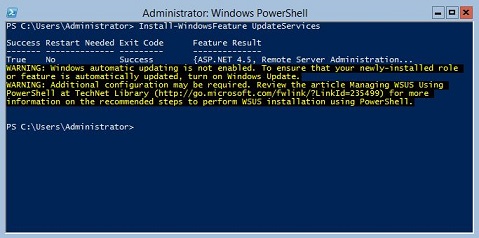
图 1:Install-WindowsFeature UpdateServices 的预期输出
其他信息:
可以使用 Windows PowerShell 安装以下 WSUS 角色服务。
- Windows 内部数据库 (WID)
- WSUS 服务
- 数据库
运行命令后安装 WID 数据库和 WSUS 服务角色服务 Install-WindowsFeature UpdateSevices。
管理
以下 Windows PowerShell cmdlet 可用于在运行 Windows Server Core 的服务器上管理 WSUS 角色。
- 将指定的客户端计算机添加到指定的目标组:
Add-WsusComputer -Computer <computername> -TargetGroupName <groupname>
- 批准向客户端提供的更新:
Approve-WsusUpdate -Update <update> -Action <approvalaction> -TargetGroupName <groupname>
在此命令中, -Update 交换机接受使用 检索到的更新对象 Get-WsusUpdate 命令(见下文)。价值 -Action 可以是 Install、 Uninstall 或 NotApproved。后者不会拒绝更新,但会删除预先存在的批准操作。
- 拒绝更新:
Deny-WsusUpdate
和以前一样, -Update 交换机接受使用 检索到的更新对象 Get-WsusUpdate 命令(见下文)。
- 列出系统中可用的所有更新分类(例如,安全更新或关键更新):
Get-WsusClassification
- 列出一台或多台 WSUS 客户端计算机:
Get-WsusComputer
此命令具有许多开关,用于筛选它返回的客户端计算机列表。有关完整列表,请参阅 Get-WsusComputer(外部链接)。
- 列出 WSUS 为其提供更新的所有产品:
Get-WsusProduct
- 在 WSUS 中显示满足特定条件的更新列表:
Get-WsusUpdate
有关可用于筛选输出的开关列表,请参阅 Get-WsusUpdate(外部链接)。
- 开始 WSUS 清理过程:
Invoke-WsusServerCleanup
此命令可以启动多个清理任务。有关相关交换机,请参阅 Invoke-WsusServerCleanup(外部链接)。
- 启用或禁用指定类型的更新(例如,安全更新或驱动程序更新):
Set-WsusClassification
使用筛选后的输出 Get-WsusClassification 运行此命令。
- 启用或禁用指定产品的更新:
Set-WsusProduct
使用筛选后的输出 Get-WsusProduct 运行此命令。
- 指定 WSUS 是与上游 WSUS 服务器还是 Microsoft 的更新服务器同步:
Set-WsusServerSynchronization
可以使用多个开关来指定与上游服务器通信的设置。有关详细信息,请参阅 Set-WsusServerSynchronization(外部链接)。
Affected Products
Microsoft Windows Server 2016, Microsoft Windows Server 2019, Microsoft Windows Server 2022, Microsoft Windows Server 2025, Microsoft Windows 2012 Server, Microsoft Windows 2012 Server R2Products
C Series, HS Series, Modular Infrastructure, Rack Servers, Tower Servers, XE Servers, XR Servers, OEM Server SolutionsArticle Properties
Article Number: 000121387
Article Type: How To
Last Modified: 01 May 2026
Version: 11
Find answers to your questions from other Dell users
Support Services
Check if your device is covered by Support Services.