Windows Server: Installation and Support for the AMD Rome Family of Processors
Summary: This article gives installation instructions for the Windows Server operating system on a Dell device containing AMD EPYC 7xx2 processors.
This article applies to
This article does not apply to
This article is not tied to any specific product.
Not all product versions are identified in this article.
Instructions
Table of Contents
- Description
- AMD Processor SKU Support
- Installing Windows Server on a Server that uses AMD EPYC 7xx2 (AMD Rome) processors
- Troubleshooting
- Further Information
Description
This article provides installation instructions for the Windows Server operating system for AMD EPYC 7xx2 processors and describes known limitations to the support for these processors.
Windows Server support according to Microsoft:
- Windows Server 2019: Supports AMD EPYC 7xx2-series CPUs. Use the Windows Server 2019 refreshed media image released early October 2019 from the appropriate licensing channel as applicable.
- Windows Server 2016: Supports AMD EPYC 7xx2-series CPUs. The support is limited to no more than 255 logical processors. Windows Server 2016 does not support X2APIC mode, and you should disable this mode in the computer's basic input/output system (BIOS).
- Windows Server 2012R2: Supports AMD EPYC 7xx2-series CPUs. The support is limited to no more than 255 logical processors. Windows Server 2012 R2 does not support X2APIC mode, and you should disable this mode in the computer's BIOS.
Note: Windows Server 20012 R2 is in an extended support cycle. Microsoft recommends upgrading to the latest version of Windows Server 2019.
AMD Processor SKU support
The following table lists support for each AMD processor SKU and Windows Server version.
| AMD EPYC 7XX2 (AMD Rome) |
Windows Server 2019 |
Windows Server 2016 |
Windows Server 2012 R2 |
| AMD EPYC 7742 64C |
Supported |
Supported: You have to disable AMD simultaneous multithreading (SMT). |
Supported: You have to disable AMD SMT. |
| AMD EPYC 7702 64C |
Supported |
Supported: You have to disable AMD SMT. |
Supported: You have to disable AMD SMT. |
| AMD EPYC 7702P 64C |
Supported |
Supported: Requires AMD SMT to be disabled. |
Supported: Requires AMD SMT to be disabled. |
| AMD EPYC 7552 48C |
Supported |
Supported |
Supported |
| AMD EPYC 7502 32C |
Supported |
Supported |
Supported |
| AMD EPYC 7502P 32C |
Supported |
Supported |
Supported |
| AMD EPYC 7402 24C |
Supported |
Supported |
Supported |
| AMD EPYC 7402P 24C |
Supported |
Supported |
Supported |
| AMD EPYC 7352 24C |
Supported |
Supported |
Supported |
| AMD EPYC 7302 16C |
Supported |
Supported |
Supported |
| AMD EPYC 7302P 16C |
Supported |
Supported |
Supported |
| AMD EPYC 7262 8C |
Supported |
Supported |
Supported |
Table 1: AMD processor SKU and supported Windows Server version.
Installing Windows Server on a Server that uses AMD EPYC 7xx2 (AMD Rome) processors
To install Windows Server on a server that uses AMD EPYC 7xx2 (AMD Rome) processors, follow these steps:
- In the server BIOS, disable the SMT settings (such as the logical processors setting).

Figure 1: Processor Settings page showing location of logical processor settings
F2 -> System BIOS -> Processor Settings -> Logical Processor -> Disabled.
- In the server BIOS, disable the x2APIC setting.

Figure 2: Processor Settings page showing location of x2APIC Mode enablement
F2 -> System BIOS -> Processor Settings -> x2APIC Mode -> Disabled.
- Use the operating system media to install Windows Server.
- Install the latest Windows Server updates for the respective Windows Server operating system that you installed.
Troubleshooting
Known UI limitations for Windows Server task manager, WMI, or PowerShell queries to pull CPU information.
Task Manager does not display L2 and L3 cache sizes, or displays incorrect L2 and L3 cache sizes.

Figure 3: Task Manager showing inaccurate or missing L1, L2, and L3 cache sizes
Task Manager displays an incorrect number of sockets.
For example, for a single-CPU one-socket system, Task Manager displays two sockets. For a two-socket system, Task Manager displays four sockets.
The task manager displays an incorrect number of Numa nodes.
For example, for a one-socket system, Task Manager displays two Numa nodes. For a two-socket system, Task Manager displays four Numa nodes.
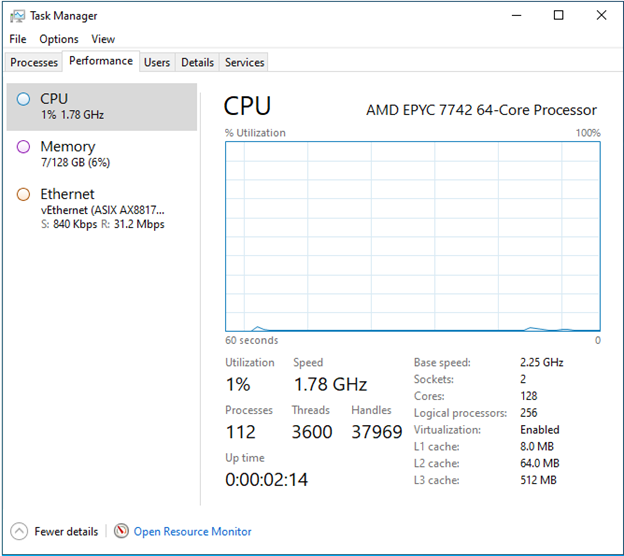
Figure 4: Task Manager showing CPU activity and Numa nodes
Further Information
For further information about this issue, consult this article
Affected Products
Microsoft Windows Server 2016, Microsoft Windows Server 2019, Microsoft Windows 2012 ServerArticle Properties
Article Number: 000124011
Article Type: How To
Last Modified: 03 Dec 2024
Version: 5
Find answers to your questions from other Dell users
Support Services
Check if your device is covered by Support Services.