Dell Encryption Enterprise BitLocker Manager 的戴尔建议策略
Summary: Dell Encryption Enterprise BitLocker Manager(以前称为 Dell Data Protection |BitLocker Manager)利用 Microsoft 的集成全卷加密协议(通常称为 BitLocker)提供保护和安全性。
This article applies to
This article does not apply to
This article is not tied to any specific product.
Not all product versions are identified in this article.
Instructions
受影响的产品:
- Dell Encryption Enterprise BitLocker Manager
- Dell Data Protection | BitLocker Manager
它们提供了一种全卷加密机制,以及保护启动周期免受攻击和保护操作系统安全的多种情形。
戴尔提供一个集中平台来管理受 BitLocker 保护的设备,并具有报告这些设备的保护情况的丰富功能。
提醒:要查看环境的当前保护状态,请使用 Dell Encryption(以前称为 Dell Data Protection |加密)控制台。
要将 BitLocker Encryption 策略设置为戴尔建议的策略:
- 转至 Enterprise。
- 单击 BitLocker Encryption。
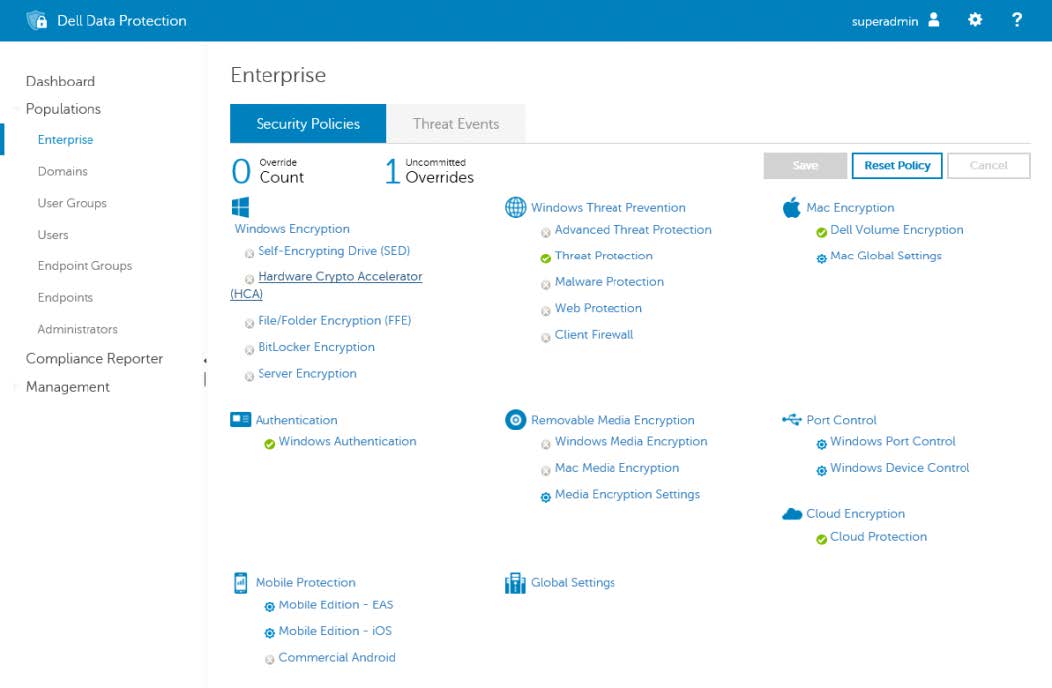
- 要查看所有设置,请单击 Show advanced settings。
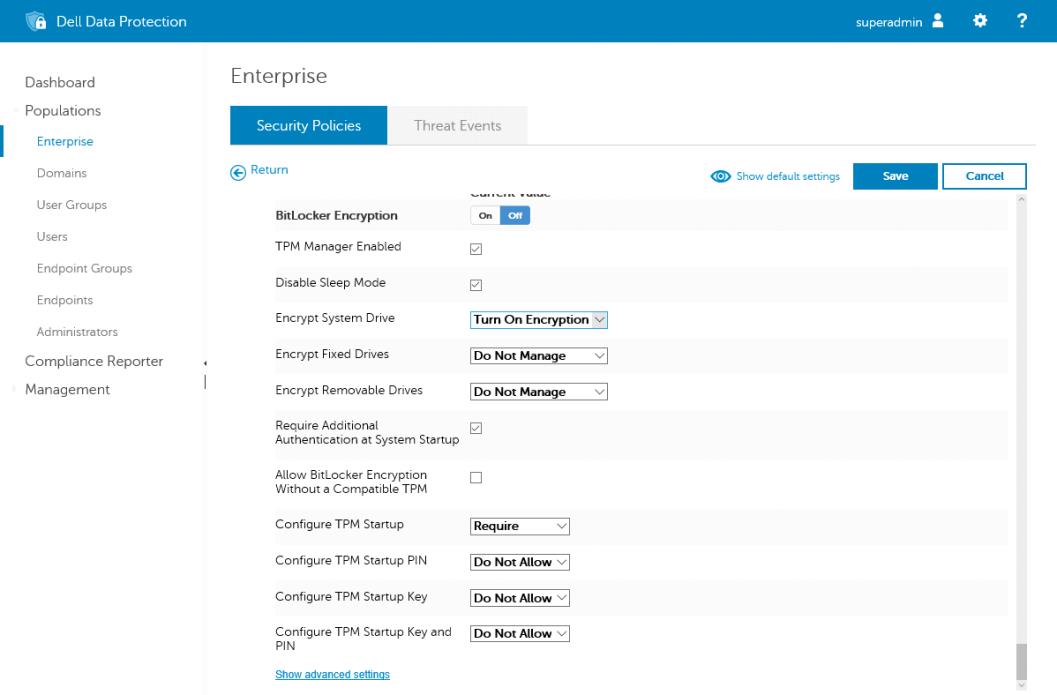
建议的设置如下:
提醒:本文最后更新于 2019 年 11 月。策略适用于 Dell Security Management Server v10.2.9。
| 政策 | 戴尔建议的设置 | 策略说明 |
|---|---|---|
| BitLocker Encryption | 亮 | 启用和禁用 BitLocker Manager 插件程序(正确应用所有 Dell BitLocker Manager 策略都需要此插件程序) |
| TPM Manager Enabled | 亮 | 启用和禁用 TPM 管理插件(如果 TPM 处于“打开”状态但未正确激活,此插件将激活 TPM) |
| Disable Sleep Mode | 关 | 启用后,在加密过程中不允许设备进入任何睡眠状态。 |
| Encrypt System Drive | Turn On Encryption | 设置为 Do Not Manage 时,设备的本地管理员可以修改 BitLocker。 将此设置为 Turn On Encryption 会强制加密卷,并且本地管理员无法对其进行修改。 将此设置为 Turn Off Encryption 会强制解密卷,本地管理员无法对其进行修改。 |
| Encrypt Fixed Drives | Do Not Manage | 设置为 Do Not Manage 时,设备的本地管理员可以修改 BitLocker。 将此设置为 Turn On Encryption 会强制加密卷,并且本地管理员无法对其进行修改。 将此设置为 Turn Off Encryption 会强制解密卷,本地管理员无法对其进行修改。 |
| Encrypt Removable Drives | Do Not Manage | 设置为 Do Not Manage 时,设备的本地管理员可以修改 BitLocker。 将此设置为 Turn On Encryption 会强制加密卷,并且本地管理员无法对其进行修改。 将此设置为 Turn Off Encryption 会强制解密卷,本地管理员无法对其进行修改。 |
| Require other Authentication at System Startup. | Enabled | 此属性会启用接下来的五个策略,并支持在受管端点上启用定义的保护器。 |
| Allow BitLocker Encryption Without a Compatible TPM. | Enabled | 启用时,确保支持较旧的 TPM 型号,并支持在没有 TPM 的设备上将 BitLocker 密钥托管到 USB。 |
| Configure TPM Startup | 要求 | 设置为 Required 时,这是终端用户的唯一选项。不会向端点上的终端用户提供提示。 设置为 Allow 时,启用此设置作为终端用户的可选选项。当多个项目设置为“Allow”时,最终用户将看到一个选择框,供其做出选择。 设置为 Do Not Allow时,此选项不可用,并且在 Dell Encryption UI 中或在 Windows 设置中都不是可选择的选项。 |
| Configure TPM Startup PIN | Do Not Allow | 设置为 Required 时,这是终端用户的唯一选项。不会向端点上的终端用户提供提示。 设置为 Allow 时,启用此设置作为终端用户的可选选项。当多个项目设置为“Allow”时,最终用户将看到一个选择框,供其做出选择。 设置为 Do Not Allow时,此选项不可用,并且在 Dell Encryption UI 中或在 Windows 设置中都不是可选择的选项。 |
| Configure TPM Startup Key | Do Not Allow | 设置为 Required 时,这是终端用户的唯一选项。不会向端点上的终端用户提供提示。 设置为 Allow 时,启用此设置作为终端用户的可选选项。当多个项目设置为“Allow”时,最终用户将看到一个选择框,供其做出选择。 设置为 Do Not Allow时,此选项不可用,并且在 Dell Encryption UI 中或在 Windows 设置中都不是可选择的选项。 |
| Configure TPM Startup Key and PIN | Do Not Allow | 设置为 Required 时,这是终端用户的唯一选项。不会向端点上的终端用户提供提示。 设置为 Allow 时,启用此设置作为终端用户的可选选项。当多个项目设置为“Allow”时,最终用户将看到一个选择框,供其做出选择。 设置为 Do Not Allow时,此选项不可用,并且在 Dell Encryption UI 中或在 Windows 设置中都不是可选择的选项。 |
| Disable BitLocker on Self-Encrypting Drives | 禁用 | 设置为 Enable 时,如果检测到自加密驱动器 (SED),BitLocker 不会保护端点。 将此策略设置为 Disabled 允许 BitLocker 保护端点,而无需考虑磁盘的功能。 |
| 政策 | 戴尔建议的设置 | 策略说明 |
|---|---|---|
| 固定数据卷设置 | ||
| Configure the Use of Smart Cards on Fixed Data Drives | Disallow | 当“Encrypt Fixed Disks”设置为“Turn On Encryption”时,此策略显示用于保护固定(非操作系统卷)磁盘的选项。 设置为 Required 时,这是终端用户的唯一选项。不会向端点上的终端用户提供提示。 设置为 Allow 时,启用此设置作为终端用户的可选选项。当多个项目设置为“Allow”时,最终用户将看到一个选择框,供其做出选择。 设置为 Disallow时,此选项不可用,并且在 Dell Encryption UI 中或在 Windows 设置中都不是可选择的选项。 |
| Deny Write Access to Fixed Drives Not Protected by BitLocker | 禁用 | 使用此策略设置时,您可以设置是否需要 BitLocker 保护才能在计算机上写入固定数据驱动器。 设置为 Disabled 时,计算机上的所有固定数据驱动器都装载了读取和写入访问权限。 设置为 Enabled 时,当用户尝试将数据保存到未加密的固定数据驱动器时,将收到“Access denied”(拒绝访问)错误消息。 设置为 “为组织启用”时,仅具有策略中设置的组织标识符的设备的用户在尝试将数据保存到未加密的固定数据驱动器时会收到“拒绝访问”错误消息。所有其他设备具有装载了读取和写入权限的计算机上的所有固定数据驱动器。 |
| Allow Access to BitLocker Protected Fixed Data Drives from Earlier Versions of Windows | Enabled | 设置为 Enabled 时,可在运行 Windows Server 2008、Windows Vista、Windows XP with SP3 或 Windows XP with SP2 的计算机上解锁使用 FAT 文件系统格式化数据驱动器,并且可以查看其内容。这些操作系统对受 BitLocker 保护的驱动器具有只读访问权限。 设置为 Disabled 时,无法在运行较早版本 Windows 的计算机上解锁使用 FAT 文件系统格式化的数据驱动器。 |
| Do Not Install BitLocker to Go Reader on FAT formatted Fixed Drives | 禁用 | 选中时会阻止安装 BitLocker To Go Reader,从而防止使用运行较旧版本 Windows 的设备的用户访问受 BitLocker 保护的驱动器。 |
| Configure Use of Passwords for Fixed Data Drives | 允许 | 当“Encrypt Fixed Disks”设置为“Turn On Encryption”时,此策略显示用于保护固定(非操作系统卷)磁盘的选项。 设置为 Required 时,这是终端用户的唯一选项。不会向端点上的终端用户提供提示。 设置为 Allow 时,启用此设置作为终端用户的可选选项。当多个项目设置为“Allow”时,最终用户将看到一个选择框,供其做出选择。 设置为 Disallow时,此选项不可用,并且在 Dell Encryption UI 中或在 Windows 设置中都不是可选择的选项。 |
| Configure Password Complexity for Fixed Data Drives | Require | 设置为 Required 时,在启用 BitLocker 时,必须连接到域控制器以验证密码的复杂性。 设置为 Allow 时,会尝试连接到域控制器,以验证复杂性符合策略设置的规则。但是,如果没有找到域控制器,则无论密码的复杂性如何,密码都会被接受,并且使用该密码作为保护器来加密驱动器。 设置为 Do Not Allow 时,不会执行密码复杂性验证。 |
| Minimum Password Length for Fixed Data Drives | 8 | 设置受 BitLocker 保护的固定磁盘卷的密码的最小长度(此设置要求将“ 配置固定数据驱动器的密码使用 ”设置为 “要求 ”或 “允许”) |
| Encryption Type for Fixed Data Drives | Full Encryption | 此策略控制固定数据驱动器是使用 Used Space Only 加密还是 Full Encryption。Bit Locker 保护的虚拟机需要 Used Space Only。 |
| Choose How BitLocker-protected Fixed Drives Can be Recovered | 禁用 | 接下来七个策略的父级策略。 设置为 Enabled时,它允许配置其他恢复选项。 选择 Disabled 时,仅可通过 Dell Security Management Server 或 Dell Security Management Server Virtual 进行恢复。 |
| Allow Data Recovery Agent for Protected Fixed Data Drives | 禁用 | “Choose How BitLocker-protected Fixed Drives Can be Recovered”策略的子策略 “Allow data recovery agent”复选框用于指定是否可以将数据恢复代理程序与受 BitLocker 保护的驱动器配合使用。在使用数据恢复代理程序之前,必须从位于组策略管理控制台 (GPMC) 或本地组策略编辑器中的公钥策略添加数据恢复代理程序。 有关如何使用数据恢复代理程序来恢复受 BitLocker 保护的设备的更多信息,请参阅:https://blogs.technet.microsoft.com/askcore/2010/10/11/how-to-use-bitlocker-data-recovery-agent-to-unlock-bitlocker-protected-drives/  |
| Configure User Storage of BitLocker 48-digit Recovery Password | 允许 | Choose How BitLocker-protected Fixed Drives Can be Recovered 策略的子策略。 设置为 Required 时,将强制生成 BitLocker 恢复信息并可供设备管理员访问。 设置为 Allow 时,将自动生成 BitLocker 恢复信息并可供设备管理员访问。 设置为 Do Not Allow 时,将不会创建 BitLocker 恢复信息。
提醒:设置为“Do Not Allow”时,可能无法恢复受 BitLocker 保护的计算机。
|
| Configure User Storage of BitLocker 256-bit Recovery Key | 允许 | Choose How BitLocker-protected Fixed Drives Can be Recovered 策略的子策略。 设置为 Required 时,将强制生成 BitLocker 恢复信息并可供设备管理员访问。 设置为 Allow 时,将自动生成 BitLocker 恢复信息并可供设备管理员访问。 设置为 Do Not Allow 时,将不会创建 BitLocker 恢复信息。
提醒:设置为“Do Not Allow”时,可能无法恢复受 BitLocker 保护的计算机。
|
| Omit Recovery Options from the BitLocker Setup Wizard | 禁用 | Choose How BitLocker-protected Fixed Drives Can be Recovered 策略的子策略。 选择 Omit recovery options from the BitLocker setup wizard 可防止用户在驱动器上启用 BitLocker 时指定恢复选项。设置为 Enabled时,策略设置将确定 BitLocker 恢复选项。 |
| Save BitLocker Recovery Information to AD DS for Fixed Data Drives | Enabled | Choose How BitLocker-protected Fixed Drives Can be Recovered 策略的子策略。 接下来两个策略的父级策略: Save BitLocker recovery information to Active Directory Domain Services:选择要存储在 Active Directory Domain Services (AD DS) 中的 BitLocker 恢复信息。 |
| BitLocker Recovery Information to Store in AD DS | Recovery Passwords and Key Packages | Choose How BitLocker-protected Fixed Drives Can be Recovered 和 Save BitLocker Recovery Information to AD DS for Fixed Data Drives 策略的子策略。 Recovery password and key packages:BitLocker 恢复密码和密钥数据包存储在 AD DS 中。存储密钥数据包支持从物理损坏的驱动器恢复数据。如果选择 “仅恢复密码”,则恢复密码是唯一存储在 AD DS 中的内容。 |
| Do Not Enable BitLocker Until Recovery Information is Stored in AD DS for Fixed Data Drives | 禁用 | Choose How BitLocker-protected Fixed Drives Can be Recovered 和 Save BitLocker Recovery Information to AD DS for Fixed Data Drives 策略的子策略。 除非计算机连接到域并且将 BitLocker 恢复信息备份到 AD DS 成功,否则如果要防止用户启用 BitLocker,请选择 Do not enable BitLocker until recovery information is stored in AD DS for fixed drives 复选框。 |
| Configure Use of Hardware-Based Encryption for Fixed Data Drives | Enabled | 接下来四个策略的父级策略。 此策略控制当配备加密驱动器的计算机将驱动器用作固定数据卷时 BitLocker 如何应对。使用基于硬件的加密可以提高涉及频繁的驱动器数据读写的驱动器操作的性能。
提醒:Choose drive encryption method and cipher strength 策略设置不适用于基于硬件的加密。在具有较旧固件的驱动器上启用此策略还可能面临以下文章中所述的各种 CVE 的风险: https://www.kb.cert.org/vuls/id/395981/
|
| Use Hardware-Based Encryption for Fixed Data Drives | Enabled | Configure Use of Hardware-Based Encryption for Fixed Data Drives 策略的子策略。 此策略控制当配备加密驱动器的计算机将驱动器用作固定数据卷时 BitLocker 如何应对。使用基于硬件的加密可以提高涉及频繁的驱动器数据读写的驱动器操作的性能。
提醒:Choose drive encryption method and cipher strength 策略设置不适用于基于硬件的加密。在具有较旧固件的驱动器上启用此策略还可能面临以下文章中所述的各种 CVE 的风险: https://www.kb.cert.org/vuls/id/395981/
|
| Use BitLocker Software-Based Encryption on Fixed Data Drives When Hardware Encryption is Not Available | Enabled | Configure Use of Hardware-Based Encryption for Fixed Data Drives 策略的子策略。 此策略控制当配备加密驱动器的计算机将驱动器用作固定数据卷时 BitLocker 如何应对。使用基于硬件的加密可以提高涉及频繁的驱动器数据读写的驱动器操作的性能。
提醒:Choose drive encryption method and cipher strength 策略设置不适用于基于硬件的加密。在具有较旧固件的驱动器上启用此策略还可能面临以下文章中所述的各种 CVE 的风险: https://www.kb.cert.org/vuls/id/395981/
|
| Restrict Crypto Algorithms and Cipher Suites Allowed for Hardware-Based Encryption on Fixed Data Drives | 禁用 | Configure Use of Hardware-Based Encryption for Fixed Data Drives 策略的子策略。 Restrict encryption algorithms and cipher suites allowed for hardware-based encryption 选项使您可以限制 BitLocker 可用于硬件加密的加密算法。如果为驱动器设置的算法不可用,BitLocker 会禁用基于硬件的加密。 |
| Configure Specific Crypto Algorithms and Cipher Suites Settings on Fixed Data Drives | 2.16.840.1.101.3.4.1.2;2.16.840.1.101.3.4.1.42 | Configure Use of Hardware-Based Encryption for Fixed Data Drives 策略的子策略。 加密算法由对象标识符 (OID) 指定,并以逗号分隔。 加密密码的示例 ID:
|
| 全局设置 | ||
| Default Folder Location to Save Recovery Password | (空白) | 设置后,当用户选择将恢复密码保存到文件夹中的选项时,指定用作默认文件夹位置的路径。可以利用完全限定路径或在路径中包括目标计算机的环境变量。如果路径无效,BitLocker 设置向导将显示计算机的顶层文件夹视图。 |
| Encryption Method and Cipher Strength | AES256 with Diffuser |
提醒:此策略不适用于加密的驱动器。加密的驱动器使用其自己的算法,该算法由驱动器在分区期间设置。
|
| Enable Organizational Unique Identifiers | 禁用 | 接下来两个策略的父级策略。 设置为 Enabled 时,允许在受 BitLocker 保护的驱动器上配置标识字段以及您的组织使用的任何允许的标识字段。 这些标识符存储为标识字段和允许的标识字段。标识字段允许您将唯一的组织标识符与受 BitLocker 保护的驱动器关联。此标识符会自动添加到受 BitLocker 保护的新驱动器中,也可使用 Manage-bde 命令行工具在受 BitLocker 保护的现有驱动器上更新此标识符。 管理受 BitLocker 保护的驱动器上的基于证书的数据恢复代理程序需要标识字段,BitLocker To Go Reader 的潜在更新也需要标识字段。只有当驱动器上的标识字段与标识字段中配置的值匹配时,BitLocker 才会管理和更新数据恢复代理程序。同样,只有当驱动器上的标识字段与为标识字段配置的值匹配时,BitLocker 才会更新 BitLocker To Go Reader。
提醒:Enable Organizational Unique Identifiers 可与 Deny write access to removable drives not protected by BitLocker 策略设置一起使用,以帮助控制组织中可移动驱动器的使用。
|
| Set Organizational Unique Identifiers | (空白) | Enable Organizational Unique Identifiers 策略的子策略。 这是一个字母数字值,用于为您的设备设置唯一标识符,以确保贵公司管理您的设备。 此标识符会自动添加到受 BitLocker 保护的新驱动器中,也可使用 Manage-bde 命令行工具在受 BitLocker 保护的现有驱动器上更新此标识符。 |
| Set Allowed Organizational Unique Identifiers | (空白) | Enable Organizational Unique Identifiers 策略的子策略。 这是一个字母数字值,用于为您的设备设置唯一标识符,以确保贵公司管理您的设备。 此标识符会自动添加到受 BitLocker 保护的新驱动器中,也可使用 Manage-bde 命令行工具在受 BitLocker 保护的现有驱动器上更新此标识符。
提醒:建议 Set Allowed Organizational Unique Identifiers 和 Set Organizational Unique Identifiers 策略匹配,以避免在恢复过程中出现问题。
|
| Prevent Memory Overwrite on Restart | 禁用 | 设置为 Disabled 时,将从内存中擦除 BitLocker 密码。设置为 Enabled 时,BitLocker 密码会保留在内存中,这可能会提高性能,但 BitLocker 机密会面临其他风险。 |
| Enable Smart Card Certificate Identifier | 禁用 | 设置为 Enabled 时,证书的 Object identifier 设置中指定的对象标识符必须与 Smart Card Certificate Identifier 策略中的对象标识符匹配。 |
| Smart Card Certificate Identifier | 1.3.6.1.4.1.311.67.1.1 | 对象标识符在证书的增强密钥使用 (EKU) 中指定。通过将证书中的对象标识符与此策略设置中的对象标识符进行匹配,BitLocker 可以确定哪些证书可用于向受 BitLocker 保护的驱动器对用户证书进行身份验证。 默认对象标识符为 1.3.6.1.4.1.311.67.1.1。 |
| 操作系统卷设置 | ||
| Allow Enhanced PINs for Startup. | 禁用 | 增强的启动 PIN 允许使用字符(包括大写字母和小写字母、符号、数字和空格)。
提醒:并非所有计算机在预启动环境中都支持增强的 PIN 字符。
|
| Number of Characters Required in PIN | 6 | 定义预启动环境所需的最小字符数
提醒:从 Windows 10 版本 1703 开始,BitLocker PIN 的最小长度增加到六个字符。
|
| Allow Network Unlock at Startup on Operating System Drives | 禁用 | 此策略控制 BitLocker 中网络解锁功能的部分行为。此策略是在网络上启用 BitLocker 网络解锁所必需的,因为它允许运行 BitLocker 的客户端在加密过程中创建必要的网络密钥保护器。 有关启用网络解锁功能的更多信息,请参阅 https://docs.microsoft.com/en-us/windows/security/information-protection/bitlocker/bitlocker-how-to-enable-network-unlock 。 |
| Allow SecureBoot on Operating System Drives | Enabled | 控制如何使用安全启动功能处理启用 BitLocker 的计算机卷。启用此功能会在启动过程中强制执行安全启动验证,并根据安全启动策略验证启动配置数据 (BCD) 设置。 |
| Disallow Standard Users from Changing the PIN on Operating System Drives | 禁用 | 此策略设置允许您配置是否允许标准用户更改用于保护操作系统驱动器的 PIN 或密码。 设置为 Enabled 时,没有本地管理员权限的用户无法修改端点上的 PIN。 设置为 Disabled 时,端点上的所有用户都可以修改预启动 PIN。 |
| Enable Use of Preboot Keyboard Input on Slates | Enabled | 设置为 Enabled时,它允许用户启用需要来自预启动环境的用户输入的身份验证选项,即使平台指示缺少预启动输入功能也是如此。 |
| Reset Platform Validation Data After Recovery | Enabled | 设置为 Enabled 时,当在 BitLocker 恢复后启动 Windows 时,将刷新平台验证数据。 设置为 Disabled 时,在 BitLocker 恢复后不会刷新平台验证数据。如果平台的基本配置已更改,这可能会导致每次启动后都进行恢复。 |
| Choose How BitLocker-protected Operating System Drives Can be Recovered | 禁用 | 接下来七个策略的父级策略。 设置为 Enabled时,它允许配置其他恢复选项。 选择 Disabled 时,仅可通过 Dell Security Management Server 或 Dell Security Management Server Virtual 进行恢复。 |
| Allow Data Recovery Agent for Protected Operating System Drives | Enabled | Choose How BitLocker-protected Operating System Drives Can be Recovered 策略的子策略。 Allow data recovery agent 复选框用于指定是否可以将数据恢复代理程序与受 BitLocker 保护的操作系统驱动器配合使用。在使用数据恢复代理程序之前,必须从位于组策略管理控制台 (GPMC) 或本地组策略编辑器中的公钥策略添加数据恢复代理程序。 有关如何使用数据恢复代理恢复受 BitLocker 保护的设备的详细信息,请参阅: https://blogs.technet.microsoft.com/askcore/2010/10/11/how-to-use-bitlocker-data-recovery-agent-to-unlock-bitlocker-protected-drives/ |
| Configure User Storage of BitLocker 48-digit Recovery Password | 允许 | Choose How BitLocker-protected Operating System Drives Can be Recovered 策略的子策略。 设置为 Required 时,将强制生成 BitLocker 恢复信息并可供设备管理员访问。 设置为 Allow 时,将自动生成 BitLocker 恢复信息并可供设备管理员访问。 设置为 Do Not Allow 时,将不会创建 BitLocker 恢复信息。
提醒:设置为 Do Not Allow 时,可能无法恢复受 BitLocker 保护的计算机。
|
| Configure User Storage of BitLocker 256-bit Recovery Key | 允许 | Choose How BitLocker-protected Operating System Drives Can be Recovered 策略的子策略。 设置为 Required 时,将强制生成 BitLocker 恢复信息并可供设备管理员访问。 设置为 Allow 时,将自动生成 BitLocker 恢复信息并可供设备管理员访问。 设置为 Do Not Allow 时,将不会创建 BitLocker 恢复信息。
提醒:设置为 Do Not Allow 时,可能无法恢复受 BitLocker 保护的计算机。
|
| Omit Recovery Options from the BitLocker Setup Wizard | 禁用 | Choose How BitLocker-protected Operating System Drives Can be Recovered 策略的子策略。 选择 Omit recovery options from the BitLocker setup wizard 可防止用户在驱动器上启用 BitLocker 时指定恢复选项。 设置为 Enabled时,策略设置将确定驱动器的 BitLocker 恢复选项。 |
| Save BitLocker Recovery Information to AD DS for Operating System Drives | Enabled | Choose How BitLocker-protected Operating System Drives Can be Recovered 策略的子策略。 接下来两个策略的父级策略: Save BitLocker recovery information to Active Directory Domain Services:选择要存储在 Active Directory Domain Services (AD DS) 中的 BitLocker 恢复信息。 |
| BitLocker Recovery Information to Store in AD DS (Windows Server 2008 Only) | Recovery Password and Key Packages | Choose How BitLocker-protected Operating System Drives Can be Recovered 和 Save BitLocker Recovery Information to AD DS for Operating System Data Drives 策略的子策略。 Recovery password and key packages:BitLocker 恢复密码和密钥数据包存储在 AD DS 中。存储密钥数据包支持从物理损坏的驱动器恢复数据。如果选择“Recovery password only”,则仅恢复密码存储在 AD DS 中。 |
| Do Not Enable BitLocker Until Recovery Information is Stored in AD DS for Operating System Drives | 禁用 | Choose How BitLocker-protected Operating System Drives Can be Recovered 和 Save BitLocker Recovery Information to AD DS for Operating System Data Drives 策略的子策略。 除非计算机连接到域并且将 BitLocker 恢复信息备份到 AD DS 成功,否则如果要防止用户启用 BitLocker,请选择 Do not enable BitLocker until recovery information is stored in AD DS for operating system drives 复选框。 |
| Configure Use of Hardware-Based Encryption for Operating System Drives | Enabled | 接下来四个策略的父级策略。 此策略控制当配备加密驱动器的计算机将驱动器用作数据卷时 BitLocker 如何应对。使用基于硬件的加密可以提高涉及频繁的驱动器数据读写的驱动器操作的性能。
提醒:Choose drive encryption method and cipher strength 策略设置不适用于基于硬件的加密。
在具有较旧固件的驱动器上启用此策略还可能面临以下文章中所述的各种 CVE 的风险: https://www.kb.cert.org/vuls/id/395981/ |
| Use Hardware-Based Encryption for Operating System Drives | Enabled | “Configure Use of Hardware-Based Encryption for Operating System Data Drives”策略的子策略。 此策略控制当配备加密驱动器的计算机将驱动器用作数据卷时 BitLocker 如何应对。使用基于硬件的加密可以提高涉及频繁的驱动器数据读写的驱动器操作的性能。
提醒:Choose drive encryption method and cipher strength 策略设置不适用于基于硬件的加密。
在具有较旧固件的驱动器上启用此策略还可能面临以下文章中所述的各种 CVE 的风险: https://www.kb.cert.org/vuls/id/395981/ |
| Use BitLocker Software-Based Encryption on Operating System Drives When Hardware Encryption is Not Available | Enabled | “Configure Use of Hardware-Based Encryption for Operating System Data Drives”策略的子策略。 此策略控制当配备加密驱动器的计算机将驱动器用作数据卷时 BitLocker 如何应对。使用基于硬件的加密可以提高涉及频繁的驱动器数据读写的驱动器操作的性能。
提醒:Choose drive encryption method and cipher strength 策略设置不适用于基于硬件的加密。
在具有较旧固件的驱动器上启用此策略还可能面临以下文章中所述的各种 CVE 的风险: https://www.kb.cert.org/vuls/id/395981/ |
| Restrict Crypto Algorithms and Cipher Suites Allowed for Hardware-Based Encryption on Operating System Drives | 禁用 | Configure Use of Hardware-Based Encryption for Operating System Data Drives 策略的子策略。 Restrict encryption algorithms and cipher suites allowed for hardware-based encryption 选项使您可以限制 BitLocker 可用于硬件加密的加密算法。如果为驱动器设置的算法不可用,BitLocker 会禁用基于硬件的加密。 |
| Configure Specific Crypto Algorithms and Cipher Suites Settings on Operating System Drives | 2.16.840.1.101.3.4.1.2;2.16.840.1.101.3.4.1.42 | Configure Use of Hardware-Based Encryption for Operating System Data Drives 策略的子策略。 加密算法由对象标识符 (OID) 指定,并以逗号 分隔。加密密码的示例 OID:
|
| Encryption Type for Operating System Drives | Full Encryption | 此策略控制数据驱动器是使用 Used Space Only 加密还是 Full Encryption。BitLocker 保护的虚拟机需要 Used Space Only。 |
| Configure Use of Passwords for Operating System Drives | Not Configured | 此策略控制非基于 TPM 的计算机如何使用密码保护器。此策略与 Configure Password Complexity for Operating System Drives 策略配合使用,允许管理员在使用密码保护器时要求密码长度和复杂度。默认情况下,密码长度必须为 8 个字符。 设置为 Enabled 时,用户可以配置符合您定义的要求的密码。 设置为 Not Configured或 Disabled时,八个字符的默认长度限制适用于操作系统驱动器密码,并且不会进行复杂性检查。
提醒:如果启用了 FIPS 合规性,则无法使用密码。
|
| Configure Password Complexity for Operating System Drives | Require | 设置为 Required 时,在启用 BitLocker 时,必须连接到域控制器以验证密码的复杂性。 设置为 Allow 时,会尝试连接到域控制器,以验证复杂性符合策略设置的规则。但是,如果没有找到域控制器,则无论密码的复杂性如何,密码都会被接受,并且使用该密码作为保护器来加密驱动器。 设置为 Do Not Allow 时,不会执行密码复杂性验证。 |
| Minimum Password Length for Operating System Drives | 8 | 设置受 BitLocker 保护的驱动器的最小密码长度
提醒:这些设置是在打开 BitLocker 时而不是解锁驱动器时强制执行的。BitLocker 允许使用驱动器上可用的任何保护器解锁驱动器。
|
| Require ASCII-Only Passwords for Operating System Drives | 禁用 | 设置为 Enabled时,不允许在操作系统驱动器的密码提示中使用 Unicode 字符。 设置为 Disabled 时,接受所有字符。 |
| Use Enhanced Boot Configuration Data Profile | Not Configured(将此策略更改为“Not Configured”以外的值可能会导致在 Windows 10 上启用 Hyper-V 功能时出现恢复提示)。 | 接下来两个策略的父级策略。 此策略设置确定要在平台验证期间验证的特定启动配置数据 (BCD) 设置。平台验证使用平台验证配置文件中的数据,其中包含从 0 到 23 的平台配置注册表 (PCR) 索引。
提醒:当 BitLocker 使用安全启动进行平台和启动配置数据完整性验证时,Use enhanced Boot Configuration Data Profile 组策略设置将被忽略。
|
| 验证其他 BCD 设置 | (空白) | Use Enhanced Boot Configuration Data Profile 的子策略。 有关自定义 BCD 设置的信息,请参阅 https://docs.microsoft.com/en-us/windows/security/information-protection/bitlocker/bcd-settings-and-bitlocker
提醒:控制启动调试 (0x16000010) 的设置始终是经过验证的,如果此设置在包含或排除列表中,则此设置无效。
|
| 排除其他 BCD 设置 | (空白) | Use Enhanced Boot Configuration Data Profile 的子策略。 有关自定义 BCD 设置的信息,请参阅 https://docs.microsoft.com/en-us/windows/security/information-protection/bitlocker/bcd-settings-and-bitlocker
提醒:控制启动调试 (0x16000010) 的设置始终是经过验证的,如果此设置在包含或排除列表中,则此设置无效。
|
| Configure TPM Platform Validation Profile | 禁用 | “Configure Specific TPM Platform Settings”的父级策略。 设置为 Enabled 时,此策略设置确定在 TPM 在运行 Windows Vista、Windows Server 2008 或 Windows 7 的计算机上解锁驱动器之前验证早期启动组件时测量的值。 |
| Configure Specific TPM Platform Settings | Dell Technologies 建议使用 Microsoft 当前的默认 PCR(除非另有要求) | Configure TPM Platform Validation Profile 的子策略。 平台验证配置文件包含从 0 到 23 的 PCR 索引。默认平台验证配置文件保护加密密钥免遭对以下各项的更改:
|
| Configure BIOS TPM Platform Validation Profile | 禁用 | Configure Specific BIOS TPM Platform Settings 的父级策略。 设置为 Enabled 时,此策略设置确定 TPM 在具有启用了兼容性支持模块 (CSM) 的 BIOS 配置或 UEFI 固件的计算机上解锁操作系统驱动器之前验证早期启动组件时测量的值。 |
| Configure Specific BIOS TPM Platform Settings | Dell Technologies 建议使用 Microsoft 当前的默认 PCR(除非另有要求) | Configure TPM Platform Validation Profile 的子策略。 平台验证配置文件包含从 0 到 23 的 PCR 索引。默认平台验证配置文件保护加密密钥免遭对以下各项的更改:
|
| Configure UEFI TPM Platform Validation Profile | 禁用 | Configure Specific UEFI TPM Platform Settings 的父级策略。 设置为 Enabled 时,此策略设置确定 TPM 在具有原生 UEFI 固件配置的计算机上解锁操作系统驱动器之前验证早期启动组件时测量的值。 |
| Configure Specific UEFI TPM Platform Settings | Dell Technologies 建议使用 Microsoft 当前的默认 PCR(除非另有要求) | Configure TPM Platform Validation Profile 的子策略。 平台验证配置文件包含从 0 到 23 的 PCR 索引。默认平台验证配置文件保护加密密钥免遭对以下各项的更改:
|
| 可移动存储设置 | ||
| Allow User to Apply BitLocker Protection on Removable Drives | Enabled | 设置为 Enabled时,它允许用户启用 BitLocker 以保护可移动驱动器。 设置为 Disabled时,Encrypt Removable Drives策略控制 BitLocker 何时保护可移动驱动器。 |
| Allow User to Suspend and Decrypt BitLocker Protection on Removable Data Drives | Enabled | 设置为 Enabled 时,允许用户从驱动器中删除 BitLocker,或在执行维护时暂停加密。 设置为 Disabled时,Encrypt Removable Drives策略控制 BitLocker 何时保护可移动驱动器。 |
| Configure Use of Smart Cards on Removable Data Drives | Disallow | 设置为 Required 时,这是终端用户的唯一选项。不会向端点上的终端用户提供提示。 设置为 Allow 时,启用此设置作为终端用户的可选选项。当多个项目设置为“Allow”时,最终用户将看到一个选择框,供其做出选择。 设置为 Do Not Allow时,此选项将不可用,并且在 Dell Encryption UI 中或在 Windows 设置中都不是可选择的选项。 |
| Deny Write Access to Removable Drives Not Protected by BitLocker | 禁用 | 此策略设置用于要求在授予写入访问权限之前对可移动驱动器进行加密,并控制是否可以使用写入访问权限打开在另一个组织中配置的受 BitLocker 保护的可移动驱动器。 设置为 Enabled时,不受 BitLocker 保护的设备不允许将数据写入磁盘,但可以读取数据。 设置为 Disabled时,不受 BitLocker 保护的设备允许读取和写入数据。 |
| Allow Access to BitLocker Protected Removable Data Drives from Earlier Versions of Windows | Enabled | 设置为 Enabled 时,可在运行 Windows Server 2008、Windows Vista、Windows XP with SP3 或 Windows XP with SP2 的计算机上解锁使用 FAT 文件系统格式化数据驱动器,并且可以查看其内容。这些操作系统对受 BitLocker 保护的驱动器具有只读访问权限。 设置为 Disabled 时,无法在运行较早版本 Windows 的计算机上解锁使用 FAT 文件系统格式化的数据驱动器。 |
| Do Not Install BitLocker to Go Reader on FAT formatted Removable Drives | 禁用 | 选中时会阻止安装 BitLocker To Go Reader,从而防止使用运行较旧版本 Windows 的设备的用户访问受 BitLocker 保护的驱动器。 |
| Configure Use of Passwords for Removable Data Drives | 允许 | 设置为 Required 时,这是终端用户的唯一选项。不会向端点上的终端用户提供提示。 设置为 Allow 时,启用此设置作为终端用户的可选选项。当多个项目设置为“Allow”时,最终用户将看到一个选择框,供其做出选择。 设置为 Do Not Allow时,此选项不可用,并且在 Dell Encryption UI 中或在 Windows 设置中都不是可选择的选项。 |
| Configure Password Complexity for Removable Data Drives | Require | 设置为 Required 时,在启用 BitLocker 时,必须连接到域控制器以验证密码的复杂性。 设置为 Allow 时,会尝试连接到域控制器,以验证复杂性符合策略设置的规则。但是,如果没有找到域控制器,则无论密码的复杂性如何,密码都会被接受,并且使用该密码作为保护器来加密驱动器。 设置为 Do Not Allow 时,不会执行密码复杂性验证。 |
| Minimum Password Length for Removable Data Drives | 8 | 为 BitLocker 保护的卷设置密码的最小长度(此设置要求将配置 可移动数据驱动器的密码使用 设置为 需要 或 允许) |
| Encryption Type for Removable Data Drives | Full Encryption | 此策略控制数据驱动器是使用 Used Space Only 加密还是 Full Encryption。BitLocker 保护的虚拟机需要 Used Space Only。 |
| Choose How BitLocker-protected Removable Drives Can be Recovered | 禁用 | 接下来七个策略的父级策略。 设置为 Enabled时,它允许配置其他恢复选项。 选择 Disabled 时,仅可通过 Dell Security Management Server 或 Dell Security Management Server Virtual 进行恢复。 |
| Allow Data Recovery Agent for Protected Removable Data Drives | Enabled | Choose How BitLocker-protected Removable Drives Can be Recovered 策略的子策略。 Allow data recovery agent 复选框用于指定是否可以将数据恢复代理程序与受 BitLocker 保护的驱动器配合使用。在使用数据恢复代理程序之前,必须从位于组策略管理控制台 (GPMC) 或本地组策略编辑器中的公钥策略添加数据恢复代理程序。 有关如何使用数据恢复代理程序来恢复受 BitLocker 保护的设备的更多信息,请参阅:https://blogs.technet.microsoft.com/askcore/2010/10/11/how-to-use-bitlocker-data-recovery-agent-to-unlock-bitlocker-protected-drives/ |
| Configure User Storage of BitLocker 48-digit Recovery Password | 允许 | Choose How BitLocker-protected Removable Drives Can be Recovered 策略的子策略。 设置为 Required 时,将强制生成 BitLocker 恢复信息并可供设备管理员访问。 设置为 Allow 时,将自动生成 BitLocker 恢复信息并可供设备管理员访问。 设置为 Do Not Allow 时,将不会创建 BitLocker 恢复信息。
提醒:设置为“Do Not Allow”时,可能无法恢复受 BitLocker 保护的驱动器。
|
| Configure User Storage of BitLocker 256-bit Recovery Key | 允许 | Choose How BitLocker-protected Removable Drives Can be Recovered 策略的子策略。 设置为 Required 时,将强制生成 BitLocker 恢复信息并可供设备管理员访问。 设置为 Allow 时,将自动生成 BitLocker 恢复信息并可供设备管理员访问。 设置为 Do Not Allow 时,将不会创建 BitLocker 恢复信息。
提醒:设置为“Do Not Allow”时,可能无法恢复受 BitLocker 保护的驱动器。
|
| Omit Recovery Options from the BitLocker Setup Wizard for Removable Media | 禁用 | Choose How BitLocker-protected Removable Drives Can be Recovered 策略的子策略。 选择 Omit recovery options from the BitLocker setup wizard 可防止用户在驱动器上启用 BitLocker 时指定恢复选项。设置为 Enabled时,策略设置将确定驱动器的 BitLocker 恢复选项。 |
| Save BitLocker Recovery Information to AD DS for Removable Data Drives | Enabled | Choose How BitLocker-protected Removable Drives Can be Recovered 策略的子策略。 接下来两个策略的父级策略。 Save BitLocker recovery information to Active Directory Domain Services:选择要存储在 Active Directory Domain Services (AD DS) 中的 BitLocker 恢复信息。 |
| BitLocker Recovery Information to Store in AD DS for Removable Data Drives | Recovery Passwords and Key Packages | Choose How BitLocker-protected Removable Drives Can be Recovered 和 Save BitLocker Recovery Information to AD DS for Removable Data Drives 策略的子策略。 Recovery password and key packages:BitLocker 恢复密码和密钥数据包存储在 AD DS 中。存储密钥数据包支持从物理损坏的驱动器恢复数据。如果选择“Recovery password only”,则仅恢复密码存储在 AD DS 中。 |
| Do Not Enable BitLocker Until Recovery Information is Stored in AD DS for Removable Data Drives | 禁用 | Choose How BitLocker-protected Removable Drives Can be Recovered 和 Save BitLocker Recovery Information to AD DS for Removable Data Drives 策略的子策略。 除非计算机连接到域并且将 BitLocker 恢复信息备份到 AD DS 成功,否则如果要防止用户启用 BitLocker,请选择 Do not enable BitLocker until recovery information is stored in AD DS for Removable drives 复选框。 |
| Configure Use of Hardware-Based Encryption for Removable Data Drives | Enabled | 接下来四个策略的父级策略。 此策略控制当配备加密驱动器的计算机将驱动器用作数据卷时 BitLocker 如何应对。使用基于硬件的加密可以提高涉及频繁的驱动器数据读写的驱动器操作的性能。
提醒:Choose drive encryption method and cipher strength 策略设置不适用于基于硬件的加密。在具有较旧固件的驱动器上启用此策略还可能面临以下文章中所述的各种 CVE 的风险: https://www.kb.cert.org/vuls/id/395981/
|
| Use Hardware-Based Encryption for Removable Data Drives | Enabled | Configure Use of Hardware-Based Encryption for Removable Data Drives 策略的子策略。 此策略控制当配备加密驱动器的计算机将驱动器用作数据卷时 BitLocker 如何应对。使用基于硬件的加密可以提高涉及频繁的驱动器数据读写的驱动器操作的性能。
提醒:Choose drive encryption method and cipher strength 策略设置不适用于基于硬件的加密。在具有较旧固件的驱动器上启用此策略还可能面临以下文章中所述的各种 CVE 的风险: https://www.kb.cert.org/vuls/id/395981/
|
| Use BitLocker Software-Based Encryption on Removable Data Drives When Hardware Encryption is Not Available | Enabled | Configure Use of Hardware-Based Encryption for Removable Data Drives 策略的子策略。 此策略控制当配备加密驱动器的计算机将驱动器用作数据卷时 BitLocker 如何应对。使用基于硬件的加密可以提高涉及频繁的驱动器数据读写的驱动器操作的性能。
提醒:Choose drive encryption method and cipher strength 策略设置不适用于基于硬件的加密。在具有较旧固件的驱动器上启用此策略还可能面临以下文章中所述的各种 CVE 的风险: https://www.kb.cert.org/vuls/id/395981/
|
| Restrict Crypto Algorithms and Cipher Suites Allowed for Hardware-Based Encryption on Removable Data | 禁用 | Configure Use of Hardware-Based Encryption for Removable Data Drives 策略的子策略。 Restrict encryption algorithms and cipher suites allowed for hardware-based encryption 选项使您可以限制 BitLocker 可用于硬件加密的加密算法。如果为驱动器设置的算法不可用,BitLocker 会禁用基于硬件的加密。 |
| Configure Specific Crypto Algorithms and Cipher Suites Settings on Removable Data Drives | 2.16.840.1.101.3.4.1.2;2.16.840.1.101.3.4.1.42 | Configure Use of Hardware-Based Encryption for Removable Data Drives 策略的子策略。 加密算法由对象标识符 (OID) 指定,并以逗号分隔。 加密密码的示例 ID:
|
提醒:有关这些策略的更多信息,请参阅 Microsoft 的 BitLocker 策略指南 KB https://technet.microsoft.com/en-us/library/ee706521(v=ws.10).aspx
。
。
要联系支持部门,请参阅 Dell Data Security 国际支持电话号码。
转至 TechDirect,在线生成技术支持请求。
要获得更多见解和资源,请加入戴尔安全社区论坛。
Affected Products
Dell EncryptionArticle Properties
Article Number: 000125922
Article Type: How To
Last Modified: 06 Sept 2024
Version: 8
Find answers to your questions from other Dell users
Support Services
Check if your device is covered by Support Services.