Dell Parts and Repairs Selector
Sommaire: The Dell Parts and Repairs selector show what Dell-certified memory, storage, drives, media, batteries, parts, and upgrades are available for purchase.
Cet article s’applique à
Cet article ne s’applique pas à
Cet article n’est lié à aucun produit spécifique.
Toutes les versions de produits ne sont pas identifiées dans cet article.
Instructions
To determine what parts and repairs are available for your Dell devices, perform the following steps.
- Browse to the Dell Support Homepage.
- Identify your Dell device.
- Select the listing for your computer under View This PC.
Note: When there is no listing for your computer under View This PC, select Download & Install SupportAssist, which automatically identifies your computer for you. Follow the prompts to download and install SupportAssist. For more information, go to the Dell SupportAssist page.
- Enter the Service Tag, Dell Product ID, or Model, select the Search button, and then select your computer from the list.
- Select Browse all products: You must select the type of device you have, the brand name, and then the product model.
Note: For more information, see How to find the product model number of your Dell computer.
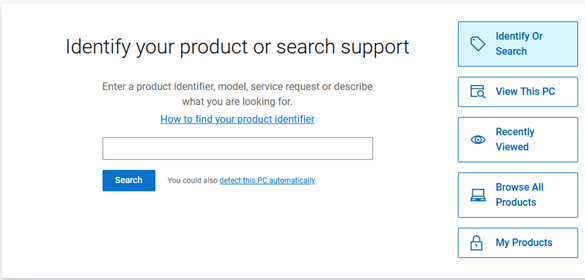
- Select the listing for your computer under View This PC.
- When you get to the product support page for your computer, select the Parts & Repairs tab on the left.
 Note: Depending on your country or region, you get different options on what parts are available for your computer. When there is not a Parts & Repairs tab, then no parts are available in your country or region.
 - Select which kind of parts that you are interested in to see which ones are available.
Produits touchés
Alienware, Inspiron, OptiPlex, Vostro, XPS, G Series, G Series, Alienware, Dell Pro, Dell Pro Max, Dell Pro Premium, Inspiron, Latitude, Vostro, XPS, Fixed Workstations, Mobile WorkstationsPropriétés de l’article
Numéro d’article: 000130752
Type d’article: How To
Dernière modification: 31 Jul 2025
Version: 14
Obtenez des réponses à vos questions auprès d’autre utilisateurs de Dell
Services de soutien
Vérifiez si votre appareil est couvert par les services de soutien.