Isilon: 플랫폼 API와 함께 PowerShell 사용 - 오브젝트 및 RAN 생성
Summary: 이 문서에서는 OneFS Platform API와 함께 Powershell을 사용하여 오브젝트 및 RAN을 생성하는 방법에 대해 설명합니다.
This article applies to
This article does not apply to
This article is not tied to any specific product.
Not all product versions are identified in this article.
Symptoms
필요 없음
Cause
필요 없음
Resolution
JSON 소개
PAPI는 JSON을 데이터 교환 형식으로 사용합니다. 이를 활용하여 PAPI를 사용하여 리소스를 생성, 수정 또는 삭제하는 방법을 이해하는 것이 중요합니다. JSON에 대한 자세한 내용은 www.json.org
- 이름 및 값 쌍의 컬렉션
- 정렬된 값 목록
API 객체를 가져올 때의 출력 예는 다음과 같습니다.
{
"<object>": {
     "<property>": <value>,
     ...
}
어떤 JSON 텍스트 출력을 사용할 수 있는지 알려면 POST 명령을 실행하여 개체를 만들어야 합니다. 다음 요청을 보내 PAPI 자체 설명서를 확인합니다.
GET /platform/1/quota/quotas?describe
관련 Powershell 코드는 다음과 같습니다.
#Get PAPI self documentation for quotas
$resource = "/platform/1/quota/quotas?describe"
$uri = $baseurl + $resource
$ISIObject = Invoke-RestMethod -Uri $uri -Headers $headers -Method Get
$ISIObject
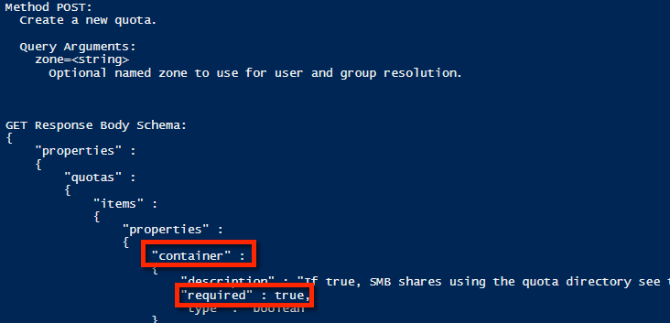
아래 예제 출력에서는 새 할당량을 생성하기 위해 POST해야 하는 사항을 간략하게 설명합니다. 필요한 속성은 해당 속성에 필요한 속성과 동일하지 않을 수 있으므로 주의해야 합니다. isi 명령어와 동일한 방식으로 AUTHC를 사용합니다.
다음은 예제 속성을 사용하여 디렉토리 고정 할당량을 생성하는 데 사용할 수 있는 JSON 문자열의 예입니다.
$QuotaObject = @"
{"type":"directory","include_snapshots": false,"container": true, "path": /ifs/home/user1", "enforced": true, "thresholds": {"hard":10000000},"thresholds_include_overhead": false}
"@
JSON 문자열이 완료되면 이제 남은 것은 Invoke-RestMethod 매개 변수를 만들고 제출합니다. 아래 예제 코드에서 JSON 문자열은 POST의 본문이고 콘텐츠 형식은 application/json:
$headers = @{"Authorization"="Basic $($EncodedPassword)"}
$uri = $baseurl + $resource
$ISIObject = Invoke-RestMethod -Uri $uri -Headers $headers -Body $QuotaObject -ContentType "application/json; charset=utf-8" -Method POST
Write-Host "   Resulting Quota ID: "  $ISIObject.id
모두 합치기
예를 들어 사용자 환경의 단일 상위 디렉토리 아래에 사용자를 위한 여러 홈 디렉토리가 있다고 가정해 보겠습니다(예: /ifs/home)을 선택하고 각 홈 디렉토리에 대한 디렉토리 할당량을 설정하려고 합니다. Isilon RESTful Access to the namespace(RAN) API를 사용하여 각 사용자 홈 디렉토리의 경로를 가져옵니다. 다음 코드는 지정된 경로의 하위 디렉터리를 가져온 다음 각 하위 디렉터리에 디렉터리 할당량을 설정합니다.
# Get subdirectories of path specified
$resource = '/namespace/' + $path
$uri = $baseurl + $resource
$ISIObject = Invoke-RestMethod -Uri $uri -Headers $headers -Method Get
#Loop through each directory and set the quota
ForEach($folder in $ISIObject.children) {
#Create quota
$resource ="/platform/1/quota/quotas"
Write-Host "Setting a $quotasize byte quota on $quotapath"
$QuotaObject = @"
{"type":"directory","include_snapshots": false,"container": true, "path": "$quotapath", "enforced": true, "thresholds": {"hard":$quotasize},"thresholds_include_overhead": false}
"@
$headers = @{"Authorization"="Basic $($EncodedPassword)"}
$uri = $baseurl + $resource
$ISIObject2 = Invoke-RestMethod -Uri $uri -Headers $headers -Body $QuotaObject -ContentType "application/json; charset=utf-8" -Method POST
Write-Host "   Resulting Quota ID: "  $ISIObject2.id
}
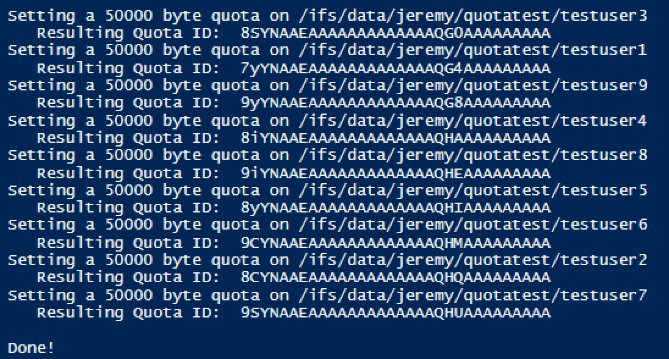
이 게시물에 첨부 된 스크립트를 실행 한 결과는 다음과 같습니다.

Affected Products
Isilon, PowerScale OneFS, Isilon Platform APIArticle Properties
Article Number: 000132770
Article Type: Solution
Last Modified: 02 Apr 2026
Version: 7
Find answers to your questions from other Dell users
Support Services
Check if your device is covered by Support Services.