Optical Disc Drives and Optical Discs - Types and Compatibility Chart
Summary: Understand what an optical drive is in a computer. Compatibility information about the various types of optical disc drives (ODD) and different types of optical discs.
This article applies to
This article does not apply to
This article is not tied to any specific product.
Not all product versions are identified in this article.
Instructions
What is an optical disc drive (ODD)?
An optical disc drive (ODD) lets you play CDs, DVDs, and Blu-rays on a computer. Most drives let you burn music, video, or backup discs.
Your Dell desktop or laptop might come with several types of optical disc drives. Optical disc drives come in two variants, determined by the disc loading mechanisms that they use:
- Tray Load drive - In a tray-loading mechanism, the disc is placed onto a motorized tray, which moves in and out of the computer.
- Slot Load drive - In a slot-loading mechanism, the disc is slid into a slot and the motorized rollers inside the drive are used to move the disc in and out.
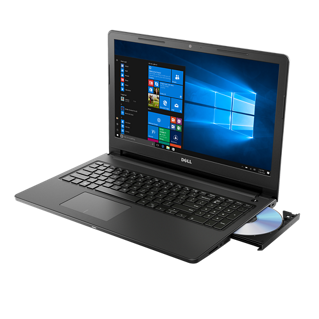
Integrated optical drive on an Inspiron 3562
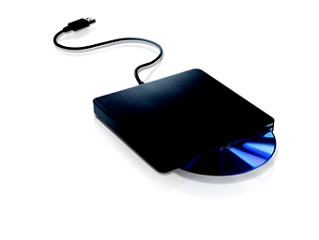
External USB optical drive
Types of Optical disc and drives
CD-ROM
Compact disc - Read-Only Memory drives were among the first disc-based drives for modern personal computers. These are like regular CDs but contain read-only media such as music, data files, or software. CD-ROM drives read-only CD-DA (audio) discs, CD-ROM (data) discs, and (usually) CD-R/CD-RW writable discs. The maximum storage capacity of a typical CD-ROM is around 700MB.
CD-R or CD-RW
CD-R/RW drives, also known as CD burners can read standard CDs and write to both write-once and rewritable discs.
NOTE: Write speeds are slower than read speeds to ensure stability, as interruptions can permanently damage the disc. While RW drives can write multiple times, writable discs come in one-time write (R) and multiple-time write (RW) variations.
DVD-ROM
Digital Versatile disc-Read Only Memory drives are the direct evolution from CD-ROM drives. DVDs had greater capacity and performance. DVD-ROM drives can read CD-DA, CD-ROM, and CD-R/RW discs, but they also read DVD-Video, DVD-ROM, and (sometimes) DVD-Audio discs.
DVD+/-RW
DVD writers typically do it all, they both read and write both CDs and DVDs. All current DVD writers can write DVD+R, DVD+RW, DVD-R, and DVD-RW discs interchangeably. Most drives can write dual-layer DVDs, storing 8.5 GB instead of the standard 4.7 GB.
NOTE: DVD+R/RW formats are technically better, but DVD-R/RW drives offer strong error correction that is also as valuable. DVD+R/RW discs maybe incompatible with some older DVD players. Early DVD+RW and DVD+R recorders could not write to DVD-R(W) discs and conversely.
NOTE: Write speeds are slower than read speeds to ensure stability, as interruptions can permanently damage the disc. While RW drives can write multiple times, writable discs come in one-time write (R) and multiple-time write (RW) variations.
Blu-ray
Blu-ray drives are the latest optical drives available. Blu-ray drives are typically reserved for devices with high-definition display capabilities, including high-end computers and the PlayStation 3 video game console. Blu-ray drives and discs can process extremely large amounts of data: Blu-ray discs have a standard capacity of 25 GB but can store more than 50 GB of data on a Blu-ray Dual Layer disc.
NOTE: Write speeds are slower than read speeds to ensure stability, as interruptions can permanently damage the disc. While RW drives can write multiple times, writable discs come in one-time write (R) and multiple-time write (RW) variations.
Optical drive and optical disc compatibility chart
Depending on the type of optical disc drive installed on your Dell computer, there are different disc options available for storing data. The chart below shows the compatibility matrix between different types of optical disc drives and discs.
| Optical Disc Drive Type | Pre-recorded CD | CD-R Disc | CD-RW Disc | Pre-recorded DVD | DVD-R/RW Disc | DVD+R/RW Disc | Pre-recorded BD | BD-R Disc | BD-RE Disc | BD-R (DL) Disc | BD-RE (DL) Disc |
|---|---|---|---|---|---|---|---|---|---|---|---|
| CD-ROM | Read Only. | Read Only. | Read Only. | ||||||||
| CD-R | Read Only. | Read and Write. | Read Only. | ||||||||
| CD-RW | Read Only. | Read and Write. | Read and Write. | ||||||||
| DVD-ROM | Read Only. | Read Only. | Read Only. | Read Only. | Read Only. | Read Only. | |||||
| DVD-R | Read Only. | Read and Write. | Read and Write. | Read Only. | Read and Write. | Read Only. | |||||
| DVD-RW | Read Only. | Read and Write. | Read and Write. | Read Only. | Read and Write. | Read Only. | |||||
| DVD+R | Read Only. | Read and Write. | Read and Write. | Read Only. | Read Only. | Read and Write. | |||||
| DVD+RW | Read Only. | Read and Write. | Read and Write. | Read Only. | Read Only. | Read and Write. | |||||
| BD-ROM | Read Only. | Read Only. | Read Only. | Read Only. | Read Only. | Read and Write. | Read Only. | Read Only. | Read Only. | Read Only. | Read Only. |
| BD-R | Read Only. | Read and Write. | Read and Write. | Read Only. | Read and Write. | Read and Write. | Read Only. | Read and Write. | Read Only. | Read Only. | Read Only. |
| BD-RE | Read Only. | Read and Write. | Read and Write. | Read Only. | Read and Write. | Read and Write. | Read Only. | Read and Write. | Read and Write. | Read Only. | Read Only. |
| BD-R (Dual Layer) | Read Only. | Read and Write. | Read and Write. | Read Only. | Read and Write. | Read and Write. | Read Only. | Read and Write. | Read Only. | Read and Write. | Read Only. |
| BD-RE (Dual Layer) | Read Only. | Read and Write. | Read and Write. | Read Only. | Read and Write. | Read and Write. | Read Only. | Read and Write. | Read and Write. | Read and Write. | Read and Write. |
| Disc | Description | Disc Type | Recordable | Playback in Computer | Playback in Car Stereo | Playback in Home DVD or Blu-ray Player |
|---|---|---|---|---|---|---|
| BD-ROM | Blu-ray Disc - Read-Only Memory | Read Only. | No | Yes
Requires Blu-ray drive and software that is Blu-ray compatible |
No | Yes
Blu-ray disc players only |
| BD-R | Blu-ray Disc - Recordable | Write Once. | Yes
Requires a Blu-ray drive |
Yes
Requires Blu-ray drive and software that is Blu-ray compatible |
No | Yes
Blu-ray disc players only |
| BD-RE | Blu-ray Disc - Rewritable | Rewritable | Yes
Requires a Blu-ray drive |
Yes
Requires Blu-ray drive and software that is Blu-ray compatible |
No | Yes
Blu-ray disc players only |
| HD DVD | High-Definition DVD | Pre-recorded Disc | Yes
Requires an HD-DVD compatible drive |
Yes
Requires an HD-DVD compatible drive and software capable of reading HD-DVD discs. May also require HDCP compliant monitors. |
No | Yes
HD-DVD compatible players only |
| DVD-ROM | DVD - Read-Only Memory | Read Only. | No | Yes
For DVD movie playback, compatible software and codec are required. |
No | Yes
DVD or Blu-ray players only |
| DVD-R | DVD - Recordable | Write Once. | Yes
Requires a DVD-R capable drive |
Yes | No | Yes
Some home DVD players may not be compatible with DVD-R discs. |
| DVD+R | DVD + Recordable | Write Once. | Yes
Requires a DVD+R capable drive |
Yes | No | Yes
Some home DVD players may not be compatible with DVD+R discs. |
| DVD-RW | DVD - Rewritable | Rewritable | Yes
Requires a DVD-RW capable drive |
Yes | No | Yes
Some home DVD players may not be compatible with DVD-RW discs. |
| DVD+RW | DVD + Rewritable | Rewritable | Yes
Requires a DVD+RW capable drive |
Yes | No | Yes
Some home DVD players may not be compatible with DVD+RW discs. |
| VCD | Video Compact Disc | Video CD Movie | No | Yes
Requires a compatible software and codec to be installed on the computer |
No | Yes
Most home VCD, DVD, and Blu-ray players are compatible, however, cannot be used on Audio CD players. |
| CD-ROM | Compact Disc-Read Only Memory | Read Only. | No | Yes | Yes | Yes
Most home VCD, DVD, and Blu-ray players are compatible, however, cannot be used to read data files. |
| CD-R | Compact Disc - Recordable | Write Once. | Yes | Yes | Yes | Yes
Data files can only be read on computers. |
| CD-RW | Compact Disc - Rewritable | Rewritable | Yes | Yes | No | No |
NOTE: Home or car audio or VCD players, DVD players, and Blu-ray players cannot read data files (doc, xls, .txt, exe, and so on). Some devices support data discs with audio, video, or image files like MP3, MP4, or JPG. See the User Manual of the device or contact the device manufacturer for more information about the supported file types.
For help with CD, DVD, or Blu-ray drive issues, see the Dell knowledge base article How to Troubleshoot CD, DVD, or Blu-Ray Drive Problems. Check out our steps to resolve unable to read or recognize a disc, unable to write or burn data to a disk, unable to eject the disc, or optical drive is not recognized in Windows.
Additional Information
Helpful information to avoid playback or recording issues.
- Avoid leaving the disc tray open when it is not in use.
- Avoid cleaning with a wet or damp cloth. Use disc cleaning kits that are made to clean optical drives which are available commercially.
- Avoid loading a smaller sized disc into a slot-load optical drive drive, use standard sized discs. The slot-load optical drive may not be able to hold the smaller disc and could damage the internals of the drive and the disc.
- Avoid touching the lens of the optical drive.
- Hold discs by their edges, never let the disc slide across any surface as this may cause scratches.
- Never leave them out in the open, especially in direct sunlight.
- Extreme temperature could cause the discs to bend slightly which may cause loud noise inside the disc drive or even cause damage within the drive.
- Re-Writable (RW) discs can be written many times and many devices cannot read the data. Re-Writable (RW) disc should ideally be used only on one computer.
- Try R (Recordable) or RW (Rewritable) discs from different manufacturers if it fails.
- Try recording at a slower speed to resolve issues with recording/writing to a disc.
- Ensure that the type of disc you purchase matches the drive type (DVD+R discs should be used with DVD+R drives, DVD-R discs should be used with DVD-R drives. DVD+R, DVD-R, or DVD+RW (Single/Dual Layer) can be used on computers with DVD+/-RW DL (Dual Layer) drive).
Affected Products
Alienware, Dell All-in-One, Dell Pro All-in-One, Dell Pro Max Micro, Dell Pro Max Slim, Dell Pro Max Tower, Dell Pro Micro, Dell Pro Slim, Dell Pro Tower, Dell Slim, Dell Tower, Inspiron, Legacy Desktop Models, OptiPlex, Vostro, XPS, G Series
, G Series, Alienware, Dell Plus, Dell Pro, Dell Pro Max, Dell Pro Plus, Dell Pro Premium, Inspiron, Latitude, Dell Pro Rugged, Vostro, XPS, Legacy Laptop Models, Fixed Workstations, Mobile Workstations, Dell Pro Max Micro XE FCM2250, Dell Pro Max Slim XE FCS1250, Dell Pro Max Tower T2 XE FCT2250, Dell Pro Max 16 XE MC16250, Dell Pro Micro Plus XE QBM1250, Dell Pro Slim Plus XE5 QBS1250, Dell Pro Tower Plus XE5 QBT1250
...
Article Properties
Article Number: 000147805
Article Type: How To
Last Modified: 02 May 2026
Version: 12
Find answers to your questions from other Dell users
Support Services
Check if your device is covered by Support Services.