PowerFlex:SVMディスクの物理的な場所を特定する方法(RDM - RAWデバイス マッピング)
Summary: SVMディスクの物理的な場所を特定する方法(RDM - RAWデバイス マッピング)
This article applies to
This article does not apply to
This article is not tied to any specific product.
Not all product versions are identified in this article.
Instructions
説明
SVMのRDMディスクと物理ディスク デバイスを相関させる方法。
手順
SVMレベル:
すべてまたは特定のディスクを一覧表示します。
すべてのディスク デバイスを一覧表示します。
ls -l /dev/disk/by-id/ | grep scsi- | awk {'print $9 " " $11'} | sed -r 's/^.{6}//' | awk {'print $0'} | sed 's/..\/..\///g'
すべてのディスク デバイスの一覧表示例:
ScaleIO:/ # ls -l /dev/disk/by-id/ | grep scsi- | awk {'print $9 " " $11'} | sed -r 's/^.{6}//' | awk {'print $0'} | sed 's/..\/..\///g' 6000c2952e4e35b264b899761ba06af1 sda 6000c2952e4e35b264b899761ba06af1-part1 sda1 6000c2952e4e35b264b899761ba06af1-part2 sda2 600605b00a36937012d0034b35edc01b sdf 600605b00a36937012d0034b35f56b55 sdk 600605b00a36937012d0034c35fd1c74 sdh 600605b00a36937012d0034c3605794d sdc 600605b00a36937012d0034d360e0a83 sde 600605b00a36937012d0034e3616eb21 sdi 600605b00a36937012d0034e362001ee sdj 600605b00a36937012d0034f3629590c sdg 600605b00a36937012d00350363504f7 sdd 600605b00a36937012d00350363ed3de sdb 600605b00a3693701f92005d07062b43 sdl
特定のディスクを一覧表示します(/dev/sdgの例)。
ls -l /dev/disk/by-id/ | grep scsi- | grep sdg | awk {'print $9'} | sed -r 's/^.{6}//' | awk {'print $0'}
ディスク デバイス識別子を検索する方法(例:/dev/sdg):
ScaleIO:/ # ls -l /dev/disk/by-id/ | grep scsi- | grep sdg | awk {'print $9'} | sed -r 's/^.{6}//' | awk {'print $0'} 600605b00a36937012d0034f3629590c
注:上記の出力では、ディスク デバイス識別子は次のとおりです。600605b00a36937012d0034f3629590c
ディスク デバイス識別子は、次の手順で使用します。
ディスク デバイス識別子は、次の手順で使用します。
ESXレベル:
物理デバイスの識別:
ESXiレベルでは、前のコマンドで取得した特定のデバイスに対して、query multi-pathコマンドを実行します。
esxcfg-mpath -m -d naa.[disk identifier]
Example:
[root@/dev/disks] esxcfg-mpath -m -d naa.600605b00a36937012d00350363504f7 vmhba1:C2:T9:L0 vmhba1 sas.500605b00a369370 sas.60d00350363504f7 naa.600605b00a36937012d00350363504f7
この出力から、このディスクがターゲット番号9(仮想ディスク番号9)に次の順序で論理的に配置されていることがわかります。ホスト アダプター: バスチャンネル : ターゲット:LUNの
注:ESXiでは、論理ディスク(VD)は認識されますが、物理ディスク(PD)は認識されません。
VMDKファイルの識別:
ディスク デバイス識別子をgrepします。
find /vmfs/volumes/ -type f -name '*.vmdk' -size -1024k -exec grep -l '^createType=.*RawDeviceMap' {} \; > /tmp/rdmsluns.txt for i in `cat /tmp/rdmsluns.txt`; do vmkfstools -q $i; done | grep [disk identifier] -B1
出力には、ディスク デバイス識別子にバインドされているVMDKファイルが表示されます。
Example:
[root@sio:/tmp] find /vmfs/volumes/ -type f -name '*.vmdk' -size -1024k -exec grep -l '^createType=.*RawDeviceMap' {} \; > /tmp/rdmsluns.txt [root@sio:/tmp] for i in `cat /tmp/rdmsluns.txt`; do vmkfstools -q $i; done | grep 600605b00a36937012d0034f3629590c -B1 Disk /vmfs/volumes/58076039-ede5c01f-4fde-90e2ba7db974/ScaleIO-10.xxx.xxx.x/ScaleIO-RDM-565898493.vmdk is a Passthrough Raw Device Mapping Maps to: vml.0200000000600605b00a36937012d0034f3629590c4d5239333631
次のスクリーンショットでは、vSphere Client UIにRDMデバイスが表示されています。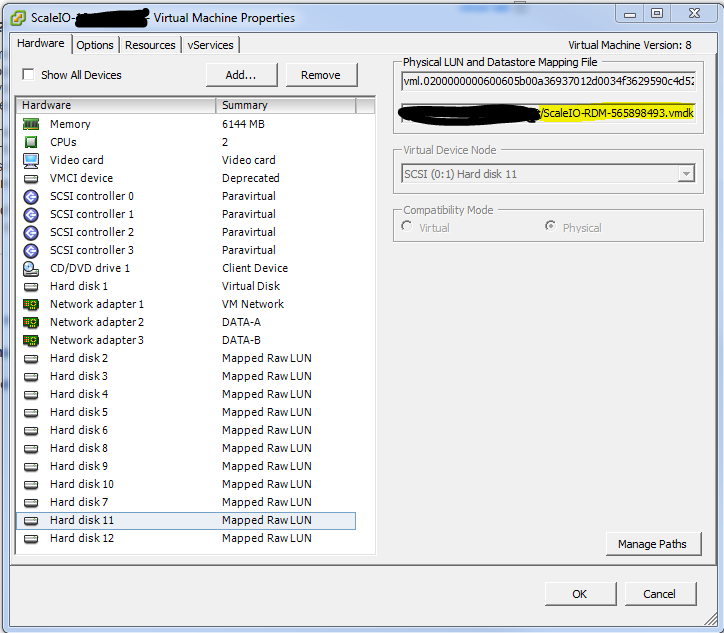
Article Properties
Article Number: 000158283
Article Type: How To
Last Modified: 20 Aug 2025
Version: 8
Find answers to your questions from other Dell users
Support Services
Check if your device is covered by Support Services.