主要站點上的 SRA 命令「discoverDevices」錯誤「無法連線至陣列管理主機」
Summary: 儲存複寫配接卡 (SRA) 命令「discoverDevices」失敗,並在主要站點上顯示訊息「無法連線至陣列管理主機」。
This article applies to
This article does not apply to
This article is not tied to any specific product.
Not all product versions are identified in this article.
Symptoms
錯誤 SrdfSRA 任一站點的紀錄:
[03/23 16:12:54  08332                      0114  SymapiSession::Init                      ] Initializing SYMAPI session for remote server [1xx.1x.2.1:2707]
[03/23 16:12:54  08332                      0120  SymapiSession::Init                      ] SymInit() [ReadModifyNowrite]
[03/23 16:12:58  08332                      0130  SymapiSession::Init                      ] [ERROR]: Failed to perform SymInit().

[ERROR]: [SYMAPI_C_NET_OPR_ERROR : A remote send or receive operation failed]
[03/23 16:12:58  08332                      0025  SymapiSession::SymapiSession             ] [ERROR]: Failed to initialize Symapi session
Solutions Enabler 中的錯誤 storsrvd 記錄:
03/23/2022 16:12:55.835  : ANR0151E Common Name in client certificate not valid: expected "SrmHostname", received "storsrvd fac838c410cd"

Or

03/23/2022 16:12:55.835  : ANR0151E Common Name in client certificate not valid: expected "SrmHostname", received "storsrvd 1xx.1x.2.1"
Cause
此問題的原因可能是:
- 封鎖的防火牆 - 每個 Site Recovery Manager (SRM) 或 SRA docker 主機必須能夠連線至兩個 Solutions Enabler (SE) 主機
storsrvd守護程式。預設連接埠是 2707。 - 無法正確解析網域名稱系統 (DNS) 主機名稱或 IP。
- 用戶端憑證不正確
- 所有遠端數據設施 (RDF) 設備都處於自適應複製模式。SRA 會忽略自適應複製中的所有 RDF 裝置。
Resolution
使用者的防火牆團隊必須打開埠 2707(如果使用者已更改預設值,則打開另一個埠 storsrvd 埠)。
有三個選項可解析用戶端憑證:
- 設定
storsrvd在伺服器上不驗證(忽略)命令列提示符中的用戶端憑證變數:
- 開啟
installdir/symapi/config/daemon_options並設置變數,如下所示,然後重新啟動storsrvd精靈:
storsrvd:SECURITY_CLT_SECURE_LVL = NOVERIFY
- 設定
storsrvd在伺服器上使用不安全的連線:
- 開啟
installDir/symapi/config/options,並按如下所示設置變數,然後重新啟動storsrvd精靈:
SYMAPI_SECURITY_LEVEL = NONSECURE
- 更新 SRA docker 上的 Solutions Enabler 憑證:
- 以「admin」身分登入 SRM docker
- 切換至根使用者
su root
- 連線至 docker

- 檢查 SE 憑證目前的主機名稱
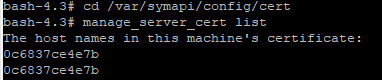
- 如果憑證未列出主機名稱,請建立新憑證

- 加密箱密碼為「dockerID@SELockbox1」。在此示例中,它是“0c6837ce4e7b@SELockbox1”。
Additional Information
故障診斷檢查:
- 檢查陣列組態。
- 嘗試使用 IP 和主機名稱來排除 DNS 問題。
- 確認 RDF 精靈已在兩端啟動並正在執行,並在選項檔案中啟用。
- 確認 vCenter 使用者登入資料已存在
symcfg auth list -vmware
- 驗證環境是否具有開放的網路。
- 檢查連接埠 2707 是否正在接聽,排除防火牆問題。
- 確定沒有 RDF 連結問題。
Article Properties
Article Number: 000167652
Article Type: Solution
Last Modified: 15 Jan 2026
Version: 4
Find answers to your questions from other Dell users
Support Services
Check if your device is covered by Support Services.