AppSync: 새로운 스토리지 시스템을 추가할 때 PowerMax 어레이가 UI에 표시되지 않음
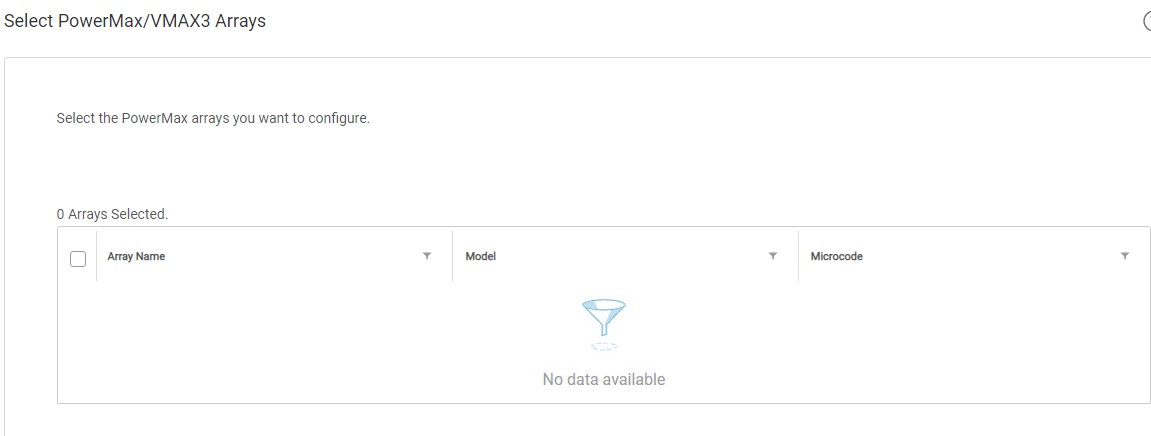
Summary: 스토리지 시스템 추가 마법사의 3단계 "PowerMax/VMAX3 어레이 선택"에 사용자의 PowerMax 어레이가 표시되지 않았습니다.
This article applies to
This article does not apply to
This article is not tied to any specific product.
Not all product versions are identified in this article.
Symptoms
PowerMax 어레이를 AppSync 4.0에 처음으로 추가하려고 하면 선택할 수 있는 어레이가 없습니다.
사용자의 PowerMax 어레이는 U4P(Unisphere for PowerMax) UI에서 볼 수 있습니다.
독립 실행형 U4P 호스트를 사용 중이었습니다.
Cause
구체적인 원인을 알 수 없습니다.
Resolution
해결 방법:
U4P 서버를 재부팅하면 이 문서에서 다루는 문제가 해결되었습니다.
이 해결 방법은 특정 환경에서 효과적일 수 있습니다. U4P 서비스를 재부팅한 후에도 문제가 지속되면 Dell EMC 기술 지원 부서에 서비스 요청을 개설하십시오.
U4P 서버를 재부팅하면 이 문서에서 다루는 문제가 해결되었습니다.
이 해결 방법은 특정 환경에서 효과적일 수 있습니다. U4P 서비스를 재부팅한 후에도 문제가 지속되면 Dell EMC 기술 지원 부서에 서비스 요청을 개설하십시오.
Additional Information
이 KB는 AppSync 버전 4.0 이상에만 해당됩니다.
AppSync 4.0은 Unisphere for PowerMax를 사용하여 VMAX3 및 PowerMax 어레이와 통신합니다.
AppSync 4.0은 Unisphere for PowerMax를 사용하여 VMAX3 및 PowerMax 어레이와 통신합니다.
Affected Products
AppSyncProducts
AppSyncArticle Properties
Article Number: 000170231
Article Type: Solution
Last Modified: 05 May 2026
Version: 4
Find answers to your questions from other Dell users
Support Services
Check if your device is covered by Support Services.