AppSync:添加新的存储系统时,PowerMax 阵列未显示在 UI 中
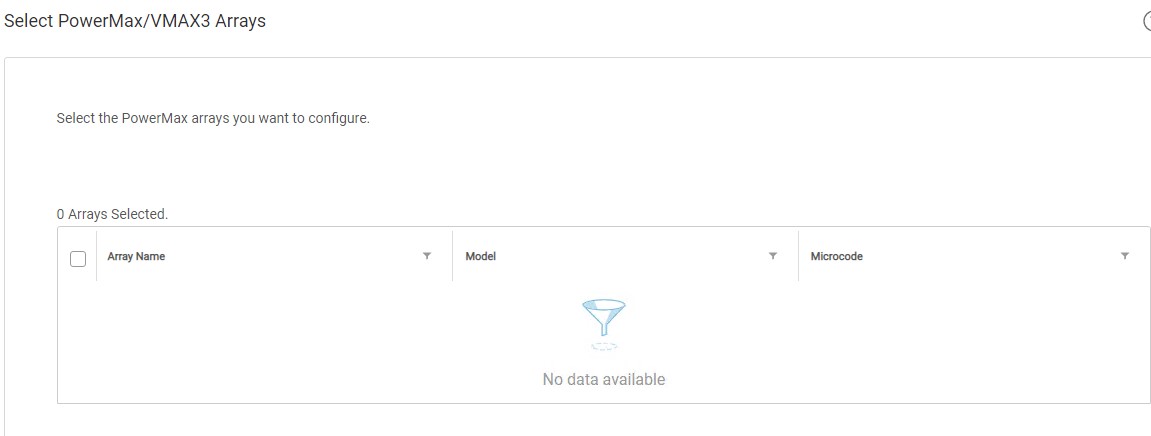
Summary: 用户的 PowerMax 阵列未在添加存储系统向导的步骤 3(即“Select PowerMax/VMAX3 Array”)中显示。
This article applies to
This article does not apply to
This article is not tied to any specific product.
Not all product versions are identified in this article.
Symptoms
首次尝试将 PowerMax 阵列添加到 AppSync 4.0 时,没有阵列可供选择。
用户的 PowerMax 阵列显示在 Unisphere for PowerMax (U4P) UI 中。
独立 U4P 主机正在使用中。
Cause
具体原因未知。
Resolution
解决方法:
重新启动 U4P 服务器解决了本文介绍的问题。
此解决方法可能在某些环境中有效。如果重新启动 U4P 服务后问题仍然存在,请向 Dell EMC 技术支持团队提交服务请求。
重新启动 U4P 服务器解决了本文介绍的问题。
此解决方法可能在某些环境中有效。如果重新启动 U4P 服务后问题仍然存在,请向 Dell EMC 技术支持团队提交服务请求。
Additional Information
此 KB 仅与 AppSync 4.0 版和更高版本相关。
AppSync 4.0 使用 Unisphere for PowerMax 与 VMAX3 和 PowerMax 阵列进行通信。
AppSync 4.0 使用 Unisphere for PowerMax 与 VMAX3 和 PowerMax 阵列进行通信。
Affected Products
AppSyncProducts
AppSyncArticle Properties
Article Number: 000170231
Article Type: Solution
Last Modified: 05 May 2026
Version: 4
Find answers to your questions from other Dell users
Support Services
Check if your device is covered by Support Services.